Installation guide
 Owner’s manual
 Error Codes


How to reset a Frigidaire electric range?
To reset your Frigidaire FFEF3017LSK electric range, turn power off at the breaker (or unplug the cord) for about 5 to 10 minutes, then restore power and reset the clock. This clears many control glitches after a power surge or outage.
Reset steps (safe and effective)
- Turn OFF the range circuit breaker (preferred) or unplug the range.
- Wait 5 to 10 minutes.
- Restore power.
- Set the clock again (the range typically requires this after power is restored).
- Test Bake and a surface element to confirm normal operation.
For model-specific control and clock instructions, follow the FFEF3017LSK use & care manual.
If the range still will not respond
These checks help separate a simple reset issue from a power or control problem:
- Confirm the display is on; if it is blank, check the home breaker and outlet.
- If the oven heats but the cooktop does not (or vice versa), a supply issue can be involved.
- If the oven will not heat, inspect the bake circuit; a failed element is common.
- If you see an error code, use the code to guide the next step.
Common symptoms and likely next step
| What you notice | What it usually points to | What we do next |
|---|---|---|
| Display is blank | No power to range | Check breaker, cord, terminal connections |
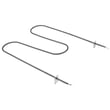
| Oven will not heat | Heating circuit issue | Inspect/replace range bake element 316075103 if damaged |
| Error code on display | Control detected a fault | Follow Frigidaire self-cleaning range error codes guidance |
Why it matters
A proper power reset clears “stuck” electronic states in the oven control board and restores normal keypad response after a surge. If the problem returns quickly, focusing on the heating components (bake element, sensor/probe, control board) prevents repeat shutdowns.
Last updated: February 2026
Why is my Frigidaire electric range display not working?
If the display on your Frigidaire FFEF3017LSK electric range is blank, the most common causes are a power supply problem (tripped breaker, loose cord connection) or a failed electronic oven control (control board/clock). Start by safely resetting power; then check wiring connections and the control board.
Quick checks we recommend first
- Reset the range by turning the double-pole breaker OFF for 5 minutes, then back ON.
- Confirm the range is getting 240 VAC (and 120 VAC on each leg) at the outlet or terminal block.
- If the cooktop elements still heat but the display is dead, suspect the electronic control.
- If nothing works at all (no heat, no lights, no display), suspect a supply or connection issue.
- Review the “Before you call” troubleshooting section in the FFEF3017LSK owner’s manual.
Parts that commonly cause a dead or blank display
In this model, the display is part of the electronic oven control system. These parts are common suspects:
| Symptom | Most likely area | What it points to |
|---|---|---|
| Display blank, oven won’t heat | Electronic control | Failed control board/clock |
| Display flickers or resets | Power connection | Loose terminal block cord or breaker issue |
| Display works, but errors show | Control/sensor circuit | Sensor, latch, or control issue |
If you’re seeing an error code (instead of a blank display), use the Frigidaire self-cleaning range error codes guide to match the code to the most likely failure.
Safe DIY steps (power off)
Because this is a 240-volt appliance, shut off power at the breaker before touching any wiring.
- Turn the breaker off and verify the cooktop will not heat.
- Inspect the power cord and rear connection area for heat damage.
- Check the terminal block screws for looseness or burned wiring.
- If connections are good, the electronic control is the next most common failure point.
A damaged power connection is often tied to the range terminal block 5303935271.
Why it matters
A blank display is more than a convenience issue; it can indicate an unstable power connection that overheats wiring, or a failing control board that can prevent accurate oven temperature control.
Last updated: February 2026
How do I tell what model my Frigidaire stove is?
On the Frigidaire FFEF3017LSK electric range, the model number is printed on the appliance serial plate. The Use and Care information for this model lists the serial plate location as the storage drawer area (on some models) or behind the lower front panel (on some models); once you find it, record both the model and serial number exactly.
Where to find the serial plate on FFEF3017LSK
Start with the locations Frigidaire calls out for this model family:
- Pull the storage drawer out and look for the label on the frame behind it
- If your range has a removable lower front panel (kick panel), remove it and look behind it
- Use a flashlight; labels are often low and hard to see
- Wipe dust or grease off the plate so every character is readable
What to write down (and what it looks like)
The model number is a letter and number code (example: FFEF3017LSK). The serial number is a separate code used to identify the specific production unit.
| Item | What it identifies | How to use it |
|---|---|---|
| Model number | The exact range design and parts | Match correct Frigidaire parts and diagrams |
| Serial number | The specific unit and production info | Helpful for service and warranty records |
Why it matters
Using the exact model number prevents ordering the wrong part and speeds up troubleshooting.
- Ensures correct fit for heating and control parts
- Helps match the right wiring layout and features
- Reduces returns caused by model mix-ups
After you find the model number
Use it to confirm parts when diagnosing symptoms. For example, no-bake heat often points to the range bake element 316075103, and temperature problems often point to the probe 316490000. For additional identification and documentation, keep a copy of the FFEF3017LSK owner’s manual.
Last updated: February 2026