Owner’s manual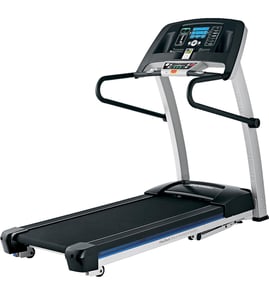




Where is the model number on a treadmill?
On the Proform CROSSWALK 480 treadmill model 831248245, the model number and serial number are on the serial number decal; the manual shows the decal location on the front cover and recommends noting both numbers before ordering parts or requesting service. See the 831248245 owner's manual.
Where to look on the treadmill
Check these common decal locations first (use a flashlight and look for a sticker or metal tag):
- On the frame near the motor hood (front of the walking deck)
- Along an upright (left or right side support)
- Near the power cord entry point or reset/off breaker area
- On the underside edge of the walking deck frame
- Near the rear roller area on the frame
What you should write down
We recommend recording both identifiers exactly as printed.
- Model number (for example: 831248245)
- Serial number (unique to your unit)
- Brand: Proform
- Product type: Crosswalk 480 treadmill
Why it matters
The model number and serial number ensure you get the correct Proform parts and procedures for your exact treadmill version. This is especially important for fit-critical and electrical items like the walking belt, incline system, and control electronics.
Quick reference
| Item | What it’s used for | Where you’ll use it |
|---|---|---|
| Model number | Identifies the treadmill design | Parts lookup, manual matching |
| Serial number | Identifies your specific unit | Service support, warranty, production version |
Last updated: January 2026
Can I plug my treadmill into a regular outlet?
Yes. For the Proform 831248245 treadmill, we recommend plugging it into a properly grounded, nominal 120-volt regular outlet, but only through a single-outlet surge suppressor; this model is not compatible with GFCI outlets and you should not use an extension cord (see the 831248245 owner's manual).
Recommended outlet setup
- Use a properly grounded 120-volt outlet.
- Plug the treadmill power cord into a surge suppressor first.
- Use a single-outlet surge suppressor (not a power strip with multiple outlets).
- Keep the treadmill as the only major load on that circuit when possible.
- Do not use an extension cord.
What to avoid (common causes of power problems)
- GFCI outlets: this treadmill is not compatible with GFCI-equipped outlets.
- Shared circuits with high-draw appliances (space heaters, vacuums, refrigerators).
- Cheap or worn surge protectors that do not clamp voltage spikes well.
Quick compatibility guide
| Outlet or device | OK to use? | Notes |
|---|---|---|
| Standard grounded 120V outlet | Yes | Best option when properly grounded |
| Single-outlet surge suppressor | Yes | Recommended to protect the control system |
| GFCI outlet | No | Can trip or prevent proper operation |
| Extension cord | No | Increases voltage drop and overheating risk |
| Multi-outlet power strip | No | Not the recommended protection method |
Why it matters
A treadmill’s console and motor control electronics can be damaged by voltage surges and electrical noise. Using the correct grounded outlet and a proper surge suppressor helps prevent unexpected speed changes, shutdowns, and control issues.
Last updated: January 2026
Where can I find my treadmill serial number?
On the Proform model 831248245 (Crosswalk 480) treadmill, the serial number is printed on a serial number decal on the front of the treadmill frame. We recommend matching that decal to the location shown in the 831248245 owner's manual.
Common serial number decal locations to check
Look for a sticker or decal on the frame in these spots:
- Front base frame near the motor hood/front roller area
- Lower front upright area (near where the uprights meet the base)
- Along the front crossmember, facing outward
- Near the reset/off breaker and power cord entry area
- On the underside edge of the front frame (use a flashlight)
What to write down before ordering parts
Having the right ID info helps us match parts like the walking belt, motor control board, or safety key.
| Item | What it looks like | Why it matters |
|---|---|---|
| Model number | Printed as 831248245 | Identifies the correct parts list and diagrams |
| Serial number | A longer code on a decal | Helps confirm production run/version |
| Part name needed | Example: safety key, walking belt | Narrows the correct replacement |
If the decal is missing or unreadable
The manual notes that decals can be replaced if missing or illegible. Use these steps to keep moving:
- Check the front frame carefully for decal residue or an outline
- Take a clear photo of the console area and frame for reference
- Use the parts diagrams in the 831248245 owner's manual to confirm you are working with the Crosswalk 480 configuration
- If you need a replacement safety key to operate the treadmill, use the treadmill safety key assembly 208603
Why it matters
The serial number helps confirm the exact build of your Proform treadmill, which reduces the chance of ordering the wrong walking belt, incline motor, or wiring harness.
Last updated: January 2026
What is the lifespan of a treadmill?
A treadmill typically lasts 5 to 10 years with normal home use and routine maintenance. For the Proform 831248245 (Crosswalk 480), lifespan depends most on how often it’s used, user weight, belt lubrication, and keeping fasteners properly tightened as outlined in the 831248245 owner's manual.
What affects treadmill lifespan the most
- Usage frequency and duration (daily long runs wear parts faster than occasional walking)
- User weight and impact (this model is intended for users 275 lb or less)
- Walking belt care (proper lubrication and correct belt tracking)
- Electrical protection (use a single-outlet surge suppressor as specified)
- Routine tightening/inspection (loose hardware accelerates wear and noise)
Typical lifespan by major wear items
These are the parts that most often determine whether a treadmill feels “worn out” even if the frame is fine.
| Component | What wear looks like | What to do |
|---|---|---|
| Walking belt and deck | Slipping, hesitation, burning smell, fraying | Lubricate, align, replace if worn |
| Drive system and electronics | Speed surging, sudden stops, no start | Check wiring, test components, replace as needed |
| Rollers and bearings | Squealing, grinding, belt tracking issues | Inspect rollers, replace if noisy or rough |
| Incline system (if equipped) | Incline stuck, clicking, won’t calibrate | Inspect lift mechanism and wiring |
Maintenance steps that extend life
- Unplug after use and before cleaning or service.
- Keep the treadmill indoors, away from moisture and dust.
- Place it on a level surface with clearance around it.
- Inspect and tighten fasteners regularly.
- Keep the belt centered; use the correct adjustment procedure.
If you’re doing belt tracking or tension adjustments, the treadmill walking belt alignment tool 128457 can help you make small, controlled changes.
Why it matters
A treadmill can “fail early” from heat and friction when the walking belt is dry or misaligned. Basic upkeep reduces motor load, protects the motor control board, and keeps workouts safer and smoother.
Last updated: January 2026