Installation guide
 Owner’s manual



How much does it cost to fix a start button on a dryer?
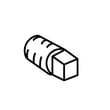
For a Kenmore dryer model 11076652500, fixing the start button usually means replacing the push-to-start switch; the part typically costs about $10 to $40, and total repair cost is commonly $100 to $250 if you hire service (parts plus labor).
What “fixing the start button” usually involves
Most “start button” problems come down to one of these issues:
- Worn or failed push-to-start switch contacts
- Loose or damaged wire connection at the switch
- Door not fully closed (the dryer will not run if the door switch is open)
- Power supply issue (tripped breaker or blown fuse)
- Timer or control issue (less common than the switch)
On this model, normal operation is to select a cycle and press PUSH TO START; the manual also notes to restart by closing the door, selecting a cycle, and pressing PUSH TO START. See the 11076652500 owner's manual for the exact operating steps and troubleshooting checks.
Typical cost breakdown
| Scenario | What you pay for | Typical total cost |
|---|---|---|
| DIY switch replacement | Part only | $10 to $40 |
| Service call repair | Part + labor + trip/diagnostic | $100 to $250 |
| Deeper electrical diagnosis | Labor time (and possibly additional parts) | $200+ |
Quick checks before you buy a part
These checks often solve a “won’t start” complaint without replacing anything:
- Confirm the dryer is plugged into a grounded outlet (no extension cord).
- Check both household fuses/breakers (many dryers use two).
- Make sure the door is firmly closed; test the door switch feel and click.
- Verify a cycle is selected and press the START button firmly.
- If it is a gas dryer, confirm the gas supply valve is open (this affects heat, not starting, but it is a common setup miss).
Why it matters
A failed start switch can look like a bigger problem, but the manual’s troubleshooting list starts with power, door closure, cycle selection, and pressing START firmly. Doing these checks first prevents unnecessary parts returns and repeat service calls.
Last updated: February 2026
What does CL mean on a Kenmore 11076652500 Elite dryer?
On the Kenmore 11076652500 dryer, CL means the controls are locked (Control Lock/Child Lock). The dryer may still run or show time remaining, but most buttons will not respond until you unlock the controls; confirm the exact unlock steps in the 11076652500 owner's manual.
How to unlock CL (control lock)
Use the control panel lock method listed for your exact console. On many Kenmore 110-series dryers, you unlock by pressing and holding the Control Lock button or a designated key for a few seconds.
- Press and hold the Control Lock (or the labeled lock key) for about 3 seconds
- Watch for CL to turn off and the panel to respond normally
- If your model uses a different key (such as End of Cycle Signal or Dryness Level), follow the exact button shown in the manual
- If CL returns, check for a stuck key on the console (press each key once to confirm it releases)
- Restore power (unplug for 1 minute, then plug back in) and try the lock key again
What you can and cannot do when CL is on
Control Lock is designed to prevent accidental setting changes.
| Dryer function | What typically happens with CL on |
|---|---|
| Start/Pause | May work, depending on how the lock is configured |
| Cycle selection and options | Usually blocked |
| Power/Cancel | Often still works |
| Time remaining display | Can still show time and alternate with CL |
Why it matters
When CL is enabled, the dryer can look “dead” even though it has power. Unlocking Control Lock is one of the fastest fixes for a Kenmore dryer that will not respond to button presses.
Last updated: February 2026
How do I know if my dryer start switch is bad?
If your Kenmore 11076652500 dryer has power but won’t run when you press PUSH TO START, the start switch is a top suspect, especially after you confirm the door is fully closed and a cycle is selected. A quick continuity test of the switch confirms failure. See the owner's manual for the correct start procedure.
Quick checks before blaming the start switch
We recommend ruling out the common “no-start” causes listed in the troubleshooting steps:
- Make sure a cycle is selected (not OFF).
- Press the START button firmly.
- Confirm the dryer door is firmly closed.
- Verify the power cord is plugged in.
- Check house power: many dryers use two fuses or breakers; one can trip and the dryer still seems partially powered.
- Avoid extension cords and adapters; plug into a properly grounded outlet.
How to test the push-to-start switch (basic method)
- Unplug the dryer.
- Access the console and locate the push-to-start switch.
- Label and remove the wires from the switch terminals.
- Set a multimeter to continuity (or lowest ohms).
- Test the switch:
- Not pressed: should typically read open (no continuity).
- Pressed and held: should read closed (continuity).
If the readings don’t change when you press the button, the switch is bad.
| What you see | What it usually means | What to do |
|---|---|---|
| No click, no continuity change | Failed start switch | Replace the switch |
| Continuity changes correctly | Switch is likely OK | Check door switch, power, timer/control |
| Dryer hums but won’t run | Motor or belt/drum issue possible | Inspect belt, drum, motor circuit |
Replacement part to consider
If your testing points to a failed start switch, the correct replacement for this model is the dryer push-to-start switch WP3977456.
Why it matters
A bad start switch prevents the motor circuit from energizing, so the dryer will not run even though the control panel looks normal. Confirming the switch with a meter helps you avoid replacing the wrong part.
Last updated: February 2026
What size belt does a Kenmore dryer take?
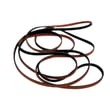
For Kenmore model 11076652500, the correct drum belt is the dryer drum belt 341241; it’s the standard multi-rib belt used on many Kenmore 110-series dryers. Confirm routing and installation steps in the installation guide.
Belt size and what it means
Most belts in this style are described by length, width, and rib/groove count. For this Kenmore dryer, the commonly used spec for belt 341241 is:
- Approx. 92 1/4 in. effective length
- Approx. 1/4 in. wide
- 4 ribs / 3 grooves (multi-rib)
- Designed to ride on the motor pulley and drum
If your old belt snapped, it can be hard to measure accurately; using the model-matched belt is the most reliable approach.
How to confirm you have the right belt
Use these quick checks before you reassemble the cabinet:
- Match the belt to the model-specific part: dryer drum belt 341241
- Check the belt has multiple ribs, not a smooth flat belt
- Verify the belt sits fully in the motor pulley grooves (no twist)
- Spin the drum by hand; it should turn smoothly and tighten the belt
- If the drum is hard to turn, inspect drum rollers and idler components (a full kit can help)
Common replacement options for this model
| What you’re fixing | Typical symptom | Part option |
|---|---|---|
| Belt only | Drum won’t turn, motor runs | Dryer drum belt 341241 |
| Belt plus wear items | Squealing, thumping, belt failure risk | Dryer repair kit 4392065 |
Why it matters
A belt that’s the wrong length or rib profile can slip, squeal, or wear out quickly. Using the correct belt for Kenmore 11076652500 helps the drum maintain proper tension and airflow for consistent drying.
Last updated: February 2026