Owner’s manual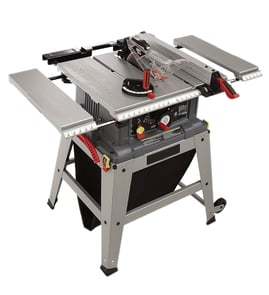

What size motor is on a 10 inch Craftsman table saw?
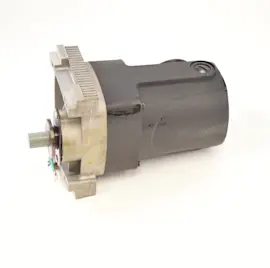
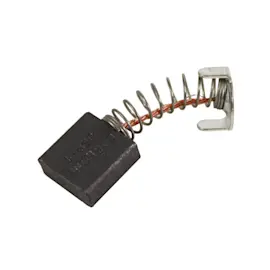
On the Craftsman 137218010 10-inch table saw, the motor is designed to run the blade at up to 5000 RPM, and the saw uses a brush-type universal motor (with serviceable brush assemblies). For the exact motor amperage and horsepower rating, check the motor nameplate and the owner's manual.
Most customers mean one of these specs:
- Amps (A): often listed on the motor nameplate and in the electrical section of the manual
- Horsepower (HP): sometimes listed as peak or developed HP on the nameplate
- No-load speed (RPM): how fast the motor spins without cutting load
- Blade speed rating: the blade must be rated to safely match the saw’s speed
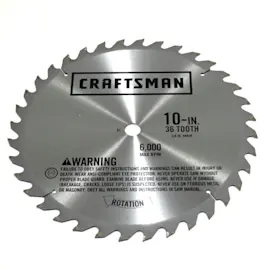
For this model, the manual confirms the saw is intended for 10-inch blades and requires blades rated 5000 RPM or higher with a 5/8-inch arbor hole.
| Spec item | Craftsman 137218010 guidance |
|---|---|
| Max blade diameter | 10 in. |
| Arbor hole | 5/8 in. |
| Blade RPM rating | 5000 RPM or higher |
| Motor type clues | Brush assemblies listed in motor parts section |
- Unplug the saw.
- Locate the motor nameplate (often on the motor housing or under a cover).
- Record the key fields:
- Amps (A)
- Volts (V)
- Hz
- RPM
- Match those values to the electrical information in the owner's manual.
Motor rating affects cut quality and safety. Using a blade not rated for the saw’s speed, or forcing stock through too fast, can cause slow blade spin, burning, and rough cuts. For cutting performance tips and common causes of poor results, use our table saw bad cuts guide.
You can also search for replacement motor-related components for Craftsman 137218010 on Sears PartsDirect.
Last updated: February 2026
Where is the reset button on a Craftsman table saw?
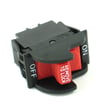
On the Craftsman table saw model 137218010, the reset is the overload reset switch (a thermal overload reset button). It’s located on the front panel of the saw base, near the ON/OFF switch; after the motor cools, you press the reset button to restore power. See the 137218010 owner's manual.
- Turn the saw OFF.
- Unplug the power cord.
- Remove the workpiece and clear any binding material from the blade area.
- Let the motor cool down.
- Press the overload reset button.
- Plug the saw back in and turn it ON.
- Keep the ON/OFF switch in OFF before pressing reset.
- Unplugging prevents accidental starting.
- Do not restart until the blade spins freely by hand (with power disconnected).
The overload device trips when the motor overheats or is overloaded. These are the most common reasons:
- Dull or dirty blade causing excessive load
- Stock pinching the blade (fence misalignment, warped wood)
- Cutting too fast for the material thickness
- Low voltage or an undersized extension cord
- Misaligned parts increasing friction
Use this quick guide to reduce repeat trips.
| Check | What “good” looks like | What to fix if it’s not |
|---|---|---|
| Blade condition | Sharp, clean teeth | Clean or replace blade |
| Fence alignment | Parallel to blade | Adjust fence alignment |
| Feed rate | Smooth, steady | Slow down, use proper blade |
| Power supply | Correct outlet, solid cord | Avoid long/light extension cords |
If the saw still struggles after resetting, we use these step-by-step resources to pinpoint the cause:
We list parts and diagrams for Craftsman 137218010 on the model page; for broader parts searches by model number, use Sears PartsDirect.
Last updated: February 2026
What not to do with a table saw?
Do not use the Craftsman 137218010 table saw in ways that defeat its safety systems or overload the tool; keep hands out of the blade path, avoid kickback setups, and never cut materials the saw is not designed to handle. For model-specific safety rules, follow the 137218010 owner's manual.
- Do not put your hands near the spinning blade; use push sticks or push blocks to keep your hands away from the cut line.
- Do not try to free a stalled blade while the saw is running; turn the saw OFF and unplug it first.
- Do not rip warped, twisted, or edge-less stock against the rip fence; it increases binding and kickback risk.
- Do not run without key safety components in place and working (guard and anti-kickback components when applicable).
- Do not leave the saw running unattended; wait for a complete stop before walking away.
- Do not cut metals, masonry, or use abrasive or metal-cutting blades on this saw.
Setting the blade and choosing the right blade reduces binding, burning, and loss of control.
| Item | What to do | What not to do |
|---|---|---|
| Blade height | Raise the blade only enough to clear the workpiece | Do not over-raise the blade (more exposed tooth increases hazard) |
| Blade rating and fit | Use a blade rated 5000 RPM+ with a 5/8-in arbor hole; max 10-in diameter | Do not install an oversized blade or an under-rated blade |
| Dado cutting | Use stackable dado blades only; max dado width 1/2 in; max dado diameter 6 in | Do not use adjustable or wobble dado sets |
- Do not run the saw on the wrong circuit; use 110-120V on a 15A time-delay fuse or circuit breaker.
- Do not use a worn, cut, or damaged power cord; replace it immediately.
- Do not operate the saw unmounted; mount it securely on a bench or stand before cutting.
Most table saw injuries happen during a moment of binding, kickback, or a hand slip. Following the model’s blade limits, material limits, and shut-off rules keeps the motor from stalling and keeps the workpiece from being thrown back toward you.
You can also find parts and diagrams for the Craftsman 137218010, or search by model number on Sears PartsDirect.
Last updated: February 2026
What are the parts of a table saw?
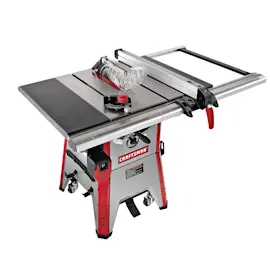
A Craftsman table saw like model 137218010 is built around the table and blade system, plus guiding and safety components that control how the workpiece moves past the blade. Your saw also includes setup and adjustment parts such as the rip fence, miter gauge, and blade height and bevel mechanisms (see the 137218010 owner's manual).
- Table saw assembly (table and base): The flat work surface and the structure that supports the motor and trunnion parts.
- Blade: The cutting tool mounted on the arbor.
- Rip fence (with lock handle): Guides rip cuts parallel to the blade and locks in position.
- Miter gauge: Guides crosscuts and angled cuts using the miter slot.
- Blade guard and splitter: Helps reduce contact with the blade and helps keep the kerf from closing during a cut.
- Blade insert (throat plate): The removable plate around the blade opening in the table.
These parts control blade position and cutting performance:
| System | What it does | Common related parts/terms |
|---|---|---|
| Blade height | Raises and lowers the blade | Handwheel, height regulating bolt, screw rod/threads |
| Bevel (tilt) | Tilts the blade for bevel cuts | Bevel/angle adjustment rod, segment gear |
| Arbor and motor | Spins the blade | Arbor shaft assembly, bearings, armature/field, brush assembly |
Knowing the names of the table saw parts makes troubleshooting and ordering the right replacement much easier. For example, inaccurate 45° or 90° cuts usually point to alignment or adjustment issues (fence, miter gauge, bevel stops), while slow blade speed points to motor or brush wear.
- Use the correct blade size and accessories; the manual specifies limits such as not using a dado larger than 6 inches.
- Unplug the saw before adjustments, blade changes, or alignment checks.
We recommend matching parts by your exact model number (137218010) and the part description from the diagrams in the 137218010 owner's manual. If you are searching beyond the parts list for this model, use Sears PartsDirect to look up parts by model number.
Last updated: February 2026