Owner’s manual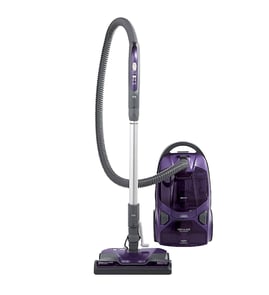




How do you reset the belt on a Kenmore vacuum?
On Kenmore canister vacuum model 11625513506, you typically “reset” the belt by reinstalling it correctly on the motor shaft and the Power-Mate agitator (brush roll). If the brush stops due to a jam, clear the blockage and press the Power-Mate overload protector reset button.
- Unplug the vacuum before opening the Power-Mate or touching the brush area.
- Let the brush fully stop before handling it.
- Work on a flat surface so small screws and parts do not get lost.
- If the brush suddenly restarts, it can cause injury, so keep fingers clear of the agitator.
- Unplug the vacuum.
- Flip the Power-Mate over and open the brush/belt access (follow the belt-changing steps in the owner's manual).
- Remove the brush roll (agitator).
- Loop the belt around the motor drive shaft first.
- Stretch the belt over the brush roll and seat it in the belt groove.
- Reinstall the brush roll so it spins freely by hand.
- Reassemble the nozzle, then test on carpet for a few seconds.
The Power-Mate has an overload protector that shuts off the Power-Mate motor if the agitator jams (the canister motor can keep running).
- Turn off and unplug the vacuum
- Remove the obstruction (string, rug fringe, hair, etc.)
- Press the overload protector reset button (a pen tip can help)
| What you notice | Most likely cause | What to do |
|---|---|---|
| Brush roll not turning, canister still runs | Agitator jam tripped overload | Clear jam, press reset button |
| Burning rubber smell | Belt slipping or misrouted | Reinstall belt on shaft and brush roll |
| Poor pickup and performance light on | Clog or full bag/filter restriction | Check bag, filters, and clogs |
A correctly seated belt transfers motor power to the brush roll; if it is off-track or the agitator is jammed, carpet cleaning drops fast and the belt can wear out prematurely.
Last updated: February 2026
What is the best vacuum canister?
The best canister vacuum is the one that matches your floors, filtration needs, and how you clean. For most homes, a bagged canister with strong suction and sealed filtration delivers the best long-term performance; your Kenmore model 11625513506 is designed around that approach.
Focus on these factors first; they decide real-world cleaning more than brand names:
- Floor type: bare floors vs. carpet (and how much carpet)
- Filtration: bagged systems typically control dust better during emptying
- Airflow health: clogs and dirty filters reduce suction fast
- Tools and handling: hose reach, wand comfort, and stair stability
- Maintenance cost: bags and filters are normal wear items
| Household need | What to prioritize | Why it matters |
|---|---|---|
| Pets and fine dust | Bagged design, good seals, clean filters | Keeps dander and dust contained while maintaining suction |
| Mostly hard floors | Smooth floor tool, adjustable suction | Prevents scatter and improves pickup along edges |
| Lots of carpet | Powered nozzle, correct height setting | Improves deep cleaning and reduces strain on the motor |
| Stairs | Stable canister placement, controlled suction | Helps prevent tipping and makes cleaning safer |
Even a top canister vacuum performs poorly if airflow is restricted. We recommend:
- Change the dust bag when the performance indicator comes on or pickup drops
- Check for clogged airflow passages (hose, wand, nozzle) and clear them
- Inspect and replace the motor safety filter when dirty
- Keep suction control set appropriately; fully closed often cleans best on carpeted stairs
- Unplug before maintenance; hold the plug when rewinding the cord to prevent injury
“Best” is really about consistent suction and filtration. A clean bag, open airflow path, and good filters keep your Kenmore canister vacuum cleaning at its designed power level and help protect the motor.
For model-specific operating and care steps (bag changes, filter checks, cord rewind safety), use the 11625513506 owner’s manual.
Last updated: February 2026
Does a Kenmore canister vacuum have a fuse?
Yes, many Kenmore canister vacuums (including model 11625513506) use a protective device in the power circuit, and some versions include a serviceable fuse or a non-resettable thermal fuse inside the vacuum. For your exact configuration and wiring path, use the wiring/schematic information in the Owner's manual.
Depending on the design, you may have one of these:
- Serviceable fuse: a small replaceable fuse in a holder (less common).
- Thermal fuse: a one-time safety fuse that opens if the motor overheats.
- Resettable thermal protector: opens on overheat and resets after cooling (not a fuse, but similar symptom).
If the vacuum is completely dead (no motor, no lights), a fuse or thermal device is a top suspect.
- No response when the power switch is turned on
- No sound from the motor (no hum)
- Works intermittently, then stops after warming up
- Power nozzle may stop if the canister loses power
- Unplug the vacuum and wait a few minutes.
- Try a different wall outlet.
- Inspect the cord and plug for cuts, burn marks, or loose prongs.
- Check for airflow restrictions (full bag, clogged hose, dirty filters) that can cause overheating.
| What you see | Most likely cause | What to do next |
|---|---|---|
| Vacuum runs, then shuts off hot | Overheat protection | Clear clogs, replace filters, let it cool |
| Vacuum is dead all the time | Fuse, thermal fuse, switch, cord | Use a meter to test continuity |
| Power nozzle stops but canister runs | Nozzle circuit issue | Check wand/hose connections and wiring |
A fuse or thermal safety device is there to reduce the risk of motor damage and electrical overheating. Fixing the airflow problem (bag, filters, clogs) often prevents repeat failures.
Last updated: February 2026
What is a canister cleaner?
A canister cleaner (canister vacuum) is a vacuum where the motor and dust collection area sit in a separate canister that rolls on the floor, connected to a hose and wand. On Kenmore model 11625513506, this design helps you reach under furniture, clean stairs, and control suction at the handle.
The canister creates suction that pulls dirt through the hose and airflow passages into a dust bag; the bag traps dirt while air continues through the filtration path. Keeping airflow open is key to strong pickup.
- Suction pulls debris through the hose and wand
- Dirt collects in the dust bag
- Filters help protect the motor and reduce exhaust dust
- A performance indicator can signal a full bag or blocked airflow
| Feature | Canister vacuum (like 11625513506) | Upright vacuum |
|---|---|---|
| Main body | Separate rolling canister | All-in-one body |
| Reach | Excellent with hose and wand | Good, but less flexible |
| Stairs | Easier to position on steps | Often heavier to carry |
| Under furniture | Typically easier | Often harder |
These habits improve cleaning results and help prevent damage or injury:
- Plug in only when the power switch is OFF
- Use a floor-level outlet (avoid outlets above counters)
- When rewinding the cord, hold the plug and keep a clear path
- Move the canister using the handle grip, not by pulling the hose
- Unplug before checking for clogs or doing maintenance
For operating steps, cord rewind guidance, bag changes, and troubleshooting, use the owner's manual.
Knowing what a canister cleaner is helps you use it the way it was designed: the hose-and-wand setup improves reach and stair cleaning, but performance depends on clear airflow, correct suction control, and timely dust bag changes.
Last updated: February 2026