Installation guide
 Owner’s manual
 Error Codes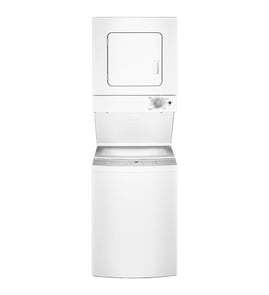



How long is the quick wash cycle on a Frigidaire washer?
On the Frigidaire FLCE752CAW1 stacked laundry center, the washer Quick Wash cycle is designed for a small, lightly soiled load and runs about 35 minutes. For the most accurate cycle-time expectations, match load size and soil level to the cycle description in the FLCE752CAW1 owner's manual.
What “Quick Wash” is best for
Quick Wash is meant to save time, not to deep-clean heavy soil.
- Small loads (a few items, not a full tub)
- Lightly soiled everyday clothing
- When you need a fast turnaround
- Not ideal for bulky items (towels, jeans) or heavy stains
Why your Quick Wash time can vary
Even with a 35-minute target, real-world time can change based on conditions.
- Load balance: an unbalanced load can slow or interrupt spinning
- Water temperature selection and incoming water temp
- Suds level from too much detergent (extra rinsing can occur)
- Lid lock and stopping time: the tub can take up to several minutes to fully stop after pausing
Quick comparison: common “fast” cycles
| Cycle | Typical purpose | Typical time |
|---|---|---|
| Quick Wash (washer) | Small, lightly soiled wash | About 35 minutes |
| Rinse & Spin (washer) | Rinse only, then spin | Varies by settings |
| Quick Dry (dryer) | Timed dry for small loads | About 25 minutes |
Why it matters
Using Quick Wash for the right load helps you get better cleaning, better spin-out, and shorter overall laundry time (wash plus dry). If clothes come out too wet, reducing load size and redistributing items usually improves the spin stage.
Last updated: January 2026
How do I know if my washer and dryer are stackable?
If you have a Frigidaire FLCE752CAW1 stacked laundry center, it is already a factory-stacked, single-piece unit, so you do not need to verify “stackability” between separate machines. Use the model/serial tag inside the dryer door opening to confirm the exact model before ordering parts or following installation steps in the FLCE752CAW1 owner’s manual.
How to confirm what you have (fast checks)
- Open the dryer door and look for the serial plate inside the door opening (this is where the model and serial numbers are listed).
- Confirm the model number reads FLCE752CAW1.
- Verify it is one combined cabinet (washer below, dryer above) with shared sides and top.
- If you see two separate appliances with their own full cabinets, you have a stackable pair, not a laundry center.
- For setup and grounding details, follow the FLCE752CAW1 installation guide.
Laundry center vs stackable pair: what’s the difference?
| What you have | How it’s built | What “stackable” means |
|---|---|---|
| Laundry center (like FLCE752CAW1) | One factory-assembled unit | Not applicable; it is already stacked |
| Stackable washer + dryer pair | Two separate machines | Requires a model-approved stacking kit |
If you actually have two separate machines
If your washer and dryer are separate units, “stackable” depends on the exact model numbers and whether the manufacturer supports stacking them with a stacking kit.
- Match the washer and dryer model numbers to an approved stacking kit list (brand-specific).
- Confirm the dryer is designed to mount on top of that washer (not all are).
- Do not stack without the correct kit; it affects stability and safe operation.
- Make sure the installation location supports proper venting and airflow.
Why it matters
Stacking rules are about stability, vibration control, and safe airflow. With a laundry center like Frigidaire FLCE752CAW1, the stacking is engineered at the factory, so the key is confirming the model number and following the correct installation and grounding instructions.
Last updated: January 2026
How do I get my Frigidaire washer to drain?
To get your Frigidaire FLCE752CAW1 washer to drain, start a drain-capable cycle (such as rinse and spin) and make sure the drain hose is not kinked or clogged. Most draining problems on this model come from a restricted drain hose or an installation issue that causes siphoning. See the FLCE752CAW1 owner's manual for cycle and draining details.
Quick steps to force a drain
- Cancel the current cycle, then select rinse and spin and press start.
- Confirm the lid is fully closed so the lid lock can engage.
- Listen for the drain pump; you should hear a steady hum and water movement.
- If water drains slowly, pause the cycle and check the drain hose routing.
Check the drain hose first (most common)
A kinked or clogged drain hose is the top reason water will not drain or drains slowly.
- Pull the unit forward enough to inspect the hose behind the washer.
- Straighten sharp bends; avoid crushing the hose against the wall.
- Remove lint or debris from the standpipe or laundry tub drain.
- Keep the factory hose routing intact; the manual notes the drain hose clips help form a standpipe to prevent siphoning.
Drain hose and standpipe checklist
| What to check | What “good” looks like | What it causes if wrong |
|---|---|---|
| Hose condition | No kinks, no pinches | Slow drain or no drain |
| Standpipe height | At least 33 in. high | Siphoning, poor draining |
| Hose routing | Supported, not shoved too deep | Siphoning or overflow |
If the washer still will not drain
If the hose and standpipe are correct and the washer still will not drain, the drain pump or a blockage at the pump can be involved.
- Unplug the laundry center before any inspection.
- Check for coins, socks, or debris in the drain path.
- If the pump runs but does not move water, replacement is a common fix; use the Frigidaire laundry center washer drain pump 5304524452.
Why it matters
A washer that cannot drain will leave clothes soaking wet, can stop mid-cycle, and can trigger error conditions. Correct drain hose installation and a clear drain path protect the pump and help the washer complete spin properly.
Last updated: January 2026
How to put a Frigidaire washer in diagnostic mode?
On the Frigidaire FLCE752CAW1 stacked laundry center, diagnostic mode is started from the washer control panel using a service key sequence; when it works, the console LEDs illuminate or blink and the washer is ready to display codes or run tests. Use the steps in the FLCE752CAW1 owner's manual for your exact control layout.
Steps to enter diagnostic mode (common Frigidaire method)
- Put the washer in standby: plugged in, powered on, no cycle running.
- Close the washer lid fully (the washer will not operate with the lid open).
- Press and hold the two option keys used for service entry on your console (often a pair like Extra Rinse and Soak).
- While holding, press Power if your panel has a Power key.
- Release when the LEDs change (all lights on, blinking pattern, or beeps).
What the lights and beeps mean
- All LEDs on or blinking: diagnostics accepted.
- Beeps with LED changes: keys are registering; you are in a service state.
- No response: starting state is wrong, lid is not sensed closed, or a key is not registering.
If it will not enter diagnostics
- Cancel any cycle and wait for the tub to stop (it can take several minutes).
- Unplug for 2 minutes, then restore power and try again.
- Press and hold the keys firmly for 3 to 5 seconds.
- Confirm the unit is powered and grounded correctly per the FLCE752CAW1 installation guide.
Next step: read error codes
Use this to decide what system to troubleshoot first.
| What you see in diagnostics | What it points to | First checks |
|---|---|---|
| Stored washer error codes | A detected fault | Drain, fill, lid/lock, balance |
| No stored codes | Intermittent or mechanical issue | Load size, hoses, wiring |
For code definitions, use Frigidaire laundry center -washer error codes.
Why it matters
Diagnostics helps us separate a simple operating condition (lid open, cycle not canceled) from a real failure so you test before replacing parts.
Last updated: January 2026