
Where is the model number on a Craftsman drill press?
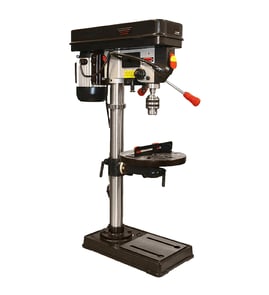
On the Craftsman drill press model 113213872, the model number is typically printed on a metal ID plate or sticker on the base near the column. Use that full model number when looking up diagrams and ordering replacement parts through Sears PartsDirect.
Check these common spots first (starting with the most likely):
- Base casting near the column (front or side edge)
- Back side of the column, low near the base
- Underside of the base (tip the unit only if it is safely supported)
- Motor housing or motor mounting plate
- Belt cover or inside the pulley cover door
Most Craftsman drill presses use a small plate or label that includes the model number and sometimes a serial number.
| You might see | What to do with it |
|---|---|
| Model number (example: 113213872) | Use it to match the exact parts list and diagrams |
| Serial number | Keep it for your records; it helps identify production runs |
| Electrical ratings (volts/amps/Hz) | Use it when troubleshooting power or motor issues |
Craftsman drill press parts can vary by production run, even when the machines look similar. Using the exact model number (like 113213872) helps ensure you get the correct belts, pulleys, switches, quill parts, and hardware for your 17 inch drill press.
- Clean the base and column area with a dry rag first; sawdust and oil often hide the stamping or label
- Look for faint stamped numbers on the base casting near the column
- If you are troubleshooting electrical issues, use safe testing practices; our guide on how to use a multimeter to test electrical parts video helps you verify power and switch continuity
Last updated: February 2026
What is the 4 inch rule for drill press?
The 4-inch rule for a drill press means we keep our hands and fingers at least 4 inches away from the rotating drill bit and spinning workpiece at all times. On a Craftsman 113213872 17" drill press, that typically means clamping the material to the table instead of holding it by hand.
- Clamp the workpiece to the drill press table, or secure it in a drill press vise.
- Use a backing board under thin stock to reduce tear-out and help prevent grabbing.
- Set the correct speed for the bit size and material; slower speeds for larger bits.
- Keep sleeves, gloves, jewelry, and long hair away from the spindle and chuck.
- Use a brush or vacuum to clear chips; never sweep chips away with your fingers.
The risk goes up when the bit can “grab” and spin the work:
| Situation | Why it’s higher risk | Safer approach |
|---|---|---|
| Small parts | Fingers naturally get close | Use a clamp, vise, or jig |
| Large hole saws/Forstner bits | High torque, sudden catch | Clamp firmly; use low speed |
| Metal drilling | Work can spin like a propeller | Vise plus clamps; cutting fluid |
| Breakthrough at the bottom | Bit can pull in | Reduce feed pressure; use backing board |
A drill press can pull a hand into the bit or whip the workpiece around instantly. The 4-inch rule forces us to use proper workholding (clamps, vise, jigs) so the tool controls the cut, not our grip.
For electrical safety checks on a drill press (switch, cord, motor circuit), we use the same basic test approach shown in how to use a multimeter to test electrical parts video.
Last updated: February 2026
Can you replace the chuck on a drill press?
Yes. On the Craftsman 113213872 17" drill press, you can replace the chuck as long as you match the chuck mounting style (most commonly a taper fit such as a Jacobs taper) and seat it correctly in the quill spindle.
- Unplug the drill press; do not rely on the switch.
- Lower the table or remove the workpiece so you have clear access to the chuck.
- Wear eye protection; a chuck can drop suddenly when it releases.
- Support the chuck with one hand when you are loosening or knocking it free.
- Clean the spindle taper and the new chuck taper; oil or dust can make the chuck slip.
Most drill presses use one of these attachment methods:
| Chuck attachment type | What it looks like | Typical removal | Typical install |
|---|---|---|---|
| Taper-fit (Jacobs taper) | Smooth cone fit, no threads visible | Eject with a wedge/drift or by lowering the quill to the eject position (varies by design) | Press the chuck onto the taper firmly |
| Threaded mount | Threads visible at the spindle or inside chuck | Unthread (often with a retaining screw inside the chuck) | Thread on and tighten |
- Open the chuck jaws fully and look for a retaining screw; if you see one, remove it first.
- Clean both tapers with a lint-free rag; use a small amount of solvent if needed, then dry.
- Align the chuck on the spindle taper and push it on by hand.
- Seat it by applying firm upward pressure; many techs use a block of wood on the chuck nose and a quick upward bump, or press the chuck against the table with the quill feed.
- Test for wobble by spinning the chuck by hand; reseat if you see runout.
A chuck that is not seated squarely can wobble, drill oversized holes, and fall off under load. A clean, properly seated taper gives you better accuracy and safer operation.
For more DIY help with electrical checks while troubleshooting a drill press switch or motor, use our guide: how to use a multimeter to test electrical parts video.
Last updated: February 2026
How to repair a drill press spindle?
On the Craftsman 113213872 17-inch drill press, spindle repair means removing the quill assembly, inspecting the spindle taper and bearings, replacing worn bearings or a bent spindle, then reassembling so the spindle turns smoothly with minimal runout.
- Unplug the drill press before servicing.
- Remove the bit and chuck; lower the table for clearance.
- Wear eye protection; snap rings and springs can release suddenly.
- Support the quill so it cannot drop when retainers are removed.
- Remove the chuck (use the correct drift/wedge for your taper).
- Remove the belt cover, relieve belt tension, and slip the belt off the pulleys.
- Note the quill return spring position; remove the spring housing if it blocks quill removal.
- Remove the quill retaining ring or snap ring and any top retainers.
- Press the spindle out of the quill using an arbor press or a well-supported vise setup.
- Replace bearings: press bearings on and off squarely; apply force only to the correct race.
- Reassemble the spindle into the quill, reinstall retainers, and confirm free rotation with no binding.
| Check | What you are looking for | Result |
|---|---|---|
| Spindle bearings | roughness, noise, looseness | replace bearings |
| Spindle taper | nicks, rust, poor chuck seating | clean or replace spindle |
| Quill bore | scoring, heavy wear | clean, deburr, evaluate fit |
| Pulley/keyway | wobble, damaged key or set screw | repair/replace hardware |
A worn spindle or bearing set causes wobble, chatter, and inaccurate holes. Correct bearing installation protects the quill, pulleys, and motor and restores smooth drilling.
Use the model number 113213872 to match the correct spindle, bearings, snap rings, and related hardware by diagram callout; you can also search by model on Sears PartsDirect.
Last updated: February 2026