Owner’s manual
 Error Codes



Why is my refrigerator running but not cooling on my Samsung?
If your Samsung RS22HDHPNSR refrigerator sounds like it’s running but isn’t getting cold, the most common model-specific cause is Cooling Off (Shop/Demo) mode. If the display isn’t in Cooling Off, focus next on airflow restrictions, dirty condenser coils, or a defrost or fan problem.
Check this first on RS22HDHPNSR: Cooling Off mode
This model’s manual describes Cooling Off mode where lights and fans can run normally but the compressor does not cool.
- Look at the display for “OFF”
- If you see OFF, exit Cooling Off mode using the button sequence in the RS22HDHPNSR use & care manual
- After exiting, allow several hours for temperatures to pull down
| Display status | What it usually means | Next step |
|---|---|---|
| “OFF” shown | Cooling Off mode is active | Turn Cooling Off off per the manual |
| No “OFF” shown | A cooling system or airflow issue is more likely | Continue checks below |
If it’s not Cooling Off: quick checks you can do
- Confirm set temps: the manual lists recommended basics of 0°F freezer / 37°F fridge
- Clear vents: keep packages from blocking interior air vents
- Clean condenser coils: dust buildup reduces heat removal
- Listen for the evaporator fan: a failed fan can leave the fresh-food side warm
- Power reset: unplug about 10 minutes, then plug back in
When a part or service is likely
If airflow is clear and the unit still won’t cool, the issue can be in the defrost system, fan system, or sealed system. Sealed-system and compressor diagnosis typically requires a technician.
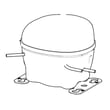
If testing points to a compressor problem, compare your exact replacement options to the model’s parts list; one example part shown for this model is the Samsung refrigerator compressor MKV190CL2BASH.
Why it matters
A refrigerator that runs without cooling can cause rapid food spoilage and can overwork major components. Catching a setting issue like Cooling Off mode early can prevent unnecessary repairs.
Related help: troubleshooting a refrigerator not cooling video
Last updated: January 2026
What is the most common problem with a Samsung refrigerator?
For the Samsung RS22HDHPNSR side-by-side refrigerator, the most common issues we see are ice maker and water dispensing problems (no ice, clumped ice, slow water) and cooling complaints (warm fridge/freezer or temperature swings). These are often tied to settings, airflow, or water supply conditions.
Most common symptoms on RS22HDHPNSR
- Ice maker not making ice
- Ice clumping in the bucket or ice not dispensing
- Water dispensing slowly or not at all
- Fridge or freezer not cooling enough
- Display shows “OFF” (Cooling Off or Shop mode)
Quick checks we recommend first
Use the troubleshooting and control-panel sections in the RS22HDHPNSR manual to confirm these basics:
- Set temperatures to the recommended 0°F freezer and 37°F fridge
- Keep interior air vents clear (blocked vents can cause poor cooling and icing)
- Confirm doors close and seal fully
- Verify the water supply valve is open and the supply line is not kinked
- Confirm water pressure is in the typical operating range for the ice maker (the manual notes 20 to 125 psi)
When it may point to a compressor or sealed-system issue
If the refrigerator runs but won’t cool, or cooling stays inconsistent after you correct settings and airflow, the sealed system (including the compressor) may be involved. For RS22HDHPNSR, we can’t confirm compressor specifications from the manual alone; the safest way to match the correct replacement is to use the model-specific parts listing. One compressor shown for this model is Samsung refrigerator compressor MKV190CL2BASH. Sealed-system diagnosis and repair is typically technician work.
| Problem area | Common symptom | First thing to check |
|---|---|---|
| Ice maker | No ice or clumped ice | Water supply open, freezer at 0°F |
| Water dispenser | Slow/no water | Filter condition, line kinks |
| Cooling | Warm sections | Vents blocked, doors sealing, “OFF” mode |
| Sealed system | Runs but won’t cool | Technician diagnosis |
Why it matters
Ice and cooling problems can look like “bad parts,” but on RS22HDHPNSR they’re often caused by airflow restrictions, temperature settings, or water supply issues. Ruling those out first helps avoid unnecessary repairs.
Last updated: January 2026
How to factory reset Samsung fridge not cooling?
For a Samsung RS22HDHPNSR that isn’t cooling, there isn’t a single “factory reset” that restores everything; we start with a power reset and then make sure Cooling Off (Shop) mode is not enabled. Both steps can quickly restore cooling if the controls were glitched.
Step 1: Do a power reset (control reboot)
- Unplug the refrigerator (or turn off the breaker).
- Wait at least 5 minutes before restoring power.
- Plug it back in and wait a few minutes for the display to come back.
- Recheck temperatures after the unit runs for a while.
Step 2: Make sure Cooling Off (Shop) mode is not on
On this model, Cooling Off mode runs lights and fans but the compressor won’t cool.
- Look for OFF on the display.
- To toggle Cooling Off mode off, press and hold Power Freeze and Freezer together for 5 seconds (the display should return to normal).
The button sequence is also shown in the RS22HDHPNSR manual.
Correct temperature targets for RS22HDHPNSR
The manual lists these as the recommended baseline temperatures and ranges:
| Compartment | Recommended baseline | Adjustable range |
|---|---|---|
| Freezer | 0°F (-18°C) | 5°F to -8°F |
| Refrigerator | 37°F (3°C) | 44°F to 34°F |
If it still won’t cool after reset
- Confirm doors seal tightly; warm air leaks stop cooling performance.
- Keep food packages from blocking interior air vents.
- Make sure the back of the refrigerator has space for airflow.
- Allow several hours after changes; temperatures do not stabilize instantly.
When a part may be involved
If Cooling Off mode is off and airflow and seals are good, a cooling failure can involve the sealed system or compressor circuit. A model-compatible part listed for this refrigerator is the Samsung refrigerator compressor MKV190CL2BASH.
Why it matters
A power reset clears control glitches, and disabling Cooling Off mode restores compressor operation; both can make the refrigerator look “on” while it cannot actually cool.
Last updated: January 2026