 Installation guide
 Owner’s manual
 Error Codes








What is the most common problem with a GE dishwasher?
The most common issues we see on a GE dishwasher like model GDT535PSM4SS are draining problems (water left in the tub), a no-start condition (often door-latch related), and poor cleaning from restricted water flow. Your GDT535PSM4SS owner's manual also points to detergent and loading problems that can mimic a “broken” dishwasher.
Most common problems and what they look like
- Not draining: standing water, gurgling, or a cycle that ends with water in the bottom.
- Won’t start or stops: lights on but no wash action, or it beeps and won’t run.
- Not cleaning well: gritty dishes, food left behind, detergent still in the cup.
- Suds/foam in the tub: caused by using the wrong detergent (hand soap) or too much.
- White film or spots: hard-water minerals and low rinse-aid use.
Quick checks we recommend first (fast, no parts)
- Use only automatic dishwasher detergent; never use hand dish soap (it causes suds and poor wash performance).
- Make sure tall dishes are not blocking the detergent dispenser.
- Confirm the kitchen water temperature is not above 150°F (66°C) to help prevent etching.
- Clean the filter area and remove debris that can restrict wash and drain flow.
- If the dishwasher has power but won’t run, verify the door closes firmly and the controls are not locked.
Parts that commonly solve these symptoms on GDT535PSM4SS
| Symptom | Common suspect part | What it affects |
|---|---|---|
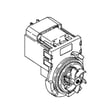
| Water left in tub | Dishwasher drain pump WD19X25461 | Pumps water out through the drain hose |
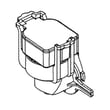
| Won’t start (door won’t “click”) | GE dishwasher door latch lock WD21X10490 | Confirms the door is shut so the control will run |
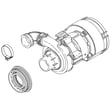
| Poor cleaning, detergent left in cup | Dishwasher fine filter assembly WD12X25995 | Keeps debris from recirculating and restricting flow |
Why it matters
Drain and wash-performance problems often come from restricted water flow (filters, spray arms, hoses) or a door-latch signal that prevents the control from running. Fixing the root cause improves cleaning, reduces odors, and helps protect the pump and heater.
Last updated: January 2026
How to do a hard reset on a GE dishwasher?
On the GE GDT535PSM4SS dishwasher, the most reliable hard reset is a power reset: turn the dishwasher’s power off at the breaker (or unplug it, if equipped) for about 1 to 5 minutes, then restore power and start a new cycle. You can also cancel a cycle by holding Start for 3 seconds.
Hard reset (power reset) steps
- Turn the dishwasher OFF at the circuit breaker (preferred) or unplug it (if your installation uses a cord).
- Wait 1 to 5 minutes.
- Restore power.
- Press Start and close the door within 10 seconds to begin a cycle.
- If the dishwasher was mid-cycle, press and hold Start for 3 seconds to cancel and drain first.
Cancel vs. reset: what each one does
| Action | What you do | What it accomplishes |
|---|---|---|
| Cancel/drain | Hold Start for 3 seconds, then close the door | Stops the current cycle and drains water |
| Hard reset | Cut power 1 to 5 minutes, then restore power | Clears many control glitches and reboots the control |
If it still will not start after a reset
These checks solve most “has power but won’t run” complaints on this GE dishwasher:
- Confirm the door is fully latched; the cycle will not start if the latch is not engaged.
- Make sure you press Start and close the door within the required time window.
- Check the breaker and any wall switch that feeds the dishwasher (common near the disposer switch).
- If the unit beeps and drains but will not wash, cancel the cycle and restart.
- If you suspect a door-latch issue, inspect the strike and latch alignment; replace worn parts if needed.
Why it matters
A power reset clears temporary control-board lockups, while the 3-second Start hold is the correct way to safely stop a cycle and drain. Using the right method helps prevent standing water, false error symptoms, and repeat no-start issues.
For model-specific button behavior and cycle start timing, follow the GDT535PSM4SS owner’s manual. For installation-related power and junction box details, use the GDT535PSM4SS installation guide.
Last updated: January 2026
What is the life expectancy of a GE dishwasher?
A GE dishwasher like model GDT535PSM4SS typically lasts 10 to 12 years with normal household use. Consistent care (especially cleaning and preventing hard-water buildup) often pushes service life closer to the upper end of that range.
What affects dishwasher lifespan most
- Water quality: hard water speeds up mineral buildup on the heating system and spray paths.
- Filter and sump cleanliness: a clogged filter makes the wash pump work harder.
- Loading habits: overloading blocks spray coverage and strains racks and spray arms.
- Detergent and rinse aid use: correct products reduce film and residue.
- Installation quality: proper electrical and plumbing connections reduce nuisance failures (see the installation guide).
Maintenance that helps you reach 10 to 12 years
Use these habits for the GDT535PSM4SS series:
- Clean the filter area regularly and remove debris (labels, glass, food).
- Run a cleaning cycle periodically to reduce film and mineral buildup.
- Keep spray arms clear; remove and rinse if holes clog.
- Use a quality detergent and rinse aid to reduce spotting and buildup.
- Wipe the control panel with a lightly damp cloth and dry thoroughly.
Quick “replace vs. repair” guide
| If your dishwasher is… | Usually worth repairing when… | Usually time to replace when… |
|---|---|---|
| Under ~8 years old | One part failed (latch, valve, drain pump) | Multiple recurring leaks or electrical issues |
| 10 to 12 years old | Repair is minor and performance is otherwise good | Repair cost is high and cleaning/drying is consistently poor |
| Over 12 years old | Simple, low-cost fix | Major pump, control, or tub-related problems |
Why it matters
Knowing the typical lifespan helps you plan maintenance and decide when a repair (like a new dishwasher heating element WD05X35098 for drying performance) makes sense versus investing in a replacement.
Last updated: January 2026
Can a clogged drain cause an FTD error?
Yes. On the GE GDT535PSM4SS dishwasher, an FTD (fail to drain) error commonly happens when the drain path is restricted, so the drain pump cannot push water out. Clearing the filter, air gap, disposer connection, or drain hose usually resolves the issue; see the GDT535PSM4SS owner's manual.
What to check first (fast, no parts)
- Cancel the cycle and wait for the drain portion to run; listen for the drain pump.
- Remove the bottom rack and clean the filter area; rinse debris off the filter.
- If you have an air gap, remove the cap and clean it (a toothpick works well).
- If the dishwasher drains into a garbage disposer, run the disposer to clear it.
- Check that the kitchen sink drains normally; a slow sink often means a plumbing clog.
- Inspect the drain hose routing for kinks, crushing, or a sag that traps water.
Drain restriction checklist (where clogs usually hide)
| Location | What you may notice | Typical fix |
|---|---|---|
| Filter area in tub | Standing water, gritty debris | Clean and reinstall filter correctly |
| Air gap (if installed) | Water backing up, poor draining | Clean air gap cap and passage |
| Disposer inlet | Dishwasher drains poorly after install | Clear disposer inlet/knockout and run disposer |
| Drain hose | Intermittent drain, gurgling | Straighten hose, clear blockage |
When a part is more likely
If the drain path is clear but the unit still will not pump out, the drain pump or a related control component can be involved.
- Loud humming but little or no water movement can point to a jammed or failing pump.
- Repeated drain errors after cleaning can point to a pump that is weak or obstructed.
- If the dishwasher drains slowly and then stops, check for a partial clog plus a struggling pump.
Relevant model parts to consider:
Why it matters
FTD is the dishwasher protecting itself. Water left in the tub can cause odors, poor cleaning, and repeat error codes, so restoring a clear drain path and correct hose routing prevents recurring drain failures.
Last updated: January 2026





