Installation guide
 Owner’s manual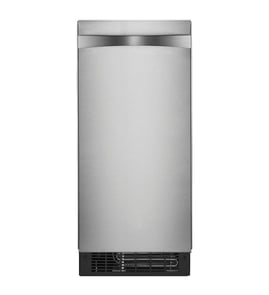

Why is my ice maker making ice but not dispensing?
If your GE UCC15NJBII is making ice but not releasing it into the bin, the most common causes are a jam in the ice path, scale buildup affecting the harvest cycle, or an airflow or drain issue that leads to partial melt and refreeze. We recommend checking the bin area first, then running the cleaning steps in the UCC15NJBII owner's manual.
Quick checks that fix most “won’t dump” issues
- Turn the unit OFF, wait 5 minutes, then turn it back ON at the control panel.
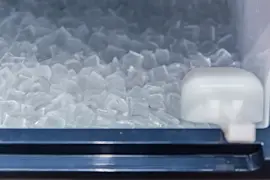
- Open the door and remove the ice bin; break up any clumped ice and clear the drop area.
- Confirm nothing has been stored in the bin except ice (bottles and labels can interfere and clog the drain).
- Make sure the front grille area is clear; this model pulls room air in at the lower right front and exhausts warm air at the lower left front.
- Verify the bin drain is not restricted and there is no standing water in the bin.
Cleaning and scale: the most common root cause
This ice maker concentrates minerals in the reservoir during normal operation; scale can prevent a clean harvest (release) and lead to ice sticking.
What to do
- Run the ice making system cleaning procedure and descale as outlined in the manual.
- If your “Time to Clean” light is on, complete the cleaning cycle before troubleshooting further.
For step-by-step help, use freestanding ice maker cleaning tips.
Airflow, temperature, and drain conditions to confirm
The UCC15NJBII performs best with adequate airflow and normal indoor temperatures.
| What to check | What “good” looks like | What happens if it’s not |
|---|---|---|
| Front airflow | Intake and exhaust at the front are unobstructed | Slow harvest, soft ice, refreeze jams |
| Room temp | Best performance around 70°F to 80°F | Low output, sticking, clumping |
| Bin drain | Water drains freely, no standing water | Melt water refreezes and locks ice in place |
Why it matters
When ice cannot release cleanly, the machine can keep cycling but leave ice stuck on the evaporator or clumped in the bin. Clearing jams and removing scale restores normal harvest and helps prevent repeat freeze-ups.
Last updated: February 2026
Why has my GE ice maker stopped making ice?
If your GE UCC15NJBII freestanding ice maker stopped making ice, the fastest fixes are to confirm the unit is ON, reset a tripped breaker, and verify the water supply. If the Check Water light is flashing red, restore water and the control will automatically reset.
Quick checks (most common)
- Press the ON/OFF button to make sure the machine is powered on.
- Check your home circuit breaker and reset it if it tripped.
- Confirm the shutoff valve is fully open and the supply line is not kinked.
- Look for a flashing red Check Water light; that indicates low water supply.
- If the Time to Clean light is on, run the cleaning cycle (scale buildup can stop ice production).
What the indicator lights mean
| What you see | What it usually means | What we do next |
|---|---|---|
| Check Water light flashing red | Water supply is low | Restore water; the unit checks about every 20 minutes and then resets |
| Time to Clean light on | Scale buildup in the ice-making system | Clean and descale the ice-making system |
| Unit appears off | Switch is OFF | Turn the unit on at the control panel |
Reset and cleaning steps that restore ice
- If the bin is full of old ice, scoop it out and discard it.
- Turn the unit off using the ON/OFF button.
- If Time to Clean is lit, follow the cleaning and descaling procedure in the UCC15NJBII owner’s manual.
- After restoring water, give the ice maker time to resume; it checks for water about every 20 minutes.
Why it matters
This model uses a continuous ice-making system that stops when the bin is full and runs when the ice level is low. Low water supply, a tripped breaker, or scale buildup are the most common reasons it stops producing ice.
For deeper troubleshooting by symptom, use our ice maker runs but no ice guide.
Last updated: February 2026
How do you reset the bottom ice maker?
For the GE UCC15NJBII freestanding ice maker, the practical “reset” is power-cycling the unit with the ON/OFF control, then restarting ice making. If the issue is related to cleaning reminders or scale buildup, use the CLEAN-RESET + ON/OFF button sequence described in the UCC15NJBII owner's manual.
Quick reset steps (most situations)
- Press and hold ON/OFF for about 3 seconds until the white ICE MAKING light goes out.
- Wait 60 seconds.
- Press ON/OFF again to restart the ice maker.
- Allow the unit time to resume; first ice typically drops after about 30 minutes.
- If the bin was just emptied or the unit was just started, expect 8 to 10 hours of continuous run time to fill the bin.
If you mean “reset the clean light” (TIME TO CLEAN)
The TIME TO CLEAN light comes on after about 6 months and stays on until the ice making system is cleaned.
Cleaning reset sequence (starts the cleaning process):
- Press and hold ON/OFF for 3 seconds to turn the unit off.
- Press and hold CLEAN-RESET and ON/OFF together for 5 seconds.
- Confirm the TIME TO CLEAN light blinks; follow the cleaning steps in the manual.
What the indicator lights are telling you
| Light | Color | What it usually means |
|---|---|---|
| ICE MAKING | White | Unit is on and making ice |
| CHECK WATER | Red | No water supply to the ice maker |
| TIME TO CLEAN | Yellow | Cleaning is due; clean cycle needs to be completed |
Why it matters
A true “reset” gets the control back to a known state, but it will not fix a no-water condition, restricted airflow, or mineral scale. Addressing the indicator light (especially CHECK WATER or TIME TO CLEAN) prevents poor ice production and misshaped cubes.
Related troubleshooting
If the unit still will not run after a reset, follow the steps in ice maker not running and the airflow and startup guidance in the UCC15NJBII owner's manual.
Last updated: February 2026