








Where to find part number on GE dryer?
On a GE electric dryer like model DPSQ495ET4WW, the model and serial tag (which you will use to match the correct replacement parts) is typically located on the inside of the dryer door opening, either on the door frame or just inside the cabinet opening.
Where to look first
Check these common GE dryer ID-tag locations in order:
- Inside the door opening on the front panel (door frame area)
- On the cabinet lip just behind the door (upper or side edge)
- Behind the lower front access panel (if your unit has one)
- On the back panel of the dryer cabinet
- Inside the control panel area (less common)
What numbers matter for ordering parts
For Sears PartsDirect ordering, we use the model number to ensure fit, and the serial number to confirm production range when parts changed during a run.
| What you see on the tag | Example format | What we use it for |
|---|---|---|
| Model number | DPSQ495ET4WW | Primary identifier for correct parts |
| Serial number | Letters and numbers | Confirms version/date range |
| Part number (on a component) | Varies by part | Helps identify a specific item, but model match still matters |
If you are trying to find a part number on the part itself
Many GE dryer parts have a number stamped or printed on them, but it may be a manufacturing number that cross-references to a different service part. When you are replacing common wear items, matching by model is the safest path.
- For a broken or slipping belt, match by model and compare to the drive belt WE03X29897
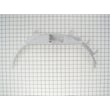
- For a dryer that will not start due to a door issue, compare to the door switch WE4M415
- For no-heat symptoms on an electric dryer, compare to the heater & h WE11M23
Why it matters
GE often uses similar-looking parts across multiple dryers; using the DPSQ495ET4WW model tag prevents ordering a belt, thermostat, timer, or heating element that looks right but does not fit your exact drum, motor, or wiring configuration.
Last updated: February 2026
Why is my GE dryer running but no heat?
If our GE DPSQ495ET4WW electric dryer tumbles but won’t heat, the most common causes are a tripped 240V breaker (dryer runs on 120V but heat needs 240V), restricted venting, or a failed heating circuit part such as the heating element, high-limit thermostat, or safety thermostat.
Quick checks first (fastest fixes)
- Reset the dryer breaker: most electric dryers use a double-pole breaker; one side can trip and still let the drum run.
- Clean the lint screen and remove any fabric softener residue.
- Check airflow at the outside vent hood; weak airflow points to a clogged vent.
- Confirm the cycle and settings: “Air fluff/no heat” and low-temp options can look like a heat failure.
- Let the dryer cool 10 to 15 minutes and try again; overheating from poor airflow can open safety devices.
Parts that commonly stop heat on this model
On an electric dryer like DPSQ495ET4WW, these parts are frequent no-heat culprits:
- Heater & h WE11M23 (heating element assembly)
- Dryer high-limit thermostat WE4M137 (opens if the heater area overheats)
- Dryer safety thermostat WE4M160 (safety cutout that can stop heat)
What symptoms usually look like
| Symptom | Most likely cause | What to do next |
|---|---|---|
| Drum runs, no heat at all | One breaker leg tripped, heater circuit open | Reset breaker; then test heater/thermostats |
| Heat starts then stops | Vent restriction causing overheating | Clean venting; recheck thermostats |
| Clothes take too long to dry | Poor airflow, partially restricted vent | Inspect vent path and outside hood |
Why it matters
No-heat problems are often caused by airflow restrictions. Fixing the venting protects the heating element and thermostats, improves dry times, and helps prevent repeat failures.
Helpful DIY guidance
For step-by-step troubleshooting flow, we recommend our electric dryer wont heat troubleshooting video.
Last updated: February 2026
What is the average lifespan of DPSQ495ET4WW?
A GE electric dryer like model DPSQ495ET4WW typically lasts 13 years with normal household use. Lifespan depends most on airflow (venting), load size, and keeping wear parts like the belt and drum glides in good condition.
What affects lifespan the most
- Restricted venting (long runs, crushed flex duct, clogged lint) increases heat and shortens heater and thermostat life.
- Overloading strains the motor, drum support, and belt.
- Worn drum support surfaces can cause scraping, drag, and longer dry times.
- Heat cycling from poor airflow can stress the heater and safety thermostats.
- Moisture and lint buildup inside the cabinet can accelerate wear.
Parts that commonly determine “end of life” (and are repairable)
If the dryer still heats and tumbles, replacing a few wear items often restores performance:
- Drive belt WE03X29897 (belt wear, squealing, no tumble)
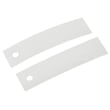
- Dryer drum glide bearing WE03X37318 (thumping, scraping, drum drag)
- Dryer blower wheel WE16M15 (poor airflow, rumbling, vibration)
- Dryer safety thermostat WE4M160 (overheating protection trips)
Quick lifespan check: repair or replace?
| Symptom | Most likely area | Typical fix |
|---|---|---|
| Drum will not turn, motor runs | Belt or idler system | Replace belt and inspect pulleys |
| Loud scraping or thumping | Drum glides/felt | Replace glides and inspect felt |
| Long dry times, hot cabinet | Airflow/blower/vent | Clean venting, inspect blower |
| No heat or overheating | Heater/thermostats | Test and replace failed component |
Why it matters
Most “old dryer” complaints are really airflow or wear-part issues. Keeping venting clear and replacing high-wear parts on time helps your DPSQ495ET4WW dry faster, run cooler, and reach its full 13-year service life.
Last updated: March 2026





