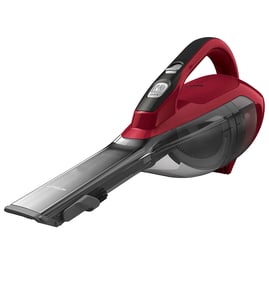

Where can I find the Kenmore vacuum model number?
For the Kenmore handheld vacuum model 20860131, the model number is usually printed on a rating label on the vacuum body, most often on the bottom, back, or near the dust cup area. Using the exact model number helps us match the correct parts and diagrams.
Check these common label locations first:
- Bottom of the vacuum body (near the base or intake)
- Back of the handle or main housing
- Inside the dust cup compartment (remove the dust cup and look on the cavity wall)
- Near the battery pack area (if your unit is cordless)
- Under a removable cover or filter door
Most Kenmore vacuums use a small sticker or plate that includes several identifiers. Here is what to capture from the label:
| Label item | What it’s used for | Example format |
|---|---|---|
| Model number | Matches the correct parts list | 20860131 |
| Serial number | Identifies your specific unit | Letters and numbers |
| Electrical rating | Confirms voltage/amps for troubleshooting | 120V, amps |
- Write down the full model number exactly as shown (include all digits)
- If there are extra characters (letters, dashes), copy them too
- Take a clear photo of the label before ordering parts
- If the label is worn, use a flashlight and look at an angle to read faint printing
Kenmore vacuums can look similar across multiple versions, but small design changes affect filters, dust cups, chargers, and switches. The correct model number (20860131) keeps you from ordering a part that does not fit.
For help confirming you are using the right identifier, use our guide: how to find your appliance model number (and what it means for parts).
Last updated: February 2026
How to change the belt on a Kenmore vacuum?
The Kenmore handheld vacuum model 20860131 does not use a drive belt or a motorized brush roll, so there is no belt to change. When cleaning performance drops on this type of handheld vac, the fix is almost always cleaning the nozzle and filters and clearing airflow restrictions.
- Power off the vacuum and remove the battery (if equipped).
- Empty the dust cup and wipe out fine dust buildup.
- Pull out any clogs from the nozzle opening and air passages.
- Clean hair and debris from any internal screens.
- Clean or replace the filter(s) on the normal maintenance schedule.
| Symptom | Most likely cause | What we do |
|---|---|---|
| Weak suction | Clogged filter or dust cup packed | Clean dust cup; clean/replace filter |
| Runs but picks up poorly | Nozzle or inlet blocked | Clear blockage; check air path |
| Loud whistling | Partial clog | Remove obstruction; recheck airflow |
| Shuts off during use | Overheating from restricted airflow | Clean filters and clogs; let it cool |
Handheld vacuums like the Kenmore 20860131 rely on airflow, not a belt-driven agitator. A dirty filter or a clogged nozzle reduces suction, increases motor strain, and can cause overheating or automatic shutoff.
To match the correct filter or dust cup components for model 20860131, use the model number when searching on Sears PartsDirect. For help confirming the model number from the rating label, use how to find your appliance model number (and what it means for parts).
Last updated: February 2026
Why is my Kenmore vacuum brush not spinning?
On the Kenmore 20860131 handheld vacuum, a brush that will not spin is usually caused by a blockage (hair, string, debris) or a brush roll that is binding at the end caps. Cleaning the brush area and confirming the brush turns freely by hand fixes most no-spin problems.
- Power the vacuum off and remove the battery (or disconnect from the charger) before servicing.
- Pull out hair and thread from the brush roll and both ends of the brush.
- Clear the intake path and nozzle opening; packed debris can stall the brush.
- Spin the brush by hand; it should rotate smoothly without grinding.
- Check for melted, cracked, or swollen end caps that make the brush bind.
- If the brush is removable, reinstall it fully seated so it is not rubbing the housing.
| What you notice | Most likely cause | What to do next |
|---|---|---|
| Brush is wrapped with hair and stops quickly | Brush roll jam | Clean brush roll and end caps thoroughly |
| Brush is hard to turn by hand | Binding end caps or damaged brush | Clean ends; replace brush roll if worn or warped |
| Brush turns by hand but stops under load | Debris in nozzle or brush channel | Clear nozzle, brush channel, and intake |
| Brush never moves and vacuum performance is otherwise normal | Brush drive issue (internal) | Inspect brush housing for damage; plan for parts replacement |
A stalled brush reduces agitation, so pickup drops sharply on carpet and upholstery. Running with a binding brush also increases wear on the brush assembly and can lead to overheating.
Last updated: February 2026


