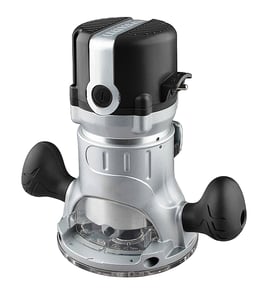

Does Craftsman make a corded router?
Yes. Craftsman makes corded routers, and your Craftsman model 31517460 is a corded-style woodworking router (it runs from household power through a power cord, not a battery). Corded routers are a common Craftsman power tool for steady RPM and consistent cutting power.
What “corded router” means (and what to expect)
A corded router plugs into a standard outlet and typically offers consistent speed under load compared with many cordless tools.
- Continuous power for longer routing sessions
- No battery charging or runtime limits
- Common for edge profiling, dadoes, and template routing
- Usually paired with a collet (often 1/4 in, sometimes 1/2 in depending on model)
- Best results come from sharp bits and correct feed direction
Quick corded vs cordless comparison
| Feature | Corded router | Cordless router |
|---|---|---|
| Runtime | Unlimited (plug-in) | Limited by battery |
| Power consistency | Very consistent | Can drop as battery drains |
| Portability | Lower | Higher |
| Typical use | Shop and bench work | Quick jobs, trim, light routing |
How to confirm your router is corded
Use these checks on Craftsman 31517460:
- Look for a fixed power cord exiting the motor housing
- Check for an on/off switch on the router body (common on corded units)
- Verify the rating label shows AC input (often listed as volts and amps)
- Inspect the cord for cuts, loose strain relief, or heat damage before use
Why it matters
Knowing whether your router is corded helps you choose the right extension cord gauge, plan safe power routing in the shop, and troubleshoot issues like intermittent power (often caused by a damaged cord, switch, or internal wiring).
For parts lookup and diagrams for Craftsman 31517460, start with the parts list for this model; for broader model searches and ordering, use Sears PartsDirect.
Last updated: February 2026
What is a Sears Craftsman router?
A Sears Craftsman router (like model 31517460) is a handheld power tool used to shape, trim, and cut wood with a spinning router bit. We commonly see it used for edge profiles, dadoes, rabbets, and hinge mortises in woodworking projects.
What a router does (and why people use it)
A router’s motor spins a bit at high speed; you guide the base along the workpiece to remove material accurately.
Common uses include:
- Rounding over or chamfering edges for a clean finish
- Cutting grooves (dadoes) for shelves and joinery
- Cutting rabbets for cabinet backs
- Flush-trimming laminate or wood to a template
- Mortising for hinges and hardware
Key features to look for on Craftsman model 31517460
Without model-specific documentation here, we recommend identifying your router’s capabilities by checking the tool’s nameplate and controls.
Look for these items:
- Amperage rating (motor power)
- Collet size (commonly 1/4 inch, sometimes 1/2 inch)
- Speed type (single-speed or variable-speed dial)
- Depth adjustment (fine adjust knob, rack-and-pinion, or clamp style)
- Base style (fixed base, plunge base, or a combo)
Quick identification checklist
Use this to confirm you are working with the correct Craftsman router model before ordering parts.
| What to check | Where to find it | Why it matters |
|---|---|---|
| Model number 31517460 | Nameplate on motor housing or base | Ensures correct parts match |
| Voltage and amps | Nameplate | Confirms power requirements |
| Collet size | Collet nut or manual markings | Ensures bits fit safely |
| Base type | Tool body | Affects how you make cuts |
Why it matters
Routers are precise but high-speed tools; using the correct bit, collet, and depth setting helps prevent burning, chatter, and kickback. Matching the exact model number also helps you get the right replacement parts and diagrams.
Finding parts and diagrams
We list parts by model so you can match components like switches, brushes, collets, bases, and hardware to your router. If you need to search beyond what’s shown for model 31517460, use Sears PartsDirect to look up parts by model number.
For general help locating the model tag on tools and equipment, use how to find your appliance model number (and what it means for parts).
Last updated: February 2026
How to change a router bit on a Craftsman router?
To change a router bit on a Craftsman router model 31517460, unplug the router, loosen the collet nut, remove the old bit, insert the new bit to the correct depth, then tighten the collet securely before testing at low speed.
Step-by-step: changing the bit safely
- Unplug the router (or remove the battery if it is cordless). Never change bits with power connected.
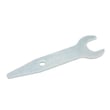
- Lock the spindle if your router has a spindle-lock button; otherwise use two wrenches (one on the spindle, one on the collet nut).
- Loosen the collet nut counterclockwise until the bit releases.
- Remove the old bit and wipe the shank clean.
- Insert the new bit shank fully, then pull it back out about 1/16 to 1/8 inch so it is not bottomed out.
- Tighten the collet nut firmly (snug plus a bit more). Do not overtighten.
Correct bit fit and depth (quick guide)
| What to check | What “right” looks like | Why it matters |
|---|---|---|
| Shank size | Matches the collet (commonly 1/4 inch or 1/2 inch) | Prevents slipping and vibration |
| Insertion depth | Not bottomed out; pulled back slightly | Helps the collet clamp evenly |
| Collet condition | Clean, no cracks, no heavy resin buildup | Improves grip and reduces runout |
If the bit is stuck in the collet
- Loosen the collet nut a few turns, then tap the wrench lightly to help break the grip.
- Remove the bit and clean resin from the bit shank and inside the collet.
- If the collet keeps sticking, inspect for wear and replace the collet if needed.
Why it matters
A properly installed router bit reduces chatter, burning, and kickback risk. Correct shank fit and collet tightening also protect the motor shaft and bearings on your Craftsman 31517460 router.
Parts and diagrams
If you need a replacement collet, collet nut, spindle lock parts, or switch components, use the parts diagrams for model 31517460 or search by model number on Sears PartsDirect.
Last updated: February 2026
What size shank is a Craftsman router?
Most Craftsman routers use 1/4-inch shank bits; some full-size models also accept 1/2-inch shank bits when they have a 1/2-inch collet (or a separate collet). For the Craftsman 31517460 router, confirm the shank size by checking the collet opening and matching it to the bit shank.
How to confirm the shank size on a Craftsman 31517460 router
- Unplug the router before checking the collet.
- Remove the bit (if installed) and look at the collet opening.
- Measure the opening with a ruler or caliper:
- About 1/4 inch (6.35 mm) indicates a 1/4-inch collet.
- About 1/2 inch (12.7 mm) indicates a 1/2-inch collet.
- Check whether your router came with two collets (common on some routers).
- Use only bits that match the collet size; do not “make it fit.”
Quick compatibility guide
| Collet size in your router | Bit shank you should buy | Typical use |
|---|---|---|
| 1/4 inch | 1/4-inch shank bits | Trim work, edge profiles, lighter cuts |
| 1/2 inch | 1/2-inch shank bits | Larger bits, heavier cuts, smoother routing |
Why it matters
Using the correct shank size helps the bit clamp securely in the collet, which reduces slipping, vibration, and poor cut quality. It also helps protect key parts like the collet, spindle, and motor bearings.
Parts and diagrams help
If you are trying to identify the correct collet or related hardware for your Craftsman 31517460 router, use the model-based parts diagrams first; for broader parts searches by model number, use Sears PartsDirect.
Last updated: February 2026
Does Craftsman make a router table?
Yes. Craftsman has made router tables and router-table accessories over the years, but the exact table that fits your Craftsman router model 31517460 depends on the router base style, mounting-hole pattern, and whether you plan to use a table insert plate. For the best match, start with your router’s model details and intended use.
How to choose a router table that works with model 31517460
A router table is compatible when the router can be mounted securely and adjusted safely. Before you buy, we recommend checking these fit points:
- Mounting pattern: Confirm the screw-hole spacing on the router base (or on the table’s insert plate).
- Base diameter and clearance: Make sure the opening supports the router and allows bit changes.
- Depth adjustment method: Some setups adjust from above the table; others require under-table access.
- Collet and bit access: Verify you can reach the collet nut safely for bit changes.
- Fence and dust collection: A stable fence and dust port make routing safer and cleaner.
What to look for based on how you’ll use it
Different projects benefit from different table features.
| If you mainly do... | Prioritize... | Why it helps |
|---|---|---|
| Edge profiling (roundovers, chamfers) | Solid fence, featherboard support | Keeps stock tight to the fence for consistent edges |
| Dados and grooves | Flat tabletop, accurate fence scale | Improves straight, repeatable cuts |
| Small parts | Guarding, push blocks, stable insert | Reduces kickback risk and improves control |
| Frequent bit changes | Large access opening, easy insert removal | Speeds up changes and reduces frustration |
Why it matters
A router table that does not match the router’s mounting pattern or does not support safe adjustment can lead to vibration, poor cut quality, and unsafe operation. A properly matched table improves accuracy, repeatability, and dust control for your Craftsman 31517460.
Ordering tips
If you are shopping for parts or accessories for your Craftsman 31517460 router, we recommend starting with the parts list for this model; for broader searches by model number or category, use Sears PartsDirect.
Last updated: February 2026