Owner’s manual
 Error Codes









What was the size of the Kenmore 79045003801 oven?
The Kenmore Elite electric range model 79045003801 is a slide-in range with an induction cooktop; the exact oven capacity (in cubic feet) and the appliance’s exterior dimensions are listed in the specifications section of the owner's manual. Use that spec page to confirm the oven size for your exact configuration.
What “size” can mean (and what to check)
People use “oven size” to mean different things. For model 79045003801, confirm which measurement you need:
- Oven capacity (cubic feet): best for comparing how much you can bake/roast at once
- Exterior width (typically about 30 inches for many slide-in ranges): best for fit in a cutout
- Overall height and depth: important for countertop alignment and door clearance
- Usable rack space: affected by rack positions and how you arrange cookware
How to find the correct size in the manual
In the owner's manual, look for a section labeled Specifications, Product dimensions, or Installation/clearances. When you find it, record these values:
- Overall width
- Overall height (to cooktop surface)
- Overall depth (with door closed)
- Oven capacity (cu ft)
Quick fit checklist (common for slide-in ranges)
| Measurement | Why it matters | What to do |
|---|---|---|
| Width | Cabinet opening fit | Measure opening at front and back |
| Height | Countertop alignment | Measure floor to countertop |
| Depth | Door and walkway clearance | Measure from back wall to front edge |
| Capacity | Cooking volume | Compare cu ft across models |
Why it matters
Using dimensions from an unrelated listing can lead to a bad fit, especially with slide-in ranges where the cooktop overlaps the countertop and venting is designed into the upper front frame. The manual specs keep your measurements tied to 79045003801.
Last updated: February 2026
Why is my Kenmore 79045003801 Elite oven not working?
If your Kenmore Elite electric range model 79045003801 oven is not working, the most common causes are a power supply issue, a control lockout or fault condition, or a failed heating or sensing component. Start with the reset and basic checks in the owner's manual, then test likely parts such as the oven temperature sensor.
Quick checks to do first
- Check for a power failure condition: the manual warns not to use the oven during a power outage; if power was interrupted, turn the oven OFF, restore power, then try again.
- Clear a fault/beeping: press STOP to clear the display; power the range off and back on, then retry the feature.
- Look for lockout: if the control is in a lockout condition (often after Self-Clean or cooktop lockout), unlock per the manual instructions.
- Confirm the correct mode: verify you selected Bake or Broil and set a temperature.
- Check the oven light separately: a dead light does not mean the oven cannot heat; it is typically a bulb issue.
Parts that commonly cause “oven not working”
If the display works but the oven will not heat or heats erratically, these parts are frequent culprits:
| Symptom | What it often points to | Example part for this model |
|---|---|---|
| Oven won’t reach temp or temp swings | Temperature sensing problem | Frigidaire range oven temperature sensor 316217002 |
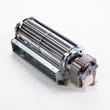
| Oven shuts down or won’t start after heating | Cooling/airflow issue | Range oven cooling fan assembly 318073028 |
| Buttons/display act up or features fail | Control panel or control board issue | Range control panel 318296602 |
Why it matters
An oven that will not start is often a control state (fault or lockout) or power problem, while an oven that starts but will not heat correctly is often a sensor or control issue. Following the model-specific steps in the manual prevents unnecessary part replacement.
Last updated: February 2026
Is Kenmore 79045003801 Elite high end?
Yes. The Kenmore Elite 79045003801 is positioned as a premium Kenmore range; it is a slide-in electric range with an induction cooktop and feature set aimed at higher performance and a more built-in look than basic freestanding models. See the owner's manual for the exact features included on your version.
What “high end” means for this model
For the 79045003801, “high end” typically shows up in day-to-day use as:
- Induction cooktop performance (fast heat response and efficient cooking)
- Slide-in design (more integrated, upscale appearance)
- Touch-style cooktop controls (common on premium induction ranges)
- Added cooking features such as a warmer drawer and self-clean options (feature availability can vary by configuration)
Quick comparison: where it fits
| Range type | Typical cooktop | Typical position | What you notice most |
|---|---|---|---|
| Basic electric range | Radiant coil or smooth top | Entry | Slower response, fewer features |
| Midrange electric range | Smooth top radiant | Mid | More settings, better fit/finish |
| Kenmore Elite 79045003801 | Induction | Premium | Faster control, premium design, more advanced controls |
If performance feels “not high end,” check these common issues
Even premium ranges can feel underwhelming when a key component is failing or out of calibration. These checks are the most common:
- Oven temperature seems off: test and calibrate; a failing sensor can cause wide swings (see frigidaire range oven temperature sensor 316217002)
- Fan noise or overheating around the control area: inspect the cooling fan and airflow paths
- Touch controls act erratic: power reset, then inspect wiring connections and harness routing
- Induction zone not heating well: confirm cookware is induction-ready and flat
- Power supply issues: inspect the cord/terminal connections for heat damage (see terminal block 5304409888)
Why it matters
“High end” is mostly about cooking control, speed, and consistency. When the induction system, temperature sensing, and cooling airflow are working correctly, this model delivers the premium experience it was designed for.
Last updated: February 2026
Where can I find my Kenmore 79045003801 Elite oven model number?
On the Kenmore Elite electric range model 79045003801, the model and serial number are printed on the serial plate (rating label). Use the serial plate location diagram in the owner's manual to identify the exact spot on your slide-in range.
Where to look on the range
Check these common serial plate locations first (range cool):
- Open the oven door and look along the oven frame (door jamb) on the left or right side
- Pull out the bottom drawer (warming drawer or storage drawer) and look on the frame behind it
- Look along the lower front frame area behind the drawer opening
- If the range has been moved, check the back panel area near where the power cord connects
Quick steps to find it fast
- Open the oven door fully and scan the frame edges for a white or silver label
- If you do not see it, remove the bottom drawer and scan the metal frame and side panels
- Write down the model number exactly as shown: 79045003801
- Record the serial number too; it helps identify the production run for service and parts matching
What the label shows (and how to use it)
| Label item | What we use it for |
|---|---|
| Model number: 79045003801 | Matching the correct parts diagrams and replacement parts |
| Serial number | Identifying the unit’s production run for service reference |
| Electrical ratings | Confirming correct power supply and wiring requirements |
Why it matters
Using the exact model number 79045003801 prevents mix-ups with similar Kenmore Elite ranges and helps ensure the parts you choose fit your induction cooktop and oven configuration.
Last updated: February 2026
How do I reset my Kenmore 79045003801 Elite electric oven?
To reset the control settings on your Kenmore Elite 79045003801 electric range, use the control’s “Quickly erase all stored recipes” reset: press and hold the recipe key pad for 6 seconds until the first single beep, then press the START key pad once. This restores factory adjustments.
Reset steps (factory adjustments)
Use these steps from the owner's manual:
- Make sure the oven is in an idle state (not baking, broiling, or in Self-Clean).
- Press and hold the recipe key pad until you hear the first single beep (about 6 seconds).
- Press START once to confirm.
- Re-enter any preferences you want (clock, tones, display options) after the reset.
What this reset changes
This reset clears stored recipes and returns common control options to default.
- Clears any stored recipes
- Resets 12/24-hour time-of-day display
- Resets continuous bake or 12-hour energy savings mode
- Resets silent control operation (beeps)
- Resets °F/°C temperature display and any oven temperature offset
If the oven looks “locked” after a reset
A lockout is a separate feature from the recipe reset.
| Display or symptom | What it means | What to do |
|---|---|---|
| “Loc” and “DOOR LOCKED” | Oven lockout feature is on | Press and hold the oven lockout pad for 3 seconds to toggle it off |
| Door won’t open after Self-Clean | Normal cooldown lock | Wait about 1 hour for the oven to cool; the door unlocks when “DOOR LOCKED” clears |
Why it matters
This reset fixes problems caused by changed settings (tones, display options, temperature calibration). It also helps separate a settings issue from a heating problem that points to a failed part such as the frigidaire range oven temperature sensor 316217002.
Last updated: February 2026