Installation guide
 Owner’s manual
 Error Codes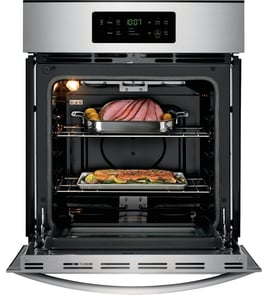

How do you reset a wall oven?
To reset your Kenmore Elite wall oven model 79047893602, we restore power to reboot the electronic oven control: turn the circuit breaker OFF (or remove the fuse) for about 1 minute, then turn it back ON. This clears many temporary control glitches.
Quick reset steps (power reset)
- Set the oven to OFF.
- Turn the wall oven circuit breaker OFF (or remove the fuse).
- Wait 60 seconds.
- Turn the breaker ON (or reinstall the fuse).
- Set the clock and test Bake and Broil.
If the display shows “LOC” or the door will not open
Your oven may be in Oven Lockout rather than needing a power reset. The manual procedure is:
- Press and hold the Oven Lockout pad for 3 seconds.
- Wait for the door to fully unlock.
- Confirm normal operation returns.
For the exact button name and display behavior on model 79047893602, follow the steps in the owner's manual.
What a reset fixes (and what it does not)
A reset helps when the control is “stuck” after a power flicker or keypad confusion. It does not repair failed parts.
| Symptom | Reset likely helps? | Common next check |
|---|---|---|
| Blank or frozen display | Yes | House breaker, wiring connections |
| Oven heats but temperature is off | Sometimes | Oven temperature sensor |
| Door locked after clean cycle | Sometimes | Lockout setting, door lock mechanism |
| No heat in Bake or Broil | Sometimes | Heating element, wiring, control |
Why it matters
A proper reset is the fastest, safest first step because it restores the electronic control to a known state before you spend time testing components like the sensor, wiring harness, or bake element.
Last updated: February 2026
Where can I find my Kenmore Elite oven model number?
For Kenmore Elite wall oven model 79047893602, the model and serial number are printed on the serial plate located along the interior side trim of the oven; you can see it when you open the oven door. For a picture-based walkthrough, use the 79047893602 owner's manual.
Where to look on the oven
Check these common label locations first:
- Open the oven door and look along the left or right interior side trim (most common for this model)
- Look for a serial plate with model and serial fields
- Use a flashlight and view from an angle; the plate can be easier to read with side lighting
- Write down the full model number and serial number exactly as shown
- If you are ordering parts, also note any lot number or letter shown on the plate
What the serial plate looks like
On this Kenmore Elite wall oven, the plate typically includes the following fields.
| Field on label | What it’s used for | Example (format) |
|---|---|---|
| Model number | Matching the correct parts diagrams | 79047893602 |
| Serial number | Identifying the production run | Letters and numbers |
| Lot number/letter (if shown) | Helps narrow down variations | Single letter/short code |
Why it matters
We use the model number to match the correct wall oven parts list (for example, heating, wiring, and door components). Using the exact model number helps prevent ordering a part that fits a similar Kenmore Elite oven but not 79047893602.
Last updated: February 2026
What causes a Kenmore oven to stop working?
On Kenmore Elite wall oven model 79047893602, the most common reasons the oven seems to “stop working” are a power interruption (the oven will shut off and not restart automatically), a tripped breaker or blown fuse, or an electronic control fault that triggers beeping and an error code. See the owner's manual for the model’s “Before You Call” checks and control reset steps.
Quick checks we recommend first
- Confirm the display is on; if it is blank, check the home breaker/fuse.
- If the control is beeping and showing an F code, press STOP/CLEAR to stop the beeping and clear the code.
- Make sure the controls are set correctly for Bake or Broil (a mis-set control can look like a failure).
- If the oven was in Sabbath mode and power was interrupted, turn Sabbath off (the oven will not resume automatically).
- If the oven “runs” but temperatures are off, suspect the temperature sensor.
Likely causes and what they look like
| Symptom | Most likely cause | What to do next |
|---|---|---|
| No power, blank display | House breaker tripped or fuse blown | Reset breaker fully; verify power at the junction box (power off first). |
| Beeping with an F code | Control detected a fault | Press STOP/CLEAR; if it returns, record the code for troubleshooting. |
| Oven will not restart after outage | Normal safety behavior | Reset the clock and reselect the cooking mode. |
| Poor or uneven baking | Temperature sensing or airflow issue | Check sensor operation; inspect convection components if equipped. |
Parts that commonly solve “not heating” complaints
If your 79047893602 has power but won’t heat correctly, these model-matched parts are common fixes:
- Frigidaire range oven temperature sensor 316217002 (helps when temps are inaccurate or heating is erratic)
- Oven element 318601604 (helps when bake heat is weak or absent)
Why it matters
An oven that “stops working” can be a simple power or control-state issue (breaker, outage behavior, Sabbath feature) rather than a failed component. Doing the quick checks first prevents unnecessary part replacement and gets you back to baking faster.
Last updated: February 2026
What are the parts of an electric oven?
An electric wall oven like the Kenmore Elite 79047893602 is built around heating elements, temperature sensing and controls, airflow and venting, and door and rack hardware. Common parts include the bake and broil elements, oven temperature sensor, convection fan components, oven vent, racks, and door seal (gasket).
Main electric oven parts (what they do)
- Bake element: Provides the primary heat for baking and roasting.
- Broil element: Provides high, top-down heat for broiling and browning.
- Oven temperature sensor: Tells the control board the oven temperature so it can regulate heat (example: frigidaire range oven temperature sensor 316217002).
- Electronic oven control: Runs bake, broil, timer, and other functions.
- Convection fan system: Circulates hot air for more even cooking (fan motor, blade hardware).
- Oven vent and blower/cooling fan: Vents warm air and helps keep internal components cooler; some models keep the blower running after the oven turns off.
Parts you will see and touch most often
| Part | What you notice when it has a problem | Common symptom |
|---|---|---|
| Oven racks | Rack won’t slide smoothly, sits uneven | Uneven baking, hard to use |
| Door seal (gasket) | Gaps, tears, looseness | Heat loss, longer cook times |
| Oven light/bulb | Light out or flickers | Poor visibility |
| Vent trim/vent area | Excess heat at front, unusual airflow | Hot cabinet face, odors |
Why it matters
Knowing the major components helps you troubleshoot faster. For example, inaccurate temperatures often point to the sensor or control logic, while uneven baking often points to airflow (convection fan) or a damaged door seal letting heat escape.
Good to know for safety and access
- Shut off power before servicing internal electrical parts.
- Do not line the oven bottom with aluminum foil unless your owner's manual specifically allows it.
- Avoid touching a hot oven light bulb; shut off power before replacing it.
Last updated: February 2026
How to unlock the Kenmore Elite oven?
To unlock the Kenmore Elite wall oven model 79047893602, use the control’s Oven Lockout feature: press and hold the lockout pad for 3 seconds to toggle the lock off, then wait for the door latch to finish cycling before opening. Steps are shown in the 79047893602 owner's manual.
Unlock steps for model 79047893602
- Stop any active cooking cycle and make sure the control is idle.
- Press and hold the Oven Lockout pad for 3 seconds.
- Watch for the lock indicator/message to change; the latch motor may run briefly.
- Wait until the door is fully released before pulling on the handle.
- If the oven is still hot from a high-temp cycle, allow it to cool while the lock releases.
What the control typically shows
| What you notice | What it means | What to do |
|---|---|---|
| “Loc” showing | Lockout is on | Hold the lockout pad 3 seconds to turn it off |
| “DOOR LOCKED” flashing | Latch is moving | Wait; do not force the door |
| “DOOR LOCKED” steady | Door is locked | Toggle lockout off and wait for release |
If it still will not unlock
- Give the latch 60 seconds to complete the unlock cycle.
- Turn the circuit breaker off for 1 minute, then back on; retry the 3-second unlock.
- If the oven was in self-clean, let it cool longer; the lock stays engaged until temperature drops.
- If the lock never releases, the door latch motor or switch circuit can be the cause; testing often involves checking wiring and components such as the wiring harness 318370304.
Why it matters
Forcing the door while the latch is engaged can damage the latch mechanism, hinges, or door alignment. Waiting for the lock cycle to complete prevents repeat lock problems and helps protect the control.
Last updated: February 2026