Owner’s manual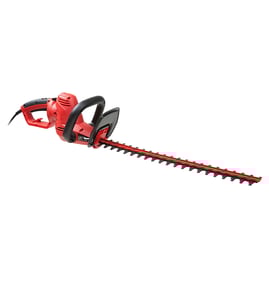

Can you sharpen a Black and Decker electric hedge trimmer?
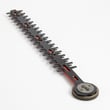
Yes. For the Black & Decker HT020 hedge trimmer, the blades are hardened steel and typically do not need resharpening with normal use; if you hit a fence, stone, or other hard object and create a nick, you can dress that nick with a fine-tooth file or sharpening stone so the blades move freely (with the trimmer unplugged). See the owner's manual for the model-specific maintenance notes.
When sharpening is appropriate (and when it is not)
- Appropriate: You see a nick or burr from hitting a hard object.
- Not needed: The trimmer still cuts cleanly and the blades move smoothly.
- Stop and inspect: The blade is bent, the housing is cracked, or handles are broken.
- Do not try to “grind an edge” aggressively: Removing too much metal can change blade geometry and increase binding.
Safe sharpening steps (corded electric trimmer)
- Unplug the trimmer before touching the blades.
- Wear eye protection and gloves; keep hands away from exposed cutting edges.
- If there is a nick that affects movement, use a fine-tooth file or sharpening stone to remove only the raised burr.
- Wipe the blades clean; then apply a light film of machine oil to help prevent rust.
- Plug in and test briefly; stop immediately if you hear binding or see uneven motion.
Quick tool and material checklist
| Item | Purpose | Notes |
|---|---|---|
| Fine-tooth file or sharpening stone | Removes burrs/nicks | Use light pressure |
| Safety glasses | Eye protection | Required when filing |
| Light machine oil | Rust prevention | Apply a thin film |
| Damp cloth + mild soap | Cleaning | Keep liquids out of the tool |
Why it matters
Keeping the HT020 blades clean, lightly oiled, and free of burrs helps the trimmer cut better and reduces the chance of blade binding, overheating, and kickback during trimming.
Last updated: February 2026
Can you spray WD-40 on a hedge trimmer?
Yes; you can spray WD-40 on the blades of your Black+DECKER HT020 hedge trimmer to help clean off sap and moisture and to provide short-term rust protection. For ongoing blade lubrication, use a light tool oil or a dry-film lubricant and wipe off excess so it does not collect debris.
Safe way to do it
Before cleaning or lubricating, unplug the trimmer. Our HT020 manual also stresses disconnecting power when servicing or cleaning and keeping hands away from the cutting edges; use gloves and keep both hands off the blades while you work. See the HT020 owner's manual.
- Unplug the trimmer and let the blades fully stop coasting.
- Brush off clippings, then wipe the blades with a rag.
- Lightly spray WD-40 on the blade surfaces (avoid soaking the housing).
- Run the trimmer briefly (off the hedge) to distribute, then unplug again.
- Wipe off excess to reduce dirt buildup.
WD-40 vs blade oil: what to use when
| Task | WD-40 | Light tool oil / dry-film lube |
|---|---|---|
| Remove sap and grime | Good | Fair |
| Displace moisture after use | Good | Fair |
| Long-lasting lubrication | Limited | Better |
| Dust and debris attraction | Higher if overapplied | Lower (especially dry-film) |
Why it matters
Clean, lightly lubricated blades cut cooler and smoother, which reduces binding and helps prevent premature wear. It also supports safer operation because the trimmer is less likely to snag and jerk while cutting.
Quick reminders from the manual
- Do not use the trimmer in damp or wet locations or in rain.
- Keep the cord away from oil, heat, and sharp edges.
- Keep handles dry, clean, and free of oil and grease.
Last updated: February 2026
How do I contact Black and Decker for replacement parts?
For Black & Decker HT020 hedge trimmer replacement parts, use the service instructions in the owner's manual: identify your exact model (HT020) and type (TYPE 1), then use the manual’s service-center guidance to request the correct replacement part or repair.
Best way to get the right replacement part
Because this is a corded hedge trimmer, the fastest path is usually using the manual’s service-center process so parts are matched to your exact tool type and configuration.
- Confirm the model is HT020 and the tool is TYPE 1
- Describe the symptom (for example: will not start, runs intermittently, blade won’t move)
- Have purchase details ready if warranty coverage applies
- Ask specifically for genuine factory replacement parts
- If the issue involves the cord or switch, stop using the trimmer until it’s repaired
What the manual says about service and parts
The manual explains that Black & Decker supports service through a network of service locations that can provide technical advice, repair, and genuine factory replacement parts; it also explains how to locate the nearest service option.
Common “parts-related” issues you can screen first
If your HT020 will not start, these are common causes to check before ordering parts.
| Check | What to do | Why it matters |
|---|---|---|
| Power connection | Plug in the cord fully | No power means no start |
| Fuse/breaker | Replace a blown fuse or reset the breaker | Restores circuit power |
| Cord or switch | Have it replaced by a qualified technician | Damaged electrical parts are unsafe |
Why it matters
Using the correct replacement part for the HT020 helps keep the blade drive and safety features working as designed; the blade can coast briefly after shutoff, so correct operation and safe handling matter.
Last updated: March 2026
Is it worth repairing a hedge trimmer?
Yes, repairing a Black & Decker HT020 hedge trimmer is worth it when the issue is basic maintenance (dull blades, dirty or dry blades, damaged extension cord) or a simple electrical problem; these fixes restore cutting performance and reduce injury risk without replacing the whole tool. Use the owner's manual to follow the correct safety steps before any service.
Quick decision checklist
- Repair it if the trimmer runs but cuts poorly; blades likely need cleaning, lubrication, or sharpening.
- Repair it if it stops intermittently; inspect the extension cord and plug for damage.
- Repair it if it jams; clear debris only with the switch off and the tool unplugged.
- Replace it if the housing is cracked, the handles are damaged, or the unit has repeated electrical failures.
- Replace it if repair requires internal motor or switch work and you do not have a qualified service option.
What to check first (safe, high-impact steps)
- Unplug the trimmer before inspecting, cleaning, or clearing jams.
- Inspect the extension cord for cuts, crushed spots, or loose connections; the manual calls for replacing damaged cords.
- Clean and lubricate the blades; keeping blades sharp and clean improves performance and reduces injury risk.
- Check for binding or misalignment in the blade set; binding can make the motor struggle.
Extension cord sizing guide (from the manual)
Using the right cord gauge helps prevent voltage drop and overheating.
| Trimmer current (amps) | Cord length (feet) | Minimum wire gauge (AWG) |
|---|---|---|
| 0 to 6 | 26 to 50 | 16 |
| 0 to 6 | 51 to 100 | 16 |
| 0 to 6 | 101 to 150 | 14 |
| 6 to 10 | 26 to 50 | 16 |
| 6 to 10 | 51 to 100 | 14 |
| 6 to 10 | 101 to 150 | 12 |
Why it matters
A hedge trimmer with dull or dirty blades forces you to push harder, cuts unevenly, and increases the chance of a slip. The manual also notes blades can coast after you turn the switch off, so safe handling and unplugging before service is essential.
Last updated: February 2026