 Installation guide
 Owner’s manual


Is an over-the-range microwave considered built-in?
An over-the-range (OTR) microwave is not the same as a built-in microwave. OTR models are designed to mount above a range and typically include a vent fan and cooktop light, while the KitchenAid KBMS1454BSS0 is designed for cabinet cutouts and built-in installations described in the KBMS1454BSS0 installation guide.
Key differences: over-the-range vs built-in
- Mounting location: OTR installs over a stove or cooktop; built-in installs in a cabinet cutout or wall.
- Ventilation: OTR often vents (recirculating or ducted); built-in models are typically not a range hood.
- Cabinet cutout requirements: Built-in models require a plumb, square cutout and a solid, level cutout floor.
- Support needs: Built-in installations require cabinetry support rated for the appliance weight and contents.
- Clearances and compatibility: Built-in units may be approved for specific placements (for example, above certain built-in ovens or below certain non-vented cooktops).
What “built-in” means for KBMS1454BSS0
The KBMS1454BSS0 is a built-in microwave oven intended for installation in wood cabinetry using a defined cutout opening. The installation instructions also describe approved placement options such as installing above electric or gas built-in ovens and below non-vented electric or gas cooktops (not below downdraft cooktops). See the KBMS1454BSS0 installation guide for the exact cutout and clearance requirements.
Quick comparison
| Feature | Over-the-range microwave | Built-in microwave (KBMS1454BSS0) |
|---|---|---|
| Primary purpose | Microwave plus range ventilation | Microwave integrated into cabinetry |
| Typical location | Above range/cooktop | Cabinet cutout or wall opening |
| Install hardware | Wall bracket and upper cabinet bolts | Trim kit/cutout-based mounting per guide |
| Venting | Common | Not a substitute for a range hood |
Why it matters
Choosing the right type prevents fit issues and airflow problems. An OTR microwave usually will not fit a built-in cutout correctly, and a built-in microwave like KBMS1454BSS0 is not designed to replace an OTR vent hood setup.
Last updated: January 2026
Can you convert a countertop microwave to built-in?
Yes, a countertop microwave can be installed to look built-in, but only when the microwave is designed for that type of installation and the cabinet cutout, clearances, and electrical requirements are met. For KitchenAid model KBMS1454BSS0, follow the built-in installation requirements in the KBMS1454BSS0 installation guide.
What “convert to built-in” really means
A true built-in installation is not just sliding a countertop unit into a cabinet. A built-in setup requires a proper cutout, required clearances, and a grounded outlet so the microwave can operate safely and be serviced.
Key requirements called out for this built-in style include:
- Wood cabinetry with a plumb, square cutout opening
- A solid, level cutout floor that is flush with the cabinet cutout bottom
- Support for at least 150 lb (microwave plus items placed inside)
- A grounded electrical outlet
- Minimum clearances above and below the cutout
Placement rules to avoid fit and clearance problems
The installation instructions for this built-in microwave style allow several common placements, but not all.
- Suitable above electric or gas built-in ovens
- Suitable below non-vented electric or gas cooktops
- Not suitable below downdraft cooktops
- Maintain the minimum clearances above and below the cutout (varies by placement)
Typical clearance examples (from the install requirements)
| Installation location | Minimum clearance examples |
|---|---|
| Above cabinet or storage drawer | 1 in above; 1-1/2 in below (typical) |
| Above oven or warming drawer | 1 in above; 3 in below (typical) |
| Below counter or below non-vented cooktop | 3 in clearance below lowest point of cooktop (typical) |
Why it matters
A “built-in look” without the correct cutout and clearances can cause overheating, door alignment issues, nuisance shutdowns, and difficult servicing. Following the specified installation requirements helps the microwave vent heat correctly and fit securely.
Last updated: January 2026
How to reset KitchenAid microwave?
To reset your KitchenAid microwave model KBMS1454BSS0, unplug it (or turn off the breaker) for about 1 minute, then restore power and test heating by microwaving 1 cup of water for 1 minute on 100% power. This clears many control glitches.
Reset steps (KBMS1454BSS0)
- Unplug the microwave from the grounded 3-prong outlet (or switch the circuit breaker OFF).
- Wait 60 seconds.
- Restore power.
- Set the clock if the display prompts you.
- Test operation: heat 1 cup (250 mL) of water for 1 minute at 100% power.
If it still will not run after the reset
If the microwave does not operate after restoring power, we follow the same checks used during installation setup in the KBMS1454BSS0 installation guide.
- Check the household fuse or reset the circuit breaker.
- Confirm the power cord is fully plugged into a grounded 3-prong outlet.
- Make sure the door closes firmly and latches; a door-interlock issue can prevent operation.
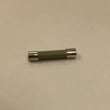
- If the unit is completely dead (no display), a blown internal fuse is a common cause.
Quick symptom guide
| What you see | Most likely area to check | Common next step |
|---|---|---|
| No display, no response | Power supply, internal fuse | Check breaker; consider testing/replacing the fuse (black) WP4375321 |
| Runs but does not heat | High-voltage heating circuit | Use troubleshooting steps in the manual; service is often required |
| Starts then stops when door moves | Door interlock switches | Inspect/replace the microwave door switch W10211972 |
Why it matters
A reset restores normal operation after a power interruption or control lockup, and the water-cup test confirms the microwave is actually heating, not just running the fan and light.
Last updated: January 2026


