 Installation guide
 Owner’s manual


Do all over the range microwaves have the same dimensions?
No. Over-the-range microwaves are built around common cabinet standards, but dimensions are not identical across brands and models. For your GE PVM9005SJ2SS microwave/hood combo, use the cutout and mounting measurements in the installation guide to confirm the exact fit before you buy or install.
Most OTR microwaves are designed to fit typical 30-inch-wide cabinet openings, but height and depth vary to match capacity, venting design, and door clearance.
- Width: commonly about 30 inches (some compact models are narrower)
- Height: varies by style (standard-height vs low-profile)
- Depth: varies with door design and handle style
- Mounting points: back wall plate and upper cabinet bolt locations vary by model
- Venting setup: outside venting vs recirculating can change required clearances
Use this as a planning reference; always verify with the model-specific installation specs.
| OTR microwave style | Typical width | Typical height | Typical depth |
|---|---|---|---|
| Standard OTR | ~30 in. | ~16 to 18 in. | ~15 to 18 in. |
| Low-profile OTR | ~30 in. | ~10 to 11 in. | ~15 to 18 in. |
| Compact OTR (less common) | ~24 in. | varies | varies |
These checks prevent common problems like blocked vents, cabinet interference, or a door that cannot open fully.
- Measure the cabinet opening width and confirm the microwave is designed for it.
- Confirm the microwave is approved for installation over your cooktop; the manual notes it is UL listed for installation over gas (under 60,000 BTU) and electric ranges.
- Verify upper cabinet depth and clearance; deeper cabinets sometimes require a bump-out style solution.
- Confirm venting direction (rear, top, or recirculating) and that the duct path is clear.
- Use the mounting plate and bolt-hole layout shown in the install instructions.
Even when two OTR microwaves are both “30-inch” models, small differences in height, depth, and mounting-hole locations can force cabinet modifications or cause venting and clearance issues. Following the model-specific measurements in the installation guide is the fastest way to avoid a bad fit.
Last updated: February 2026
Is there a big difference between 900W and 1000W in a microwave?
Yes. A 1000W microwave delivers about 11% more cooking power than a 900W unit, so it typically heats faster and can feel a bit more responsive on reheats and frozen foods. In day-to-day use, the difference is noticeable but not dramatic; you usually just adjust time or power level.
A 1000W microwave generally finishes the same job sooner because it can put more energy into the food per minute.
Common rule of thumb adjustments:
- If a recipe is written for 1000W, start by adding about 10% more time on a 900W microwave.
- For short cook times (under 2 minutes), add time in small steps (10 to 20 seconds) to avoid overcooking.
- For longer cook times, add 30 to 60 seconds, then check and stir.
- Use lower power levels for more even heating (especially casseroles, sauces, and dense foods).
- Stir, rotate, or turn food more often when cooking on High.
Your GE PVM9005SJ2SS has variable power levels; lower settings cook more evenly because the microwave energy cycles on and off. The exact wattage matters less when you choose the right power level and allow rest time.
| Goal | Better setting | Why it helps |
|---|---|---|
| Fast reheat | High (Power level 10) | Maximum output, shortest time |
| Even reheat | Medium-High (Power level 7) | Less hot-spotting, fewer overcooked edges |
| Defrost | Low (Power level 2 to 3) | Prevents outside cooking before inside thaws |
| Gentle melt/soften | Warm (Power level 1) | Reduces scorching |
For the exact steps to change power levels during Cook Time, follow the PVM9005SJ2SS owner’s manual.
Wattage mainly affects speed. Cooking results (evenness, texture, boil-overs) are usually improved more by using the right power level, stirring/rotating, and letting food rest than by chasing an extra 100 watts.
Last updated: February 2026
What is the life expectancy of a GE microwave?
A GE microwave typically lasts about 10 years with normal household use. For an over-the-range microwave/hood combo like GE PVM9005SJ2SS, heavy daily cooking, heat from the cooktop, and poor airflow can shorten life; good cleaning and ventilation habits help it reach the full lifespan.
Most microwaves fall into a predictable range; the difference is usually how they are used and maintained.
- Light use (reheat/defrost only): often reaches the full 10 years
- Heavy use (multiple cook cycles daily): wears components faster
- Over-the-range installs: more exposure to grease and cooktop heat
- Poor ventilation or clogged filters/grilles: increases internal temperatures
- Door slamming or misalignment: stresses interlock switches and mounts
When a microwave stops heating, won’t start, or shuts off, these components are frequent culprits.
| Symptom | Common cause | Example part for PVM9005SJ2SS |
|---|---|---|
| Dead, no display | Blown fuse or power issue | Microwave fuse WB27X11138 |
| Runs but does not heat | High-voltage component failure | Magnetron WB27X11191 |
| Starts then stops when door moves | Door safety switch or lever wear | Microwave door interlock switch WB24X10146 |
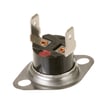
| Shuts off during cooking | Overheat condition, thermostat opens | Microwave thermostat WB27X11210 |
These habits reduce heat, arcing, and door-switch wear (the most common life-shorteners).
- Keep the cavity clean; wipe splatters before they carbonize
- Use the vent fan when cooking on the range to reduce heat buildup
- Do not run the microwave empty
- Avoid metal, foil, and twist ties; prevent arcing damage
- Close the door gently; do not lift on the handle to “pull” the unit
- Make sure the vent grille and airflow paths stay clear
Microwaves usually fail from heat stress (venting and grease buildup) or electrical wear (door interlocks, fuse, high-voltage parts). Keeping airflow and the door system in good shape is the most reliable way to hit the typical 10-year lifespan.
For model-specific care, cleaning, and operating guidance, follow the owner's manual.
Last updated: February 2026
What are common problems with GE PVM9005SJ2SS microwaves?
Common problems on the GE PVM9005SJ2SS microwave/hood combo include running but not heating, not powering on, door-related start issues, a dead or erratic keypad/control, the vent fan acting unexpectedly, and a turntable that will not rotate. Use the PVM9005SJ2SS owner's manual troubleshooting tips to narrow the symptom before replacing parts.
- Runs but does not heat: high-voltage components such as the magnetron, high-voltage diode, or high-voltage capacitor
- Completely dead (no display): blown fuse, thermal cutout/thermostat, or power supply issue
- Starts then stops, or will not start with door closed: door interlock switch or switch lever misalignment/wear
- Buttons do not respond or display acts up: control panel or main board
- Turntable not turning: turntable motor or a mechanical obstruction
- Vent fan turns on by itself: the unit can automatically run the fan when it senses heat from the cooktop below (normal behavior)
- Confirm the outlet has power and the breaker is not tripped.
- Open and close the door firmly; listen for a solid latch “click.”
- Test a short cook cycle with a cup of water; note whether it heats, just hums, or stops.
- If the unit is dead, inspect and test the internal fuse (unplug first).
- If the turntable is not moving, remove the tray and check for binding or debris.
| Symptom | Common part to check/replace | Example part for this model |
|---|---|---|
| Dead display, no operation | Microwave fuse | Microwave fuse WB27X11138 |
| Won’t start, door-related | Door interlock switch | Microwave door interlock switch WB24X10146 |
| Runs but no heat | High-voltage diode | High-voltage diode WB27X25616 |
| Runs but no heat | Magnetron | Magnetron WB27X11191 |
| Turntable not rotating | Turntable motor | Microwave turntable motor WB26X32190 |
Microwave/hood combos like the PVM9005SJ2SS use multiple safety interlocks and thermal protections. A “no start” or “dead” complaint is often a safety circuit doing its job, while a “runs but no heat” complaint typically points to the high-voltage heating circuit.
Last updated: February 2026


