Owner’s manual



What is the life expectancy of a GE dehumidifier?
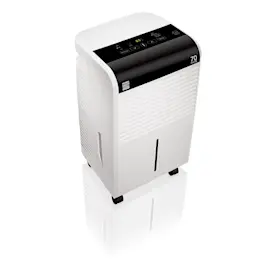
A GE dehumidifier like model ADEL30LWQ1 typically lasts 4 to 8 years when it runs often (especially in damp basements). Regular cleaning, good airflow clearance, and keeping the bucket and filter maintained help it reach the upper end of that range; see the ADEL30LWQ1 owner's manual.
Most residential compressor-style dehumidifiers fall into this range:
| Usage pattern | Typical life expectancy | What usually shortens life |
|---|---|---|
| Seasonal, moderate humidity | 6 to 8 years | Dust buildup, poor airflow |
| Frequent or near-continuous use | 4 to 6 years | Dirty filter, warm rooms, heavy load |
| Harsh conditions (very damp, dusty) | 4 to 5 years | Restricted airflow, neglected cleaning |
These steps reduce strain on the compressor and improve moisture removal:
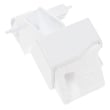
- Clean the air filter regularly; replace it if it is damaged or won’t clean up well (use the filter assembly WK85X21720).
- Keep the unit level and give it breathing room; most units need about 18 inches of clearance around airflow areas.
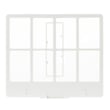
- Empty, rinse, and dry the bucket to prevent odors and sticky residue (replace a cracked bucket with the water bucket assembly WK10X24755).
- If the unit shuts off with a “bucket full” condition when the bucket is empty, check the bucket seating and the float movement (replace a stuck or damaged float with the float WK11X21724).
- When you first start using it for the season, run it continuously for 24 hours to pull down humidity and stabilize performance.
A dehumidifier that is near end-of-life often still runs, but it removes less moisture, cycles oddly, or shuts off due to bucket/float issues. Keeping airflow open and the filter clean helps the ADEL30LWQ1 dehumidify efficiently and reduces wear on the sealed system.
Last updated: February 2026
What is the downside of a dehumidifier?
A dehumidifier like the GE ADEL30LWQ1 can make a room feel too dry if the humidity setting is too low or it runs continuously; it also adds a little heat to the room during normal operation. Using the right setpoint and keeping airflow clear prevents most comfort issues.
- Over-drying the air: Very low humidity can contribute to dry skin, irritated sinuses, and static. Set a reasonable target (many homes feel best around 40% to 50% RH) and adjust as needed.
- Warmer room temperature: The manual notes it is normal for surrounding air to become slightly warmer while running.
- Noise and vibration: Fan and compressor sound is normal; placing the unit on a smooth, level floor helps.
- Maintenance needs: A dirty filter restricts airflow and reduces performance; follow the cleaning schedule in the owner's manual.
- Water handling hassles: You must empty the bucket or use a drain hose correctly; if the bucket is removed or not seated, the unit shuts off.
| Goal | Suggested approach | What you will notice |
|---|---|---|
| Comfortable everyday use | Target 40% to 50% RH | Steady moisture removal, fewer dry-air symptoms |
| Maximum drying | Lower the setpoint, or use continuous mode if needed | Faster drying, higher chance of over-dry air |
| Basement use | Keep doors/windows closed; allow 12 to 18 inches clearance | Better performance, less short-cycling |
If moisture removal seems weak or airflow feels low, start with the filter and bucket fit.
When humidity is driven too low, comfort drops and the unit may run longer than necessary. When airflow is restricted (often from a dirty filter or poor clearance), performance drops and you may think the dehumidifier is “not working,” even though it is.
Last updated: February 2026
How many hours a day should you run a dehumidifier?
For a GE ADEL30LWQ1 dehumidifier, we run it continuously for the first 24 hours when starting in a damp space, then run it as needed to hold your target humidity. Many homes land around 8 to 12 hours per day, but very damp areas can require longer run times.
The owner's manual specifically calls out an initial continuous run to pull down moisture quickly. After that, the right schedule depends on room conditions and your humidity setting.
- First-time or after a long shutdown: run 24 hours continuously
- Normal maintenance: run until you stay in a comfortable range (commonly 30% to 50% RH)
- Very damp basements or rainy seasons: expect longer daily run time
- Cool rooms: moisture removal drops in low temperatures; this model is designed for operation above 41°F (5°C)
- If it seems to run “too much”: the space may be too large, or outside air is leaking in
| Situation | Typical daily run time | What to do |
|---|---|---|
| First use in a damp room | 24 hours | Set a low humidity target and let it pull down moisture |
| Average living space | 8 to 12 hours | Adjust the humidity setpoint to maintain comfort |
| Basement or high humidity | 12 to 24 hours | Keep doors/windows closed; improve airflow |
| Room below 41°F | Limited dehumidifying | Warm the space or relocate the unit |
These items directly affect how long the compressor needs to run each day:
- Humidity setpoint: lower percent settings increase run time
- Airflow: keep the front and back clear (no curtains or furniture blocking)
- Filter condition: a dirty filter restricts airflow; replace the filter assembly WK85X21720 if it is damaged or won’t clean up well
- Water removal method: use the bucket or a drain hose, but not both at the same time
- Bucket/float operation: if the bucket is not seated correctly, the unit can shut off; if you have bucket-full issues, inspect the float WK11X21724
Running long enough to reach and maintain your target humidity prevents musty odors and condensation, and it also reduces unnecessary cycling that can make the dehumidifier seem noisy or ineffective.
Last updated: February 2026