



How do I know if my Kenmore dryer thermal fuse is blown?
If your Kenmore electric dryer model 1106108800 won’t start at all, or it runs but won’t heat, a blown thermal fuse is a top suspect. The sure way to know is a continuity test with a multimeter after disconnecting power.
- Dryer will not start (no motor run) even though the outlet has power
- Dryer tumbles but produces no heat (some designs allow motor operation with a failed heat circuit)
- Cycle stops unexpectedly after a short run time
- You recently had poor airflow (packed lint screen, crushed vent, long vent run)
- The problem appeared suddenly, not gradually
- Unplug the dryer (or switch off the breaker) and confirm the drum light is off.
- Access the fuse (commonly on the blower housing or heater housing, depending on design).
- Remove at least one wire from the fuse terminal.
- Set a multimeter to continuity or lowest ohms.
- Touch probes to the fuse terminals.
Results guide
| Meter result | What it means | What to do next |
|---|---|---|
| Beep or near 0 Ω | Fuse is good | Check door switch, start switch, timer/control, motor circuit, and airflow |
| No beep or OL/infinite | Fuse is blown | Replace the fuse and correct the airflow restriction |
A thermal fuse is a one-time safety device; it opens when the dryer overheats. If we replace the fuse without fixing the overheating cause, the new fuse can blow again quickly. The most common cause is restricted venting and lint buildup.
- Clean the lint screen and the housing it slides into
- Inspect the vent hose for kinks, crushing, or heavy lint
- Check the outside vent hood for a stuck flap or blockage
- Vacuum lint from the blower area and cabinet (with power disconnected)
- Reassemble tightly so air does not leak inside the cabinet
For a broader overview of what components affect heating and airflow, see what are the main parts of a clothes dryer.
Last updated: February 2026
How do I tell what model my Kenmore dryer is?
Your Kenmore dryer’s model number is printed on the appliance’s ID label; for Kenmore 1106108800, it’s typically inside the door opening on the cabinet frame. Once you have the full model number, we can match the correct parts and diagrams for your exact dryer.
Check these common spots on Kenmore electric dryers:
- Inside the dryer door opening on the front frame (most common)
- On the back panel of the dryer cabinet
- Along the door opening edge near the latch area
- On the inside of the front panel (visible when the door is open)
- Near the lint screen housing (some designs)
Write down the full model number exactly as shown, plus the serial number.
| What to capture | Example | Why it matters |
|---|---|---|
| Model number | 1106108800 | Ensures parts fit your exact Kenmore dryer |
| Serial number | (varies) | Helps confirm production run and compatible revisions |
| Type | Electric dryer | Confirms correct electrical and heating parts |
These quick checks prevent the most common mistakes:
- Copy every digit; do not drop leading zeros
- Use the model number from the dryer label, not a receipt or manual
- If the label is worn, take a clear photo and zoom in
- Match parts by model first, then confirm by part ID
- For common wear items, compare your old part to the listing photos before ordering
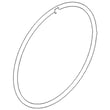
Kenmore model numbers (like the 110 prefix family) identify the exact design and parts layout. Using the full model number helps us pull the right diagrams and ensures items like a drive belt WP337019 or terminal block 279320 match your dryer.
Last updated: February 2026
Where is the moisture sensor in a Kenmore dryer?
On Kenmore model 1106108800, the moisture sensor is typically mounted inside the drum area on the lint screen housing (lint duct), with the sensor bars facing the clothes as the drum tumbles. You usually access it from the front by removing the lint screen and lint screen duct cover.
In most Kenmore electric dryers like 1106108800, the moisture sensor sits:
- Just inside the drum opening
- On or next to the lint filter chute (lint screen housing)
- Behind a small grille or cover held by screws
- With two wire leads connected to the sensor harness
If you see two metal strips (sensor bars) that clothes rub against during drying, you have found the moisture sensor.
Unplug the dryer first; then use this common access path:
- Remove the lint screen.
- Remove the screws securing the lint screen housing cover/duct.
- Look for the sensor bars and the small bracket holding them.
- Disconnect the two wires from the sensor terminals.
- Remove the mounting screws and lift the sensor out.
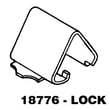
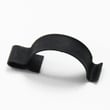
If you need to open the cabinet further, keep track of fasteners and panel clips such as the dryer top panel clip WP18776.
| What you see | What it usually means | What to do next |
|---|---|---|
| Two metal strips near lint chute | Moisture sensor bars | Check for waxy residue, clean them |
| Two white (or light) wires on a small bracket | Sensor wiring | Reseat connectors, inspect for damage |
| No sensor bars near lint chute | Different sensor style or location | Check front bulkhead area near blower housing |
If the moisture sensor is dirty or the wiring is loose, the dryer can shut off too soon, run too long, or dry unevenly. Cleaning the sensor bars with rubbing alcohol and a soft cloth often restores normal automatic cycle performance.
Last updated: February 2026
What are common problems with Kenmore dryers?
Common problems on Kenmore electric dryers like model 1106108800 include no heat, long dry times, the drum not turning, and unusual noises. Most issues trace back to restricted airflow (lint or venting) or normal wear on drive and support components.
- Dryer won’t heat: restricted venting, failed heater circuit component, or poor power supply (one leg of 240V missing)
- Long drying times: clogged lint screen, crushed/long vent run, blocked exterior hood
- Drum won’t turn: broken belt, seized drum support, or motor issue
- Squealing/thumping/grinding: worn drum support parts, belt wear, or blower area obstruction
- Won’t start: door not closing fully, power issue, or control/drive circuit problem
- Clean the lint screen and confirm strong airflow at the outside vent hood.
- Verify the dryer is getting full 240V (a dryer can run but not heat on 120V).
- Listen for the motor: hums but won’t turn often points to a jammed drum or failed drive system.
- Check the door seal for gaps that can reduce airflow efficiency.
If the drum won’t turn or you hear squealing, these model-matched parts are common fixes:
| Symptom | What you’ll notice | What usually fixes it |
|---|---|---|
| No heat | Runs but clothes stay cool | Restore airflow, verify 240V, then test heater circuit parts |
| Long dry time | Loads take 2+ cycles | Vent cleaning/shortening, lint removal |
| Drum not turning | Motor runs, drum still | Belt or drum support repair |
| Loud noise | Squeal, thump, scrape | Support components and belt inspection |
Airflow problems make any Kenmore dryer dry slower and run hotter internally, which increases wear on the belt, drum supports, and electrical heating components.
For display or diagnostic messages on Kenmore electronic-control dryers, use our Kenmore 110 series electronic control model dryer error codes reference.
Last updated: February 2026
What size is a Kenmore Model 1106108800 dryer?
Most Kenmore electric dryers like model 1106108800 are full-size, 27-inch platform machines. Plan on an exterior footprint of about 27 inches wide, 27 to 30 inches deep, and 38 to 43 inches tall; exact height varies with leveling legs and console style.
These planning numbers fit most Kenmore 110-series electric dryers:
- Width: ~27 inches
- Depth (cabinet): ~27 to 30 inches
- Height: ~38 to 43 inches
- Front clearance: allow extra space for door swing and loading
- Rear clearance: allow space for the vent elbow and power cord
Before you commit to a tight laundry space:
- Measure the opening at the narrowest point (trim and baseboards count).
- Confirm rear clearance so the vent is not crushed.
- Verify the floor is solid; dryers need to sit level to reduce vibration.
- Leave room for service access (belt, drum, and blower repairs).
| Measurement | Where to measure | What commonly adds space |
|---|---|---|
| Width | Side to side across cabinet | Side clearance for airflow |
| Depth | Front panel to back panel | Vent elbow and cord |
| Height | Floor to top of cabinet/console | Leveling legs adjustment |
| Front clearance | In front of door | Door swing and basket clearance |
Correct sizing prevents crushed venting (slow drying), pinched cords, and excess vibration. If the cabinet rocks or sits unevenly, replacing a worn leveling leg such as the foot WP233550 helps stabilize the dryer and keep the drum and belt system running smoothly.
Last updated: February 2026





