Owner’s manual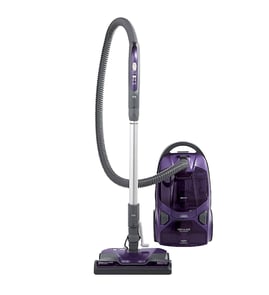

Are canister vacuums outdated?
Canister vacuums are not outdated; they are still a strong choice for many homes because they deliver steady suction, handle multiple floor types, and make it easier to clean above-floor areas with a hose and attachments. Your Kenmore model 11625614503 is designed for versatile, whole-home cleaning when maintained correctly.
Canister designs remain popular because the canister body rolls behind you while the wand and floor nozzle do the work.
- Strong airflow and suction for carpets and hard floors
- Easier above-floor cleaning (stairs, upholstery, corners) using the hose and wand
- Typically better reach under furniture than many upright designs
- Convenient storage options for wand and floor nozzle on many models
- Good performance when the bag and filters are kept clean
This model relies on clear airflow and routine care. When suction drops, the most common causes are a full bag, a clog, or restricted filters.
| Symptom | Most common cause | What we do first |
|---|---|---|
| Weak pickup | Bag full or airflow blocked | Check bag, then check for clogs |
| Vacuum shuts off | Thermal protector tripped from overheating | Unplug, clear clogs, let it cool |
| Works but seems “lazy” | Filter restriction | Inspect and replace clogged filters |
- Change the dust bag when the performance indicator shows it is time, or when pickup drops.
- Check the airflow path for clogs (hose, wand, nozzle) and clear blockages.
- Inspect and replace clogged filters as needed.
- If the motor shuts off, unplug and allow about 30 minutes for the thermal protector to reset after clearing restrictions.
- Move the canister by the handle grip (not by pulling the hose), especially on stairs.
Most “outdated vacuum” complaints are really maintenance or airflow issues. A canister vacuum that has an open airflow path, a fresh bag, and clean filters cleans as powerfully and efficiently as it was designed to.
For model-specific operating and care steps, use the 11625614503 owner’s manual.
Last updated: February 2026
Does a Kenmore canister vacuum have a fuse?
Yes. Kenmore canister vacuums like model 11625614503 commonly include a protective fuse or motor safety device in the power path to help prevent damage if the motor overheats or there is an electrical fault. For your exact fuse location and access steps, use the 11625614503 owner's manual.
Depending on the design, your vacuum may use one of these protections:
- Replaceable fuse in the electrical circuit (often near the cord reel or switch wiring)
- Thermal protector (resets after cooling; sometimes called a motor safety device)
- Circuit breaker style reset (less common on canisters)
Unplug the vacuum first.
- Try a different wall outlet (rule out a tripped breaker or bad receptacle)
- Inspect the power cord for cuts, kinks, or a loose plug
- Check that the on/off switch feels normal (not stuck or mushy)
- If it shut off during use, let it cool 30 to 60 minutes and try again (thermal protector behavior)
- Replace the bag and check for clogs in the hose and wand (restricted airflow can overheat the motor)
If the vacuum is completely dead (no motor sound, no lights), testing is the fastest way to confirm.
- Use a multimeter to check continuity through the fuse or thermal protector
- Check continuity from the plug blades through the cord to the switch area
- Look for a loose spade connector at the switch, cord reel, or motor leads
| Symptom | More likely cause | What to do first |
|---|---|---|
| Dead, no response | Fuse, cord, switch, thermal protector | Cool down; then continuity test |
| Runs briefly then stops | Overheat protection tripping | Clear clogs; replace bag/filter |
| Intermittent power when cord moves | Cord reel or cord connection | Inspect reel wiring; test cord |
A fuse or thermal protector is there to prevent motor damage and reduce overheating risk. If it is opening repeatedly, the root cause is usually airflow restriction, worn motor, or a wiring/cord issue, not the fuse itself.
Last updated: February 2026
Does the Kenmore vacuum 400 series bagged canister have a retractable cord?
The Kenmore canister vacuum model 11625614503 uses a power cord that plugs into a wall outlet; whether it rewinds automatically depends on the specific canister design and controls shown for your unit. We recommend confirming the cord storage and any rewind control in the 11625614503 owner's manual.
- Look for a rewind button or foot pedal on the canister (often labeled “rewind” or shown with a cord icon).
- Gently pull the cord out; a retractable cord typically feeds from a single exit port.
- Check for a cord reel cavity inside the canister near the cord exit.
- Review the parts and features section for “cord rewind” or “cord reel.”
- If there is no rewind control, the cord is typically manual wrap (hooks or a storage clip).
- Unplug by gripping the plug, not the cord.
- Keep the cord away from the Power-Mate/brush roll and wheels.
- Do not run the vacuum over the cord.
- If your model has rewind, guide the plug end as it retracts.
| Cord type | What you’ll see on the vacuum | Best practice |
|---|---|---|
| Retractable (cord reel) | Rewind button/pedal; cord feeds into canister | Guide plug while rewinding; avoid snap-back |
| Manual wrap | Upper/lower cord hooks or clip | Wrap loosely; avoid tight bends at the plug |
Knowing the cord storage style helps you store the vacuum correctly and prevents cord damage that can lead to intermittent power or a tripping hazard.
Last updated: February 2026
How long do Kenmore canister vacuums last?
A Kenmore canister vacuum like model 11625614503 typically lasts 8 to 12 years with normal home use and basic maintenance. Lifespan is driven less by the motor itself and more by routine care items (bags, filters, belts) and keeping airflow unrestricted.
Most canister vacuums fall into a predictable range based on how often they run and how well they are maintained.
| Usage pattern | Typical lifespan | What usually ends it |
|---|---|---|
| Light (1 to 2 times/week) | 10 to 12 years | Worn hose, cord reel, switches |
| Average (2 to 4 times/week) | 8 to 10 years | Motor wear from restricted airflow |
| Heavy (daily, large home/pets) | 5 to 8 years | Repeated clogs, overheated motor, worn power nozzle parts |
We recommend focusing on airflow and wear items first because they directly affect suction and motor temperature.
- Change the vacuum bag before it is packed full (a stuffed bag reduces airflow)
- Replace or clean filters on schedule (exhaust and any motor safety filter)
- Clear clogs in the hose, wand, and floor nozzle as soon as suction drops
- Inspect the power nozzle belt and brush roll area for hair and string buildup
- Keep electrical connections snug; stop using the vacuum if the cord or plug is damaged
For model-specific care intervals and steps, follow the 11625614503 owner's manual.
These symptoms usually mean the vacuum is being restricted, overheating, or has worn electrical or nozzle components.
- Burning smell or repeated shutoffs (often airflow restriction)
- Suction stays weak even after a new bag and clean filters
- Power nozzle stops spinning or is unusually noisy
- Cord reel will not retract reliably
- Intermittent power when you move the hose or handle
A canister vacuum that runs with clogged filters or a full bag can overheat and shorten motor life. Staying ahead of bags, filters, and clogs is the simplest way to keep your Kenmore vacuum performing like it should for years.
Last updated: February 2026
How to replace a canister vacuum bag?
To replace the dust bag on your Kenmore canister vacuum model 11625614503, unplug the vacuum, open the canister hood, release the cardboard tab from the red bag mount, remove the old bag, then seat a new bag fully and latch the hood closed. See the step-by-step in the 11625614503 owner's manual.
- Unplug the power cord from the wall outlet.
- Remove the hose from the canister.
- Pull the hood release up, then lift the canister hood.
- Disengage the cardboard tab from the red bag mount by pulling away and lifting up.
- Pull the bag out of the red bag mount.
- Check the motor safety filter; replace it if it is dirty or clogged.
- Install the new bag:
- Rotate the red bag mount down.
- Slide the bag’s cardboard into the mount slots and push down until it locks.
- Tuck the bag into the bag cavity so none of it can be pinched by the hood.
- Close and latch the canister hood.
- Reinstall the hose, then plug the vacuum back in.
- Never reuse a dust bag. Fine dust can clog the bag and cause it to burst.
- Change the bag more often when vacuuming fine powders (carpet freshener, drywall dust, soot, new carpet lint).
- If your model has a performance indicator light, treat it as a “change bag or check airflow” alert.
The red bag mount is designed to flip forward after you remove the bag; this helps prevent closing the hood until a new bag is installed.
| What you see | Most likely cause | What to do |
|---|---|---|
| Hood will not latch | Bag mount not rotated down | Rotate mount down, then re-seat the cardboard tab until it locks |
| Hood pinches the bag | Bag not tucked into cavity | Reposition bag so it sits fully inside the bag chamber |
| Weak suction after bag change | Clog or dirty filter | Check airflow path for clogs; replace clogged filters |
Running the vacuum without the dust bag and filters in place reduces airflow and can cause the bag to burst or lead to permanent vacuum damage. A properly installed bag also helps maintain steady suction and protects the motor.
Last updated: February 2026
What is the very best canister vacuum?
The “best” canister vacuum depends on your floors, allergies, and how you clean; for most homes, the top choice is the one that keeps airflow strong, seals well for filtration, and is easy to maintain. For your Kenmore canister vacuum model 11625614503, performance stays best when you keep the bag and filters clean and the airflow path clear (per the 11625614503 owner's manual).
- Bagged vs. bagless: Bagged models typically control dust better; bagless can be cheaper to run but needs more frequent filter cleaning.
- Filtration: Look for a sealed system and HEPA filtration if allergies or fine dust are a concern.
- Floor type: A power nozzle helps on carpet; straight suction is often enough for hard floors and area rugs.
- Maintenance access: Easy bag changes, filter access, and clog clearing keep suction consistent.
- Handling: Weight, hose reach, wand adjustability, and stair stability matter as much as suction.
| If your priority is... | Look for... | Why it helps |
|---|---|---|
| Allergy control | Bagged + HEPA + sealed body | Less dust escapes during use and emptying |
| Pet hair on carpet | Power nozzle + strong agitation | Lifts hair from carpet fibers |
| Hard floors | Smooth hard-floor tool + suction control | Prevents scatter and improves pickup |
| Low ongoing cost | Durable filters + common consumables | Keeps maintenance predictable |
Your Kenmore 11625614503 can clean at its best when airflow is protected.
- Change the dust bag before it overfills; restricted airflow can reduce suction and can damage the vacuum.
- Check for clogs in the hose, wand, and nozzle when suction drops.
- Replace or clean filters on schedule; clogged filters mimic a blockage.
- If the motor shuts off, let it cool about 30 minutes, clear clogs, then restart (thermal protector behavior).
- Use safe handling on stairs; move the canister by its handle, not by pulling the hose.
Canister vacuums clean by moving air; when bags, filters, or passages clog, suction drops and the motor runs hotter. Keeping airflow open is the simplest way to make any “best” vacuum stay the best over time.
Last updated: February 2026
What vacuum bags fit a Kenmore canister vacuum?
For Kenmore canister vacuum model 11625614503, the correct bag is the Kenmore canister bag type specified on the vacuum’s packing list/repair parts list. We recommend matching the bag type/style (not just “Kenmore canister”) to ensure the bag collar seals correctly and airflow stays strong. See the 11625614503 owner's manual for the exact bag style callout.
Use these quick checks so you get a bag that fits the bag holder and seals at the intake.
- Check the packing list/repair parts list referenced in the manual for the bag style/type
- Look at the bag collar shape (cardboard/plastic mount) and compare to your current bag
- Confirm the vacuum uses a bagged canister setup (not bagless)
- Replace the bag if it is overfull, torn, or has a musty odor (all reduce suction)
- Install the bag fully seated; a mis-seated collar can cause dust leaks and weak pickup
Many Kenmore canisters use lettered bag styles (for example C, Q, or similar), but the exact match depends on the bag mount used in your specific canister.
| What you match | Why it matters | What can go wrong if mismatched |
|---|---|---|
| Bag type/style | Ensures the collar seals to the bag holder | Air leaks, dust bypass, poor suction |
| Collar shape/size | Prevents the bag from slipping or collapsing | Bag won’t latch, bag tears |
| Filtration level (standard vs HEPA) | Controls fine dust and allergens | More dust exhaust, faster filter loading |
Using the correct bag style helps your Kenmore 11625614503 maintain airflow, protects the motor from debris, and keeps the exhaust filter from clogging prematurely.
Last updated: February 2026
Where to find model number on Kenmore canister vacuum?
On your Kenmore canister vacuum model 11625614503, the model and serial numbers are printed on the model and serial number plate on the vacuum. We recommend writing both numbers down for parts lookup and service; see the 11625614503 owner's manual for the exact plate location and recording fields.
Look for a small label or plate on the main canister body (not the wand). Check these spots:
- Bottom of the canister (near the wheels)
- Back of the canister near the cord rewind area
- Under the bag door or dust compartment cover
- Near the hose connection port on the canister
- On the rear housing close to the exhaust filter cover
The plate usually includes both a model number and a serial number. For Sears PartsDirect parts searches, the model number is the key.
| What you see on the plate | What it’s used for | Example for this vacuum |
|---|---|---|
| Model number | Parts diagrams, compatible parts | 11625614503 |
| Serial number | Manufacturing/run info, service records | Varies |
Kenmore canister vacuums often have similar-looking canisters, hoses, and Power-Mate style nozzles. Using the exact model number (11625614503) helps match the correct bag type, filters, hose, wand, and nozzle components.
Last updated: February 2026