Installation guide
 Owner’s manual
 Error Codes






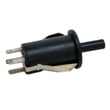
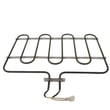
What are the parts of an electric oven?
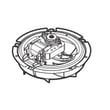
An electric wall oven like Kenmore Elite model 79048453410 is built around a heating system (bake and broil), temperature sensing and controls, airflow and venting, and door and rack hardware. These parts work together to heat evenly, regulate temperature, and vent moisture safely (see the owner's manual).
Main parts you will find in most electric ovens
- Bake element: the primary heat source for baking, located at the bottom of the oven cavity.
- Broil element: high-heat element at the top for broiling and browning.
- Oven temperature sensor: tells the control how hot the oven is so it can cycle the elements.
- Electronic oven control and relay/control board: manages temperature, timing, and element cycling.
- Oven vent: releases warm air and moisture; on this model it is under the control panel.
- Convection system (on convection models): a fan motor and fan blade circulate hot air for more even cooking.
- Door system: hinges, glass panels, and switches that support safe operation.
Model-specific examples of parts on 79048453410
These are common service parts we see for this Kenmore Elite wall oven:
| System | Example part | What it does |
|---|---|---|
| Temperature sensing | Range oven temperature sensor 5304504897 | Helps the oven maintain the set temperature |
| Heating | Wall oven bake element, 2,200-watts 5304501015 | Provides bake heat in the oven cavity |
| Convection airflow | Oven motor 139008504 and blade 318398302 | Circulates hot air for more even baking |
| Safety/cooling | Range thermal cut-off 5304494446 | Helps protect components if temperatures get too high |
Why the vent and racks matter
Proper airflow is part of “how the oven works,” not just comfort. The manual notes the vent is under the control panel and should not be blocked; blocking it can hurt baking performance and increase heat around the controls.
Quick care and use tips (prevents common problems)
- Keep the oven vent area clear of foil, towels, and oversized pans.
- Arrange oven racks only when the oven is cool.
- Do not line the oven bottom or racks with aluminum foil; it can damage the interior and affect heat distribution.
- If baking seems off by 25 to 50 degrees, the temperature sensor is a common check point.
- If convection is noisy or uneven, inspect the fan blade and fan motor.
Last updated: February 2026
What does PF mean on Kenmore Elite oven?
On the Kenmore Elite wall oven model 79048453410, PF means power failure. It shows up when the oven’s electrical supply is interrupted (even briefly). After power is stable, you can usually clear PF and reset the clock using the steps in the 79048453410 owner's manual.
How to clear the PF message
- Press Cancel/Stop (or Clear/Off) to stop any active cooking cycle.
- If PF remains, press Cancel/Stop again.
- Set the clock; many Kenmore Elite ovens keep PF displayed until time is reset.
- Try a quick control reset: turn the oven off, wait 60 seconds, then try again.
- If PF returns during normal use, check for a loose power connection or a household power dip.
What to check if PF keeps coming back
PF repeating usually points to an intermittent power issue, not a bad bake setting.
- Check the home circuit breaker for a weak trip or loose connection.
- Make sure the oven’s power cord or junction box wiring is secure (power off first).
- Look for signs of overheating at the connection point; a damaged connection can cause voltage drop.
- If the display goes blank or resets randomly, inspect the oven’s power input connections.
Helpful part to consider
If you find heat damage or looseness where the house wiring connects to the oven, the terminal block is a common repair item: terminal block 5304409888.
Quick guide: PF vs. other symptoms
| What you see | Most likely cause | What to do first |
|---|---|---|
| PF after a storm or outage | Utility power interruption | Clear PF, reset clock |
| PF during baking | Loose connection or breaker issue | Check breaker and wiring |
| Display resets, fan stops briefly | Intermittent power drop | Inspect terminal block and supply wiring |
Why it matters
A one-time PF is normal after an outage. Repeated PF can interrupt cooking, cause temperature swings, and overheat electrical connections, so it is worth addressing early.
Last updated: February 2026
Where can I find my Kenmore Elite oven model number?
On Kenmore Elite wall ovens like model 79048453410, the model and serial number are printed on an identification plate (often called the serial plate). You will typically find it on the oven frame area you can see when the door is open; the exact location is shown in the owner's manual.
Common places to check on a wall oven
Look in these spots first (with the oven door open and the oven cool):
- Along the oven frame (front trim) near the door opening
- On the left or right side of the door jamb area
- Near the lower front frame area (around the bottom of the oven cavity opening)
- Behind the control panel area (less common; usually not needed)
- On a side panel label if the unit is partially pulled from the cabinet (use caution)
Quick, safe way to find it
- Turn the oven off and let it cool completely
- Open the door and use a flashlight
- Check the vertical frame on both sides of the opening
- Write down the model number and serial number exactly as shown
- Keep the information with your purchase records for parts lookup and service history
What the label looks like (typical)
| Item on the plate | What it’s used for | Example format |
|---|---|---|
| Model number | Ordering correct parts and matching diagrams | 790.4845* / 79048453410 |
| Serial number | Identifying production run and revisions | Letters and numbers |
| Date of purchase (your record) | Warranty and maintenance tracking | Month/day/year |
Why it matters
The model number is the fastest way to match the correct Kenmore parts list, wiring layout, and component options for your exact oven configuration. Even small model-number differences can change parts like the oven temperature sensor, control board, or door hardware.
Last updated: February 2026
Why is my Kenmore Elite oven not working?
If your Kenmore Elite wall oven model 79048453410 is not working, the most common causes are a tripped 240V breaker, a loose power connection, or a failed component such as the temperature sensor, thermal cut-off, or relay control board. Start with power, then test likely parts.
Power and reset checks (do these first)
- Reset the oven by switching the breaker OFF for 1 minute, then ON.
- If the clock resets, set the time and try Bake again; after a power interruption the oven may need the clock and function reset.
- If the display is blank, check for a partially tripped double breaker (one side can trip).
- If you notice a burning smell or heat damage at the junction box, keep power off and have the wiring inspected.
Quick symptom guide for model 79048453410
| What you see | What to check next | Parts that often relate |
|---|---|---|
| No display, no response | Breaker, junction box connections | Terminal block 5304409888 |
| Display works, no heat | Sensor, thermal protection, control relays | Range oven temperature sensor 5304504897, range thermal cut-off 5304494446, wall oven relay control board 316475806 |
| Convection fan not running | Fan motor, fan blade, wiring | Oven motor 139008504, blade 318398302 |
Basic part checks (power OFF)
- Inspect wiring for loose spade terminals, discoloration, or melted insulation.
- Test the thermal cut-off for continuity; an open cut-off can stop heating or shut the oven down.
- If temperatures are erratic or the oven will not reach set temp, test the oven temperature sensor.
Why it matters
“Oven not working” can mean no power, no heat, or poor temperature control. Following a symptom-based checklist helps you avoid replacing the wrong part and gets the oven back to safe, accurate baking.
For model-specific operating and troubleshooting steps, use the 79048453410 owner's manual.
Last updated: February 2026