Installation guide
 Owner’s manual
 Error Codes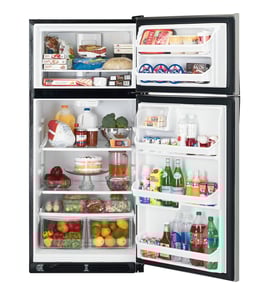
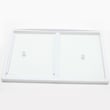


Do all Frigidaire refrigerators use the same water filter?
No. Frigidaire refrigerators do not all use the same water filter because filter style and fit are model-specific. For the Frigidaire LFTR1832TF0 top-mount refrigerator, the correct filter (if your unit is a filter-equipped version) is the one listed for your exact model in the LFTR1832TF0 owner's manual and parts listing.
How to identify the right filter for your Frigidaire model
Use these checks to match the correct replacement filter to the refrigerator’s design:
- Confirm your full model number is LFTR1832TF0 (from the rating label inside the fresh food section).
- Check whether your refrigerator has a built-in filter location (some configurations use no internal filter).
- Match the filter’s installation type (push-in vs. twist-in) to the housing.
- If you have an ice maker connected, verify your water supply setup meets the manual’s guidance.
- Replace only with the filter specified for the model to avoid leaks and poor water flow.
What the manual says that affects filter choice
Even when the filter part varies by model, the water system requirements are consistent. The LFTR1832TF0 manual calls out key installation requirements such as:
- Use 1/4-inch OD copper or stainless steel water line (not plastic).
- Supply water pressure should be 30 to 100 psi.
- Do not route water tubing where it can freeze.
These details matter because the wrong filter or incorrect water line setup can cause slow fill, weak flow, or leaks.
Quick comparison: common Frigidaire filter families
| Filter family (example) | Typical fit style | Used on |
|---|---|---|
| PurePour (PWF-1/FPPWFU01) | Push-in | Many newer Frigidaire designs |
| PureSource Ultra (ULTRAWF) | Twist-in | Many side-by-side and French door models |
| PureSource 3 (WF3CB) | Push-in | Many older Frigidaire designs |
Why it matters
Using the model-correct water filter helps protect water taste, supports proper ice maker operation, and prevents fit issues that can lead to leaks or restricted water flow.
Last updated: February 2026
Is Frigidaire Gallery high end?
Frigidaire Gallery is not a luxury, high-end line; it is a strong mid-range lineup with upgraded finishes and features compared to basic Frigidaire models. For your Frigidaire top-mount refrigerator model LFTR1832TF0, “Gallery” is a separate product family, not a requirement for reliable everyday cooling.
Where Frigidaire Gallery fits in the lineup
In most Frigidaire refrigerator lineups, Gallery sits above entry-level models and below premium-style lines. You typically get more convenience features and styling, but not the same “built-like-a-commercial-unit” positioning as luxury brands.
Common Gallery upgrades (varies by model):
- More electronic controls and temperature management features
- More finish options (often fingerprint-resistant stainless)
- More storage and organization features (bins, drawers, shelving)
- More model choices (including larger capacities and configurations)
- More feature bundles (ice maker options, lighting, etc.)
What “high end” usually means for refrigerators
“High end” usually refers to premium build, specialty configurations, and higher price tiers.
| Tier | Typical focus | What you usually see |
|---|---|---|
| Entry-level | Value and simplicity | Basic controls, fewer features |
| Mid-range (Gallery) | Features and styling | More options, upgraded organization |
| High-end / luxury | Premium design and performance | Specialty layouts, premium materials, higher cost |
Why it matters when shopping parts and planning repairs
Knowing the tier helps set expectations for features and serviceability. Even if Gallery is not “luxury,” parts support and routine repairs are still very normal for Frigidaire refrigerators.
For model-specific use, care, and feature details, use the LFTR1832TF0 owner’s manual.
Last updated: February 2026
What is the most common problem with a Frigidaire refrigerator?
The most common problem we see with Frigidaire refrigerators like model LFTR1832TF0 is a cooling complaint: the refrigerator section runs warm, temperatures swing, or frost builds up and restricts airflow. These symptoms usually trace back to airflow, dirty condenser areas, or a defrost-system issue.
Most common causes behind “not cooling right”
- Airflow blocked by overpacked shelves or items covering vents
- Condenser area dirty (dust and pet hair reduce heat removal)
- Evaporator fan issue (weak or noisy fan reduces cold-air circulation)
- Defrost problem (ice buildup on the evaporator coils restricts airflow)
- Control settings set too warm or changed recently (allow time to stabilize)
Quick checks we recommend first (no tools)
Use the troubleshooting steps in the LFTR1832TF0 owner’s manual and start with these basics:
- Confirm the control is not set to “0” (off)
- Adjust the refrigerator or auxiliary freezer control one step, then wait 24 hours for temperatures to stabilize
- Make sure doors close fully and gaskets seal all the way around
- Listen for normal fan and compressor operation (some sound is normal)
- Check for frost or heavy ice on the freezer back wall (often points to defrost or airflow)
Common symptoms and what they usually mean
| Symptom | Most likely direction | What to do next |
|---|---|---|
| Freezer cold, fridge warm | Airflow or evaporator fan | Check vents, listen for fan, inspect for frost buildup |
| Frost/ice buildup in freezer | Defrost system | Inspect for ice on coils; defrost components may be involved |
| Temps too cold or too warm | Control setting or sensor/control issue | Adjust settings; wait 24 hours; recheck |
| No run at all | Power, control set to “0”, or defrost cycle | Check outlet/breaker; wait 20 minutes and recheck |
Parts that commonly relate to these problems (when diagnosis points there)
If troubleshooting indicates a defrost failure, these model-matched parts are commonly involved:
Why it matters
Cooling problems are often airflow-related at first; if frost buildup continues, the refrigerator can run longer, waste energy, and still keep the fresh-food section too warm. Catching a dirty condenser area, blocked vent, or early defrost issue helps prevent food spoilage and bigger repairs.
Last updated: February 2026
How do I clear the error code on my Frigidaire refrigerator?
On your Frigidaire LFTR1832TF0 top-mount refrigerator, you clear an error code by resetting power to reboot the control; if the code returns after the reset, it is reporting an active problem that must be corrected (the code will not stay cleared until the condition is fixed).
Clear the code: the reset that applies to this model
Use a full power reset (not just turning the temperature control to “0”):
- Unplug the refrigerator by gripping the plug (do not pull the cord).
- Wait 5 to 10 minutes.
- Plug it back in firmly.
- Allow 10 to 15 minutes for the control to stabilize.
- Confirm the refrigerator is cooling again and the display is normal.
For control locations, indicator meanings, and any model-specific alerts, follow the LFTR1832TF0 owner’s manual.
When a reset will not “clear” the code
A reset only clears the display when the fault is no longer present. If the code comes back, focus on the system the refrigerator is monitoring:
- Door left ajar or poor door seal letting warm air in
- Airflow restriction from heavy frost or blocked vents
- Evaporator fan not running or noisy
- Defrost system problem causing frost buildup
- Power supply issue (loose plug, tripped breaker, weak outlet)
Quick guide: clear vs. fix
| After reset | What it means | Next step |
|---|---|---|
| Code stays off | Condition is no longer detected | Monitor temps for 24 hours |
| Code returns | Active fault still detected | Troubleshoot the related system |
| Cooling is weak and frost builds up | Defrost or airflow issue | Check fan operation and frost pattern |
If you see classic defrost symptoms (frost on the freezer back wall, reduced airflow), common related parts include the refrigerator defrost heater 242044008 and the refrigerator defrost bi-metal thermostat 5303918634.
Why it matters
Error codes are designed to protect food temperatures and prevent repeat failures. Clearing the display without correcting the cause lets the refrigerator keep detecting the same problem, so the code returns.
Last updated: February 2026