Owner’s manual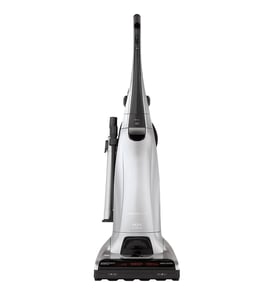


How long is the cord on the 11635922502?
The Kenmore 11635922502 upright vacuum uses a wrap-style power cord that stores on the upper quick-release cord hook and carrying handle, but the owner’s manual does not list an exact cord length. Most Kenmore uprights in this design class use a cord in the 20 to 30 foot range; measure yours end-to-end for the exact length.
- Unplug the vacuum and fully unwind the cord from the upper cord hook and handle.
- Lay the cord straight on the floor without tight bends.
- Measure from the plug blades to where the cord enters the vacuum body (strain relief).
- If you only have a short tape, measure in sections (for example, 5 feet at a time) and add them.
- Rewrap the cord and make sure it sits in the locking notch so it stays clear of the agitator area.
The manual’s cord assembly and operating steps are the best guide for safe use and storage on the 11635922502.
| Task | What to do | Why it helps |
|---|---|---|
| Release cord | Rotate the quick-release upper cord hook down/sideways | Prevents yanking the cord and loosening connections |
| Keep cord routed | Seat cord in the locking notch | Helps keep cord from getting under the agitator |
| Store cord | Turn hook up, then wrap cord neatly | Reduces kinks and internal wire fatigue |
Cord length affects reach, voltage drop, and trip hazards. A cord that is too short for your space often leads to using extension cords, which can reduce performance and increase overheating risk.
For cord routing, storage, and safety details, follow the owner's manual.
Last updated: February 2026
Why did my Kenmore vacuum stop working?
If your Kenmore upright vacuum model 11635922502 stopped working, the most common causes are a tripped breaker or thermal protector, a blockage that restricts airflow, or a problem in the handle or power path. We focus first on power, then airflow, then the brush (agitator) system. See the 11635922502 owner's manual for the exact troubleshooting table and safety steps.
- Confirm the vacuum is fully plugged in and the outlet works.
- Check the home circuit breaker or fuse; reset or replace if tripped/blown.
- Let the vacuum cool down 30 to 60 minutes; the thermal protector can trip if the motor overheats.
- Check the bag and filters; a full bag or dirty filters can restrict airflow and trigger protection.
- Inspect for clogs in the nozzle, hose, and bag holder areas.
- Make sure the handle hardware is tight; the manual lists a loose handle screw as a possible “won’t run” cause.
Your model uses a performance indicator light that turns on when airflow becomes blocked. If that light is on, clear restrictions first.
| What you notice | Most likely cause | What to do next |
|---|---|---|
| Vacuum won’t run | Thermal protector tripped, breaker/fuse issue | Cool down, then recheck power |
| Runs but picks up poorly | Full bag, dirty filters, clog, hole in hose | Empty/replace bag, clean/replace filters, clear clogs |
| Sound changes with tools | Reduced airflow through attachment | Check for partial blockage; try a different tool |
If the vacuum runs but cleaning on carpet is poor, the agitator may not be turning or may be overloaded.
- Turn off and unplug before checking the nozzle area.
- Remove hair and debris from the agitator per the manual’s cleaning instructions.
- If the agitator stops on thick carpet or rugs, switch to the gentler setting; this model has a two-speed direct drive agitator.
Restricted airflow (full bag, dirty filters, clogs) makes the motor run hotter and can trip the thermal protector, which looks like the vacuum “just died.” Restoring airflow often fixes both “won’t run” and “no suction” complaints.
For step-by-step clog and brush-roll troubleshooting, use our vacuum repair-guides landing page.
Last updated: February 2026
Does a Kenmore canister vacuum have a fuse?
Yes, Kenmore vacuums can be protected by a household fuse or breaker, and many models also use built-in protection such as a thermal protector or overload device instead of a user-replaceable fuse. For your Kenmore model 11635922502, the troubleshooting guidance focuses on resetting a tripped thermal protector and checking power, which is the most common “fuse-like” protection you will run into. See the 11635922502 owner's manual for the exact reset steps and locations.
In most homes, the first fuse involved is not inside the vacuum.
- Household protection: a blown fuse or tripped circuit breaker at your electrical panel
- Thermal protector: shuts the motor off if it overheats; resets after cooling
- Overload protection: can trip if the brush/agitator jams
- No user-serviceable fuse: many vacuums do not have a replaceable inline fuse you can swap
- Confirm outlet power (try a lamp or small appliance).
- Check the cord and plug for damage and make sure it is fully seated.
- If the vacuum shut off while running, let it cool 40 to 50 minutes, then try again (thermal protector behavior).
- Clear airflow restrictions: replace the dust bag if full and clean/replace filters.
- Check for clogs in the nozzle and hose; blocked airflow commonly triggers protection.
| What you notice | Most likely cause | What to do next |
|---|---|---|
| Vacuum will not start at all | No power at outlet, tripped breaker, or thermal protector | Verify outlet; cool-down reset; inspect for clogs |
| Vacuum shuts off during use | Overheating from restriction or full bag | Bag, filters, clog removal; cool-down reset |
| Brush/agitator stops | Agitator overload tripped or jam | Remove debris; reset overload; inspect belt/brush |
Replacing a “fuse” is rarely the real fix. When a vacuum loses power, the root cause is usually overheating from restricted airflow, a jammed brush roll, or a household power issue. Fixing the restriction prevents repeat shutoffs and protects the motor.
Last updated: February 2026
How do you reset the belt on a Kenmore vacuum?
On the Kenmore 11635922502 upright vacuum, “resetting” the belt means reseating the drive belt on the motor shaft and the brush roll after it slips or after you clear a jam. Unplug the vacuum, reinstall the belt so it tracks straight, then confirm the brush roll turns freely.
- Unplug the vacuum before opening the nozzle.
- Lock the handle upright before flipping the vacuum over.
- Clear hair and string from the brush roll ends.
- Replace a full dust bag and clean filters to prevent overheating.
- Follow the cover removal steps in the owner's manual.
- Remove the bottom plate or nozzle cover to access the brush roll.
- Lift out the brush roll and clean debris from the belt path.
- Loop the belt onto the motor shaft first.
- Stretch the belt over the brush roll and seat it in the belt groove.
- Reinstall the brush roll; make sure end caps are fully seated.
- Spin the brush roll by hand; it should rotate smoothly with belt tension.
- Reinstall the cover, stand the vacuum up, plug in, and test on carpet.
- Reset the agitator/brush roll overload (if equipped).
- Clear clogs; blocked airflow can trigger the performance indicator and reduce power.
- Replace the belt if it is stretched, glazed, cracked, or keeps slipping.
| Symptom | Likely cause | Fix |
|---|---|---|
| Burning rubber smell | Belt slipping on a jam | Remove jam, reseat belt, replace belt if damaged |
| Stops on thick carpet | Brush roll drag or overload | Clean brush roll, verify free spin, reset overload |
| Shuts off during use | Thermal protector from restriction | Clear clogs, change bag, clean filters, cool 40 to 50 minutes |
A correctly seated belt transfers motor power to the brush roll for carpet agitation. If the belt is off-track or the brush roll is jammed, cleaning performance drops and the vacuum can overheat.
Last updated: February 2026