Installation guide
 Owner’s manual
 Error Codes










How do I tell what model my Kenmore dryer is?
Your Kenmore dryer’s model number is printed on the appliance ID label; on model 11071632610, it’s typically found around the door opening (door jamb) or on the back panel. Once you have the full model number, we can match the correct parts, cycles, and specifications.
Check these common locations first:
- Inside the dryer door opening on the frame (door jamb)
- On the back panel of the dryer cabinet
- Near the lint screen housing area (depending on the exact configuration)
- On the side panel edge near the door opening
If you see a model format like 110.7163*610, the asterisk is a color code; the core model family still maps to 11071632610 for parts lookup.
Record the information exactly as shown on the label:
- Model number (example: 11071632610)
- Serial number (helps confirm production run)
- Fuel type listed (electric or gas)
- Any suffixes or color codes (letters or extra digits)
| Item | What it does | Why we need it |
|---|---|---|
| Model number | Identifies the design and parts list | Ensures diagrams and parts fit |
| Serial number | Identifies the specific unit build | Helps confirm correct revisions |
Kenmore uses different internal designs across series, even when dryers look similar. Using the exact model number prevents ordering the wrong belt, thermal fuse, or control parts and keeps troubleshooting steps aligned with your dryer’s control panel and features.
Use the model number to cross-check operating features and cycle behavior in the 11071632610 owner’s manual.
Last updated: February 2026
How to replace a Kenmore dryer thermistor?
On Kenmore dryer model 11071632610, the thermistor is a temperature sensor typically mounted on the blower housing or exhaust duct. We replace it by disconnecting power, accessing the sensor from the rear or lower panel, moving the wires to the new part one at a time, then reassembling and test-drying.
- Unplug the dryer (or switch off the breaker); for gas models, shut off the gas supply.
- Let the dryer cool completely.
- Have a 1/4-inch nut driver or screwdriver, needle-nose pliers, and a vacuum ready.
- Take a quick photo of the wire routing before you disconnect anything.
- Clean lint from the lint screen and housing while you are in there; airflow problems can mimic a bad sensor.
- Disconnect power.
- Remove the rear panel (common access point) or the lower front access panel, depending on your configuration.
- Locate the thermistor on the blower housing or exhaust duct; it is a small sensor with a 2-wire connector.
- Pull off the wire connector (grip the connector, not the wires).
- Remove the mounting screw(s) and lift off the thermistor.
- Install the new thermistor and tighten the screw(s) snugly.
- Reconnect the wire connector.
- Reinstall panels, restore power (and gas if applicable), then run a timed dry test.
For model-specific panel removal and component locations, follow the 11071632610 owner's manual.
| Symptom | More likely cause | What to check first |
|---|---|---|
| Long dry times, clothes still damp | Restricted venting | Lint screen, vent hose, outside hood |
| Dryer runs but heat is erratic | Thermistor or cycling control issue | Inspect sensor mounting and wiring |
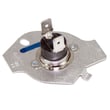
| Dryer runs but no heat at all | Safety device opened | Check thermal fuse W10909685 and venting |
The thermistor helps the control regulate drum temperature. If it reads wrong, the dryer can underheat, overheat, or end cycles poorly. Fixing airflow at the same time helps protect the new sensor and improves drying performance.
Last updated: February 2026
How to open Kenmore dryer control panel?
To open the control panel on Kenmore dryer model 11071632610, we typically remove the top first, then remove the screws that secure the control console so it can hinge forward or lift off for access to the user interface and electronic control.
- Unplug the dryer (or switch off the breaker); we do this before removing any panels.
- If you have a gas version, shut off the gas supply valve.
- Pull the dryer forward enough to work comfortably behind the console.
- Have a container ready for screws; console screws are easy to lose.
- Review the console and top removal steps in the 11071632610 owner's manual.
- Remove the top panel
- From the back of the dryer, remove the screws securing the top.
- Lift the back edge of the top, slide it back about 1 inch, then lift it off.
- Access the console mounting screws
- With the top off, locate the screws holding the control console/bracket.
- Remove the screws (often 1/4-inch hex-head).
- Release the console
- Tilt the console forward or lift it up (depending on how the tabs are set).
- Support the console so it does not hang by the wiring.
- Disconnect wiring only if needed
- If you need the console fully off, label connectors and unplug them from the control or user interface.
| Area | What it does | Common reason to access |
|---|---|---|
| User interface (console) | Buttons/knob inputs | Dead buttons, intermittent response |
| Electronic control | Runs cycles and heat logic | No-start, shuts off early, odd behavior |
| Harness connections | Power and signal paths | Loose plug, corrosion, broken wire |
- If the dryer is dead or won’t start, check door switch operation and harness connections first.
- If the dryer runs but won’t heat (gas models), ignition components are common suspects; see gas dryer wont heat troubleshooting video.
- If you’re replacing the main control, match connectors carefully; the correct board for this model is the Electronic Control (example part: electronic control W11367335).
Opening the control panel the right way prevents broken console tabs, pinched wires, and loose connections that can cause new problems like intermittent power or cycle selection issues.
Last updated: February 2026
What are the codes for Kenmore Elite dryer?
Kenmore Elite dryers use a mix of short display messages (like power or voltage warnings) and service-style fault codes. For Kenmore model 11071632610, the built-in troubleshooting section lists PF (power failure), L2 (low or no line voltage), and a Check Vent airflow warning; it also notes that F# E#-style codes indicate the dryer needs service. See the 11071632610 use and care manual for the exact on-screen wording and the recommended first steps.
- PF (power failure): The cycle was interrupted by a power outage.
- L2 (low or no line voltage): The dryer can run, but heat may not turn on.
- Check Vent indicator: Blocked vent or low airflow condition.
- F# E# (variable service codes): The control detected a problem that requires service-level diagnosis.
- Clear the message on the display, then restart the cycle.
- For L2, check the home electrical supply; electric dryers use two fuses or breakers.
- Confirm the power cord is installed correctly; use the 11071632610 installation guide for wiring and connection details.
- For Check Vent, clean the lint screen and inspect the vent run for crushing, kinks, lint buildup, and too many elbows.
- Verify strong airflow at the exterior vent hood.
| Display message | What it indicates | Best first action |
|---|---|---|
| PF | Power failure interrupted the cycle | Clear code; touch and hold Start to resume if needed |
| L2 | Low/no line voltage affecting heater | Check breakers/fuses; verify cord installation |
| Check Vent | Restricted airflow | Clean lint screen; clear and shorten venting if needed |
| F# E# | Service fault detected | Reset power once; then schedule service if it returns |
These codes protect drying performance and safety. Airflow warnings help prevent long dry times and overheating that can trip safety devices such as the thermal fuse W10909685.
For a broader Kenmore Elite code list (useful when your display shows a code not listed above), use our Kenmore elite dryer error codes reference.
Last updated: February 2026