 Installation guide
 Owner’s manual
 Error Codes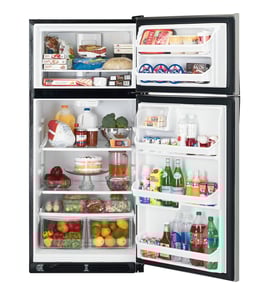




What is the difference between top mount and bottom mount refrigerators?
A top-mount refrigerator (like the Hotpoint HTS17GBSDRWW) has the freezer on top and the fresh-food section below; a bottom-mount flips that layout. The biggest day-to-day difference is ergonomics: bottom-mount designs put refrigerated items at eye level, while top-mount designs make freezer access easier.
Quick comparison
| Feature | Top mount (freezer on top) | Bottom mount (freezer on bottom) |
|---|---|---|
| Most-used items (fresh food) | Lower, requires more bending | Higher, easier to see and reach |
| Freezer access | Easier, at chest/eye level | Lower, often a pull-out drawer |
| Typical layout | Simple shelves and bins | Often more drawers and organizers |
| Service basics | Similar cooling system concepts | Similar cooling system concepts |
What you will notice in everyday use
- Fresh-food access: Bottom-mount models reduce bending for produce, milk, and leftovers.
- Freezer access: Top-mount models make it easier to grab frozen items without crouching.
- Organization style: Bottom-mount freezers commonly use drawers; top-mount freezers commonly use shelves.
- Door swing and clearance: Both styles need proper airflow and spacing around the cabinet.
Installation and space considerations
Your installation clearances and leveling matter regardless of mount style. For this Hotpoint design, we follow the guidance in the installation guide for airflow and door closing performance.
- Plan for typical clearances around the cabinet (sides, top, and back) for ventilation.
- Level the refrigerator so doors close easily and seal consistently.
- Avoid placing the unit where room temperature drops too low for normal operation.
Why it matters
Choosing top-mount vs bottom-mount is mostly about how you use the refrigerator every day. If you access fresh food more often than frozen food, bottom-mount usually feels more convenient; if you use the freezer frequently, top-mount can be more comfortable.
Last updated: February 2026
How wide is a 17.6 cubic foot refrigerator?
A 17.6 cu. ft. top-mount refrigerator is most often about 28 inches wide (commonly in the 27 to 30 inch range). For your Hotpoint HTS17GBSDRWW, we use the exact cabinet dimensions listed in the owner's manual when you need a precise fit.
Typical width ranges (what you can plan around)
Most 17 to 18 cu. ft. top-freezer refrigerators fall into these common size bands:
- Width: 27 to 30 inches
- Height: about 64 to 67 inches
- Depth (cabinet): about 28 to 32 inches
- Depth with doors/handles: often 30 to 34 inches
Don’t forget installation clearance
Even if the cabinet width fits, you still need space for airflow and door swing. The installation instructions for this model call out these clearances:
- Sides: 3/4 inch
- Top: 1 inch
- Back: 1 inch
Quick planning table
Use this as a simple checklist before you measure your opening.
| What you’re measuring | What to include | Why it changes |
|---|---|---|
| Cabinet width | Metal cabinet only | Usually the smallest number |
| “Overall” width | Doors and hinges | Can add a little width |
| Opening width | Cabinet plus side clearances | Prevents heat buildup |
| Door swing space | Door arc in front | Prevents door from hitting walls/cabinets |
Why it matters
If the refrigerator is too tight in the opening, airflow can suffer and temperatures can become inconsistent. Leaving the recommended side, top, and back clearance helps the Hotpoint HTS17GBSDRWW cool efficiently and reduces strain on components like the compressor and condenser fan.
Last updated: February 2026
What is the top part of a refrigerator called?
On the Hotpoint HTS17GBSDRWW top-mount refrigerator, the top section is the freezer compartment (often just called the freezer). It’s the coldest area of the appliance and is designed to keep foods frozen while the fresh food section below stays above freezing.
What the freezer compartment does
- Maintains freezing temperatures for long-term food storage
- Helps the refrigerator hold steady temperatures by keeping doors closed and seals tight
- Often houses the ice maker on some models (if equipped)
- Shares airflow with the fresh food section through internal ducts and vents
Common names you may see in instructions and parts lists
You might see different wording depending on the diagram or step you’re following.
| What people call it | What it usually means | Where it is |
|---|---|---|
| Freezer | Freezer compartment | Top section |
| Freezer door | Door that seals the freezer | Top door |
| Fresh food section | Refrigerator compartment | Bottom section |
| Cabinet | The main body of the refrigerator | Surrounds both sections |
Why it matters when ordering parts or troubleshooting
Using the right term helps you match the correct diagram and order the correct part for the correct door or compartment.
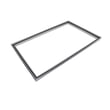
- If the top door is not sealing, you typically need a freezer door gasket such as the refrigerator freezer door gasket WR24X10228.
- If the bottom door is not sealing, you typically need the fresh food door gasket such as the refrigerator door gasket (white) WR24X10229.
- If you’re reversing the door swing or working on hinges, the freezer door is removed first in many procedures; follow the steps in the installation guide.
Quick tip for identifying the compartment
- Top-mount refrigerator: freezer on top, fresh food below
- Bottom-freezer refrigerator: freezer on bottom
- Side-by-side: freezer on one side, fresh food on the other
Last updated: February 2026
Can I replace fridge parts myself?
Yes. On a Hotpoint HTS17GBSDRWW top-mount refrigerator, we recommend DIY replacement for many common, non-sealed-system parts (light bulb, shelves, drawers, door gaskets, hinge hardware) as long as you unplug the refrigerator first and follow the steps in the owner's manual.
Good DIY repairs vs. repairs to leave to a pro
Many refrigerator fixes are straightforward, but anything involving refrigerant lines or complex electrical diagnosis should be handled by a qualified technician.
- Good DIY: light bulb, door gasket, shelves, drawers, hinge pin/washer, cleaning condenser area
- Usually not DIY: compressor replacement, sealed refrigerating system work, advanced electrical troubleshooting
- Always start: unplug the refrigerator (turning the control to 0 does not remove power to the light circuit)
Common DIY parts for this model
These are examples of parts on this model that are typically safe and practical to replace at home.
- G.e. appliance light bulb, 40-watt 40A15 (interior light)
- Refrigerator door gasket (white) WR24X10229 (fresh food door seal)
- Refrigerator freezer door gasket WR24X10228 (freezer door seal)
- Refrigerator crisper drawer WR32X10340 (bin replacement)
- Refrigerator door hinge pin WR02X27092 and refrigerator door hinge nylon washer WR01X27364 (door alignment wear parts)
Quick safety checklist before you start
- Unplug the refrigerator from the electrical outlet.
- Wear cut-resistant gloves when working around sheet metal edges.
- Let the light bulb cool before removing it.
- Keep screws and small parts organized by location.
- Do not puncture or bend any tubing near the compressor or evaporator.
What the manual specifically calls out (example: light bulb)
The manual procedure for a burned-out bulb is simple: unplug the refrigerator, unscrew the bulb when cool, and replace it with an appliance bulb of the same or lower wattage.
| Repair task | Typical DIY difficulty | Tools you usually need |
|---|---|---|
| Replace light bulb | Easy | None or gloves |
| Replace door gasket | Medium | Phillips screwdriver, hair dryer (to relax gasket) |
| Replace shelf/drawer | Easy | None |
| Replace hinge pin/washer | Medium | Nut driver or wrench |
Why it matters
DIY replacement of wear items like a door gasket can improve temperature stability, reduce frost, and help the compressor run less. Simple repairs also prevent food spoilage and avoid unnecessary service calls.
Last updated: February 2026
What number should my Hotpoint fridge freezer be set at?
On your Hotpoint HTS17GBSDRWW top-mount refrigerator, the temperature control dial is numbered 1 (warmest) to 9 (coldest). We recommend starting at 5, then adjusting by one number at a time and waiting 24 hours between changes so temperatures can stabilize.
Recommended settings and how to adjust
Use the dial number as a starting point, then fine-tune based on actual food temperatures.
- Start at: 5
- If fresh food is too warm: turn 1 step colder (example: 5 to 6)
- If items freeze in the fresh-food section: turn 1 step warmer (example: 5 to 4)
- After any change: wait 24 hours before adjusting again
- Best practice: confirm with a refrigerator thermometer, not just the dial number
Quick guide: what the numbers mean
| Dial setting | Cooling level | Typical use case |
|---|---|---|
| 1 to 3 | Warmer | Lightly loaded fridge, cooler kitchen, fewer door openings |
| 4 to 6 | Normal | Most homes and everyday use |
| 7 to 9 | Coldest | Hot kitchen, frequent door openings, heavy loading |
Model-specific notes for HTS17GBSDRWW
This model uses a single temperature control dial that affects overall cooling. For the exact control description, including any special dial positions and how they function, follow the instructions in the HTS17GBSDRWW owner’s manual.
Why it matters
A correct setting keeps the fresh-food section near 37°F and the freezer near 0°F, which protects food quality, helps prevent thawing or freezer burn, and reduces temperature swings that can cause frosting issues.
Last updated: February 2026





