 Owner’s manual
 Error Codes




Why is my Hotpoint refrigerator not cooling?
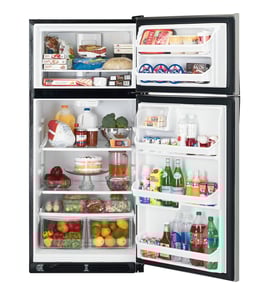
If your Hotpoint HTR16ABSARWW top-mount refrigerator is not cooling, the fastest fixes are usually restoring power, setting the temperature control dial correctly (not on 0), and making sure airflow is not blocked in the freezer. After any adjustment, allow up to 24 hours to reach normal temperatures.
Quick checks first (no tools)
- Confirm the temperature control dial is not set to 0; 0 stops cooling in both compartments.
- Set the dial to 5 as a starting point (1 is warmest, 9 is coldest).
- Make sure the refrigerator is fully plugged into a properly grounded 3-prong outlet (avoid extension cords).
- Check for a tripped breaker or blown fuse.
- Look for food packages blocking the freezer air duct; blocked airflow can stop the fresh food section from cooling.
What to do next if it still will not cool
1) Give it time after changes
The sealed system and airflow need time to stabilize.
| Situation | What to expect |
|---|---|
| Just plugged in or dial changed | Allow 24 hours for full cool-down |
| Unit seems “off” briefly | Defrost cycle can pause cooling for about 30 minutes |
2) Check the fans (common cooling failure)
A failed evaporator fan can prevent cold air from circulating.
- Listen for a fan running when the compressor is on.
- If the freezer is cold but the refrigerator section is warm, airflow or the evaporator fan is a prime suspect.
- If you find the evaporator fan motor is bad, use the model-matched refrigerator ac/dc motor WR60X31522.
3) Look for frost buildup (defrost problem)
Heavy frost on the evaporator area can block airflow and mimic a “not cooling” complaint. A common repair part is the refrigerator defrost heater WR51X10038.
Why it matters
Running warm can spoil food quickly and forces the compressor to run longer than normal. Correct dial settings, clear airflow, and working fan and defrost components keep temperatures stable and reduce wear.
For control locations, dial settings, and safety guidance, follow the HTR16ABSARWW owner's manual.
Last updated: February 2026
How to find the model of Hotpoint fridge?
On a Hotpoint refrigerator, the model number is printed on the appliance’s rating label; for your unit it should read HTR16ABSARWW. Once you find that label, match the letters and numbers exactly when ordering parts or checking specifications in the HTR16ABSARWW owner's manual.
Where to look on a top-mount refrigerator
Most Hotpoint top-mount models place the rating label in one of these spots:
- Inside the fresh food (refrigerator) compartment on a side wall
- Along the ceiling of the fresh food compartment near the temperature control area
- On the frame around the door opening (hinge side)
- Behind the crisper drawers (less common)
- On the back of the cabinet (sometimes a secondary label)
What to write down (and why)
Record these items exactly as shown on the label:
- Model number (example: HTR16ABSARWW)
- Serial number (helps with production variations)
- Brand (Hotpoint)
- Any suffix letters (they can change the correct door gasket, shelf, or motor)
Quick checklist
| Item | What it’s used for | Tip |
|---|---|---|
| Model number | Correct parts lookup | Copy every character |
| Serial number | Version and date range | Take a clear photo |
| Product type | Matching diagrams | “Top-mount” means freezer on top |
Why it matters
Hotpoint refrigerators often share similar cabinet designs across multiple series, but parts like a door gasket, evaporator fan motor, or defrost heater can vary by exact model. Using the correct model number prevents ordering the wrong component and avoids fitment issues.
Last updated: February 2026
Can I replace fridge parts myself?
Yes. With a Hotpoint HTR16ABSARWW top-mount refrigerator, we can replace many non-sealed-system parts ourselves (light bulb, door gasket, shelves, some fan components) using basic tools and safe power shutoff; sealed-system and high-voltage repairs are best left to a technician.
What you can usually replace yourself
These repairs are typically straightforward if we unplug the refrigerator first and follow the steps in the HTR16ABSARWW owner's manual.
- Light bulb (replace with same or lower wattage after the bulb cools)
- Door gaskets (fixes warm temps, moisture, and frost from air leaks)
- Door hardware (hinge pin, nylon washer, shelf rail)
- Some airflow parts (fan motor grommets, condenser fan blade)
- Power cord (only if you are comfortable with electrical connections and strain relief)
Repairs that usually require a pro
These involve higher risk (electrical, refrigerant, or complex diagnostics) and can cause bigger damage if miswired.
- Compressor and sealed refrigerant system work
- Run capacitor and compressor start issues
- Persistent “no cooling” after basic checks (controls, defrost system diagnosis)
Quick safety checklist (do this first)
The manual emphasizes safe power and outlet practices.
- Unplug by gripping the plug, not pulling the cord
- Use a properly grounded 3-prong outlet on a dedicated circuit
- Do not use a frayed or cracked cord; replace it immediately
- When sliding the refrigerator, do not roll over the power cord
- Remember: turning the temperature control to “0” does not remove power to the unit
Common DIY parts for this model
| DIY task | Example part for HTR16ABSARWW | What it fixes |
|---|---|---|
| Replace interior light | G.e. appliance light bulb, 40-watt 40A15 | Light out when door opens |
| Stop warm air leaks | Refrigerator freezer door gasket WR24X10228 | Frost, sweating, poor cooling |
| Reduce door sag/wobble | Refrigerator door hinge pin WR02X27092 | Misaligned door, poor seal |
| Improve airflow noise/vibration | Refrigerator condenser fan blade WR60X10207 | Fan noise, weak airflow |
Why it matters
DIY-friendly repairs can restore cooling performance and efficiency quickly, but electrical and sealed-system work can create safety hazards and expensive follow-on damage. Starting with the manual steps and simple parts keeps the repair safe and cost-effective.
Last updated: February 2026
What brand is Hotpoint refrigerator?
Hotpoint is the appliance brand name on your Hotpoint HTR16ABSARWW top-mount refrigerator. In the U.S., Hotpoint-branded refrigerators are part of the GE Appliances family (GE Appliances is owned by Haier), so you will often see GE-style parts and service references in documentation.
How to confirm the brand and model on your refrigerator
We recommend matching parts and instructions to the exact model tag, not just the door badge.
- Open the fresh food (refrigerator) door
- Look for the model and serial label on the upper left side of the fresh food compartment
- Write down the model number exactly as shown (for this unit: HTR16ABSARWW)
- Use that model number when ordering parts like a door gasket, fan motor, or light bulb
For the official location and labeling details, use the HTR16ABSARWW owner's manual.
What “Hotpoint” means when you are buying parts
Hotpoint is the brand you shop by; the model number is what ensures fit.
| What you have | What it’s used for | Example on this model page |
|---|---|---|
| Brand name (Hotpoint) | General product family | Hotpoint refrigerator parts |
| Model number (HTR16ABSARWW) | Exact fit and compatibility | Correct gasket, motor, shelves |
| Part ID / part number | The specific replacement item | WR24X10228, WR60X31522 |
Common parts you might see for this Hotpoint model
These are examples of GE-style replacement parts listed for HTR16ABSARWW:
- Refrigerator ac/dc motor WR60X31522 (evaporator fan motor)
- Refrigerator freezer door gasket WR24X10228
- G.e. appliance light bulb, 40-watt 40A15
Why it matters
Hotpoint branding can be shared across different product lines over time, but your model number locks in the correct diagrams, part substitutions, and installation notes. That prevents ordering a gasket, fan motor, or control housing that looks right but does not fit.
Last updated: February 2026