Installation guide
 Owner’s manual
 Error Codes




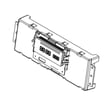
How do I reset my Whirlpool electric range?
To reset a Whirlpool WFE775H0HV1 electric freestanding range, we recommend doing a power reset: turn the range off, then disconnect power for 1 minute and restore power. This clears many control glitches and is the safest, most reliable reset method.
Quick reset options (start here)
- Cancel/Off reset: Press Cancel/Off once to stop a cooking cycle.
- Power reset (best overall): Unplug the range (or switch the circuit breaker off) for 1 minute, then restore power.
- After restoring power: Set the clock and test Bake for a few minutes to confirm normal operation.
Step-by-step: power reset (recommended)
- Press Cancel/Off to stop any active function.
- Turn all cooktop knobs to Off.
- Disconnect power:
- Unplug the power cord, or
- Turn the range circuit breaker off.
- Wait 60 seconds.
- Restore power and test oven heat.
If the range still will not operate
The installation guidance for this model points to a few common power-supply checks:
- Confirm the range is plugged into a grounded outlet.
- Check the household fuse or circuit breaker.
- If the control shows F9 or F9, E0, have a qualified electrician verify the outlet wiring.
- Use the troubleshooting steps in the WFE775H0HV1 owner's manual.
What different “reset” results mean
| What you see after reset | What it usually indicates | What to do next |
|---|---|---|
| Display returns to normal | Temporary control glitch | Re-test Bake and a surface element |
| No display, no heat | Power supply issue | Check breaker, cord, outlet |
| F9 or F9, E0 error | Possible miswired outlet | Electrician should verify supply |
Why it matters
A proper reset helps you separate a simple control lockup from a real electrical supply problem. On an electric range like the Whirlpool WFE775H0HV1, stable power is required for both the oven control and heating circuits.
Last updated: January 2026
What is F9E0 after power outage?
On the Whirlpool WFE775H0HV1 electric range, the F9E0 error after a power outage points to a home electrical supply issue (most often a miswired outlet or incorrect polarity/ground) rather than a cooking setting problem. Reset power, then have the outlet and supply wiring verified before replacing parts. See the WFE775H0HV1 installation guide for the manufacturer’s guidance.
What to do first (safe, fast checks)
- Press Cancel to clear the display after power is restored.
- If the code returns, turn the range off at the breaker (or unplug if accessible) for 1 minute, then restore power.
- Confirm the breaker is fully reset (switch OFF, then ON).
- If the range still shows F9E0, stop using it until the electrical supply is checked.
- Have a qualified electrician verify the outlet wiring and voltage.
What F9E0 usually means on this model
The installation and troubleshooting guidance for this range indicates that when the control displays F9 or F9E0, the electrical outlet in the home may be miswired. That can happen after an outage, surge, or electrical work, and it can prevent the control from sensing a correct supply.
Common causes vs. likely fixes
| What you notice | Most common cause | Best next step |
|---|---|---|
| F9E0 appears immediately after outage | Outlet polarity/ground issue | Electrician checks receptacle and supply wiring |
| Range seems dead or intermittent | Breaker not fully reset, loose connection | Reset breaker; verify tight connections |
| Code returns during heating | Supply issue under load | Electrician load-tests circuit |
When to consider a part (after supply is verified)
If the electrical supply checks out and the code persists, then a failed component becomes more likely. Parts that can be involved in heating/control symptoms include:
- Range terminal block WPW10245259 (burned/loose power connection point)
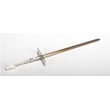
- Range oven temperature sensor WPW10181986 (temperature feedback issues, different symptoms than F9E0)
- Control assembly W11536793 (control fault, typically after surge)
Why it matters
F9E0 is tied to the incoming power quality and wiring. Correcting the supply first prevents repeat failures and helps avoid damaging the control or terminal connections.
Last updated: January 2026
Why is my Whirlpool oven suddenly not working?
If your Whirlpool WFE775H0HV1 oven suddenly will not operate, the most common causes are a control setting that disables heating (Control Lock, Delay Start, or Demo mode) or a power issue to the range. Start by checking the display and canceling any special modes per the WFE775H0HV1 owner's manual.
Quick checks (fastest fixes first)
- Press CANCEL to clear the control and try BAKE again.
- Make sure Control Lock is off; press and hold CONTROL LOCK for 3 seconds to unlock.
- Check that Delay Start is not set.
- Make sure the control is not in Demo mode (Demo mode allows the control to work but prevents the heating elements from turning on).
- If the display or indicator lights are flashing after power was restored, let the control stabilize; if flashing continues, service is typically needed.
Demo mode: a common “sudden no-heat” cause
Demo mode is intended for showroom display and deactivates all oven elements. To toggle Demo mode on this style of Whirlpool control:
- Press CANCEL, CANCEL, Temp/Time Up, then TIMER SET/OFF.
Parts to consider if settings are correct
If the oven powers on but will not heat, these model-compatible parts are common suspects:
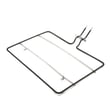
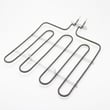
- Bake element (no heat in Bake): bake element W10779716
- Oven temperature sensor (erratic temps, no heat, or overheating symptoms): range oven temperature sensor WPW10181986
Symptom-to-part guide
| What you notice | Most likely area | Common next step |
|---|---|---|
| Display works, Bake starts, but no heat | Bake circuit | Inspect and test bake element for continuity |
| Temps are far off or fluctuate | Sensor/control feedback | Test oven temperature sensor resistance |
| Completely dead (no display) | Power supply/terminal block | Check breaker, cord, and connections |
Why it matters
On the WFE775H0HV1, a single setting like Control Lock or Demo mode can stop the oven from operating even though the range still has power. Confirming settings first prevents unnecessary part replacement and gets you back to cooking faster.
Last updated: January 2026