Owner’s manual



Why does an LG sensor dry dryer take so long to dry?
Long dry times on an LG Sensor Dry dryer like model DLGY1702VE almost always come from restricted airflow (lint filter or vent duct) or load and setting choices that make the moisture sensors extend the cycle. The dryer will keep adjusting time until it detects the target dryness.
What to check first (fast fixes)
- Clean the lint filter before every load; some loads need the filter cleaned mid-cycle.
- Check the exhaust duct for lint buildup, kinks, crushed flex duct, or a stuck outside damper.
- Run smaller, consistent-size loads; heavy items and bulky fabrics hold more moisture.
- Separate heavy items (towels, jeans, comforters) from lightweight items.
- If you are using the Normal cycle, turn off Energy Saver for faster drying.
Sensor Dry settings that affect time
Sensor Dry cycles use dual sensors to compare moisture in the clothes and in the air, then adjust time automatically. Choosing a higher dryness target increases cycle time.
| Setting or condition | What it does | What to try |
|---|---|---|
| More Dry / Very Dry | Increases cycle time | Use Normal or Less Dry for mixed loads |
| Less Dry / Damp Dry | Shortens cycle time | Use for items you plan to iron |
| Energy Saver (Normal) | Can reduce heat to save energy | Turn it off when you need faster drying |
| Overloading | Reduces tumbling and airflow | Dry fewer items per load |
Parts that commonly contribute to slow drying
Airflow problems are usually maintenance-related, but these parts can also play a role:
- A torn or poorly seated lint screen can let lint bypass and clog the blower housing or duct.
- A temperature-sensing issue can cause poor heat control and longer cycles.
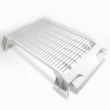
If your lint screen is damaged or not fitting correctly, replace it with the dryer lint screen 5231EL1001C. For cycle behavior and recommended settings, follow the owner's manual.
Why it matters
Restricted exhaust airflow traps moist air in the drum, so Sensor Dry keeps extending the cycle. Keeping the lint filter and venting clear improves drying performance, helps prevent overheating, and reduces wear on components like the drum belt and support rollers.
Last updated: February 2026
What is the average lifespan of an LG dryer?
Most LG dryers, including the LG DLGY1702VE, typically last 10 to 15 years with normal household use. Consistent airflow maintenance (lint filter and venting), avoiding overloads, and replacing wear parts early are the biggest factors that push lifespan toward the high end.
What affects dryer lifespan the most
- Venting and airflow: restricted ducts make the dryer run hotter and longer
- Lint filter habits: clean the lint screen before every load
- Load size and cycle choice: frequent heavy loads shorten belt, roller, and motor life
- Heat control components: thermostats and sensors that drift can cause overheating or long dry times
- Timely repairs: replacing a worn belt or roller early prevents secondary damage
Maintenance that extends life on the DLGY1702VE
We recommend these routine steps (they match how LG designs the dryer to operate and protect airflow):
- Clean the lint screen before every load; replace it if it is torn or warped
- Inspect and clean the exhaust duct periodically; keep the run short and free of kinks
- If you see airflow restriction alerts, correct the ducting issue promptly
- Keep the area around the dryer clean so the blower can move air efficiently
- If you hear thumping or squealing, address drum support wear before it damages the drum or motor
Common wear parts and what they usually mean
| Symptom | Most common wear area | Example part for DLGY1702VE |
|---|---|---|
| Drum will not tumble | Belt or idler pulley | Dryer drum belt 4400EL2001F |
| Thumping or rumbling | Drum support rollers | Dryer drum support roller 4581EL2002H |
| Long dry times, overheating | Airflow restriction or thermostat issue | Dryer high-limit thermostat 6931EL3003C |
Why it matters
A dryer that is forced to run hot or run long wears out the drum support system (belt, rollers, idler) and heat-control parts faster. Keeping airflow strong is the simplest way to protect the motor, drum, and burner system over the life of the appliance.
For model-specific care, cleaning, and operating guidance, follow the DLGY1702VE owner's manual.
Last updated: February 2026
What is the most common problem with LG dryers?
The most common issue we see with LG dryers (including model DLGY1702VE) is restricted airflow from lint buildup or a clogged exhaust duct. Poor airflow causes long dry times, overheating, and safety shutoffs; LG’s Flow Sense system is designed to detect and alert you to duct restrictions. See the owner's manual for your model’s airflow alerts and cleaning guidance.
Quick checks that fix most “LG dryer not drying” complaints
- Clean the lint filter after every cycle; never run the dryer without it installed.
- If the lint screen looks waxy or clogged, wash it in warm, soapy water; dry it fully before reinstalling.
- Check the vent hood outside; confirm the flap opens strongly during a cycle.
- Inspect the vent run for kinks, crushed flex duct, or heavy lint buildup.
- Avoid overloading; a packed drum blocks airflow through the load.
Symptoms and the most likely cause
| Symptom | Most common cause | What to do first |
|---|---|---|
| Clothes take too long to dry | Exhaust duct restriction or dirty lint filter | Clean lint filter; clear/repair ducting |
| Dryer stops mid-cycle or seems to “shut off” | Overheating from poor airflow | Check venting and lint path |
| No heat on a gas model | Gas supply shutoff closed | Confirm house and dryer gas shutoffs are fully open |
| Loud thumping/squealing | Worn drum support parts | Inspect belt, rollers, idler |
When it is not airflow: common wear parts to consider
If airflow is good and dry times are still poor, we typically look at temperature sensing and drum support components.
- For noise or slipping drum issues: dryer drum belt 4400EL2001F, dryer drum support roller 4581EL2002H, and dryer idler pulley 4560EL3001A
- For heat regulation problems: dryer thermistor AGM30045804, dryer blower thermostat 6931EL3002M, and dryer high-limit thermostat 6931EL3003C
Why it matters
Restricted venting does more than slow drying; it drives up operating temperature, triggers airflow alerts, and can shorten the life of thermostats, sensors, and other dryer parts.
Last updated: February 2026
What is code DLGY1702VE?
DLGY1702VE is the model number for an LG gas steam dryer, not an error code. We use it to match the correct parts, specifications, and troubleshooting steps for your exact dryer; confirm details in the DLGY1702VE owner's manual.
What DLGY1702VE tells you about the dryer
For LG model DLGY1702VE, the manual lists these key specs:
- Type: gas steam dryer
- Drying capacity (Normal cycle): 7.3 cu. ft.
- Gas supply requirements: NG 4 to 10.5 inches WC; LP 8 to 13 inches WC
- Dimensions: 27 in (W) x 28 15/16 in (D) x 40 3/16 in (H)
If you meant an error code on the display
LG dryer error codes are short codes shown on the control panel (for example, airflow restriction codes like “d90” or “d95” related to venting). If you are seeing a code, use the model-specific error code list and match it to the symptom.
- Write down the exact code (letters and numbers)
- Check airflow at the outside vent hood while the dryer runs
- Clean lint from the lint screen and inspect the lint screen housing
- Inspect the vent duct for crushing, long runs, or heavy lint buildup
Helpful reference: LG dryer error codes
Common “code-like” mix-ups (quick guide)
| What you see | What it usually is | What to do next |
|---|---|---|
| DLGY1702VE | Model number | Use it to look up parts and specs in the manual |
| d90 / d95 | Vent restriction warning | Check and clean the exhaust ducting |
| A part ID like 4400EL2001F | Replacement part identifier | Match the part to your symptom before ordering |
Why it matters
Using the correct model number prevents ordering the wrong LG parts and helps you troubleshoot accurately. For example, a “no tumble” problem often points to a worn belt such as the dryer drum belt 4400EL2001F, while airflow-related codes point to venting issues first.
Last updated: February 2026