 Owner’s manual




Where to check Samsung washer model?
On your Samsung washer, the model number is printed on the appliance’s rating label. For the Samsung WF45R6100AC, we recommend checking the door opening area first (common on front-load washers), then the back panel if you do not see it.
Where to look on a Samsung front-load washer
Check these spots in order:
- Door opening: open the door and look around the door frame or front cabinet opening
- Behind the door: along the inner edge near the hinge side
- Rear panel: on the back of the washer cabinet
- Inside the service area: behind the lower front access area (if your version has one)
For label location diagrams and the exact way Samsung formats the model and serial, use the WF45R6100AC owner's manual.
What to write down (and why)
Record the full ID information so we can match parts like a door boot, drain pump, or control board correctly.
- Model number (example format: WF45R6100AC)
- Version code (if shown; can affect part compatibility)
- Serial number (helps identify production run)
- Manufacture date (sometimes listed)
Quick ID checklist
| Item on label | What it’s used for | Example |
|---|---|---|
| Model number | Finds the correct parts list | WF45R6100AC |
| Version code | Confirms exact configuration | (varies) |
| Serial number | Identifies unit build | (varies) |
Why it matters
Samsung washers often have multiple versions under the same model family. Using the complete model and any version code helps prevent ordering the wrong washer door boot, door lock switch, or water inlet valve.
Last updated: February 2026
What size is the wf45r6100ac?
The Samsung WF45R6100AC is a 27-inch wide front-load washer with about 4.5 cu. ft. capacity. For the exact cabinet height, depth, and clearance requirements for your installation, we recommend confirming the specifications in the WF45R6100AC owner's manual.
What “size” usually means for this washer
Most customers mean one (or more) of these:
- Width: 27 inches (standard full-size front-load footprint)
- Capacity: about 4.5 cu. ft.
- Fit/clearances: space needed behind for hoses and in front for door swing
- Stacking/closet fit: depends on required ventilation and door clearance
Quick spec snapshot
| Spec | What to expect for WF45R6100AC |
|---|---|
| Washer type | Front-load |
| Nominal width | 27 inches |
| Capacity | About 4.5 cu. ft. |
| Best source for exact dimensions | WF45R6100AC owner's manual |
Why it matters
Getting the “size” right prevents common install problems like the washer not fitting through a doorway, the door not opening fully, or kinked fill hoses that can lead to fill errors and slow filling.
Tips before you measure your space
- Measure the tightest point (doorways, hallways, closet opening), not just the laundry nook.
- Plan for rear clearance so the drain hose and water lines are not crushed.
- Leave room for the door swing and for loading bulky items.
- If you are replacing an older unit, confirm the electrical and plumbing locations still line up.
Last updated: February 2026
What is the life expectancy of a Samsung top load washer?
Most Samsung top-load washers last 10 to 15 years with normal household use and basic maintenance. For your Samsung washer model WF45R6100AC, use the care and maintenance steps in the WF45R6100AC owner's manual to help reach the upper end of that range.
Typical lifespan and what affects it
A washer’s life is mostly driven by load size, detergent habits, and how quickly small issues are fixed.
- Load habits: frequent oversized loads shorten bearing, suspension, and motor life
- Detergent use: too much detergent can cause residue, odors, and drain issues
- Water quality: hard water can increase buildup in hoses and valves
- Leveling and vibration: chronic shaking accelerates wear on shocks and tub components
- Timely repairs: fixing leaks and drain problems early prevents bigger failures
Maintenance that extends washer life
These are the highest-impact steps we recommend for Samsung washers.
- Run a monthly tub-clean cycle (or a hot cycle) to reduce residue
- Leave the door ajar between loads to dry out the boot area
- Clean the dispenser drawer and flush channels periodically
- Check fill hoses for bulges or seepage and replace if needed
- Keep the washer level; re-level if it starts walking or banging
Common wear items and what they usually mean
If you see these symptoms, addressing them early often adds years of service.
| Symptom | Common cause | What to check first |
|---|---|---|
| Excessive vibration or banging | Worn suspension | Inspect shocks and confirm leveling |
| Won’t fill or fills slowly | Water supply or valve issue | Verify faucets fully open; clean inlet screens |
| Water leaking at the door | Door boot or clamp issue | Inspect boot for tears; check clamp seating |
| Won’t drain | Pump/filter restriction | Clean pump filter and check drain hose routing |
Why it matters
A washer that is kept clean, level, and not overloaded typically avoids the most expensive failures (tub, bearings, and control issues). Small fixes, like addressing a leak or vibration early, prevent secondary damage.
Last updated: February 2026
How to diagnostic a Samsung washer?
For the Samsung WF45R6100AC washer, diagnostics means using the built-in error-code display and (when needed) the service test mode to pinpoint what system is failing (fill, drain, door lock, motor, or out-of-balance). We use the WF45R6100AC owner's manual to confirm the exact button sequence for your control panel.
Quick checks before you enter test mode
These steps often reveal the problem without running any special tests:
- Unplug the washer for 2 minutes, then restore power (clears minor control glitches).
- Confirm the door is fully closed and latches firmly (a weak latch can stop cycles).
- Verify both water supply valves are fully open and inlet hoses are not kinked.
- Run a Rinse/Spin with the drum empty to see if the issue is load-related.
- Note any displayed code exactly as shown (letters and numbers matter).
How we typically access diagnostic or service mode (Samsung front load)
Samsung front-load washers commonly enter a service menu by powering the washer on, then pressing and holding a specific two-button combination for several seconds until the display changes. From there, we use Start/Pause and the cycle selector to step through tests.
Because the exact key combination varies by revision, use the procedure listed in the WF45R6100AC owner's manual.
What the results tell you
Use what you observe to narrow the repair:
| What you see | What it usually points to | Common next step |
|---|---|---|
| No/slow fill, NF-type symptoms | Water supply or inlet valve issue | Check screens; consider replacing a water inlet valve |
| Won’t drain, ND-type symptoms | Drain pump, filter, or drain hose restriction | Clean pump filter; inspect hose; test pump |
| Door won’t lock/unlock | Door lock circuit or latch alignment | Inspect strike; test lock switch |
| Heavy vibration, DC-type symptoms | Load balance or suspension | Rebalance load; inspect shocks/counterweight |
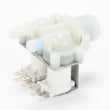
If you’re troubleshooting a fill problem, the washer water inlet valve DC62-30314K is a common replacement part used when the valve is electrically open but not flowing correctly.
Why it matters
Diagnostic mode and error codes prevent guesswork. Instead of replacing random parts, we match the symptom to the correct system (water inlet valve, drain pump, door lock switch, shock absorber, or control board) and fix the root cause.
Last updated: February 2026



