 Installation guide
 Owner’s manual
 Error Codes





How do I unlock a Kenmore Elite oven door?
On Kenmore Elite wall oven model 79048079000, the door typically unlocks after the lock mechanism finishes its cycle. If the door is locked after Self Clean, press and hold STOP/CLEAR for about 5 seconds; when you hear the lock click, the latch should retract and the door will open. For model-specific control steps, use the 79048079000 owner's manual.
- Wait for the oven to cool; the latch often stays locked until the cavity temperature drops.
- Confirm Self Clean is canceled (use STOP/CLEAR).
- Restore power if the control is unresponsive (turn the breaker off for 1 minute, then on).
- Do not pull on the handle; you can bend hinges or the latch.
- If the display shows a lock icon, keep the door closed until the icon clears.
A stuck lock is usually a control, latch motor, or temperature-sensing issue. These parts are commonly involved on this model:
| Symptom | Most likely area | Part you may need |
|---|---|---|
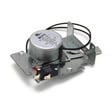
| Lock won’t retract after canceling clean | Door lock motor/latch | Range oven door lock motor 318261229 |
| Oven thinks it is still too hot | Temperature sensing | Range oven temperature sensor 5304504897 |
| Oven overheats or trips out during clean | Safety limit opens | Frigidaire range high-limit thermostat 318578506 |
The lock system is a safety feature; forcing the door can damage the hinge receptacles, inner glass, or the latch assembly and turn a simple unlock issue into a bigger wall oven repair.
Last updated: February 2026
How to reset Kenmore Elite oven?
To reset your Kenmore Elite wall oven model 79048079000, we recommend doing a simple power reset first (it clears many control glitches). If you need to restore control settings, use the reset steps listed in your 79048079000 owner's manual.
- Power reset (recommended first): Turn the oven circuit breaker OFF for 1 minute, then turn it ON.
- Control reset: If the display is unresponsive, press Cancel/Off once, then try setting Bake again.
- After a self-clean issue: Let the oven cool completely; the door lock can stay engaged until temperatures drop.
- Turn OFF the wall oven breaker (or remove the fuse) at your home electrical panel.
- Wait 60 seconds.
- Turn power back ON.
- Set the clock (if prompted), then test Bake at 350°F.
These checks help separate a control issue from a heating or safety-limit issue:
- Confirm the breaker is fully seated (flip OFF, then ON).
- If the oven heats incorrectly or shows temperature problems, test the oven temperature sensor; a failed sensor can cause erratic temps or error codes (see range oven temperature sensor 5304504897).
- If the oven shuts down when hot, a tripped safety device can be involved (see frigidaire range high-limit thermostat 318578506).
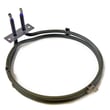
- If the display works but there is no heat, inspect the bake circuit and element condition (see frigidaire range bake element 318254902).
| Reset type | What it fixes | What it does not fix |
|---|---|---|
| Power reset | Frozen keypad, minor control glitches | Failed sensor, bad element, wiring damage |
| Cancel/Off | Clears an active cooking mode | Underlying heating failures |
| Cool-down after self-clean | Door lock staying engaged | Broken lock motor or latch issues |
A reset is the fastest way to clear a temporary electronic control problem on the 79048079000. If symptoms return right away, the issue is usually a component such as the temperature sensor, high-limit thermostat, or bake element rather than the control needing another reset.
Last updated: February 2026
What does the code F7 mean on a Kenmore oven?
On the Kenmore Elite wall oven model 79048079000, an F7 error typically points to a problem in the keypad or electronic oven control circuit, most often a stuck key or a communication issue between the touchpad and the control board. Power cycling can confirm whether the fault is intermittent.
- Turn off power at the breaker for 1 minute, then restore power and see if F7 returns.
- If F7 appears immediately on power-up, the keypad or control input is usually the cause.
- If F7 appears only after the oven heats up, heat-related electrical issues become more likely.
- If the oven is in self-clean when the code appears, let the oven cool fully and recheck.
- If any keys feel stuck or the panel is unresponsive, stop using the oven until the issue is corrected.
In most Kenmore wall ovens, F7 is triggered when the control senses an invalid key signal or a persistent key press.
| Likely cause | What you may notice | What usually fixes it |
|---|---|---|
| Stuck or shorted keypad/touchpad | Beeping, random inputs, F7 returns quickly | Replace the user interface/control panel assembly (if applicable) |
| Loose or contaminated ribbon connection | F7 comes and goes, may change with door slam or vibration | Reseat/clean the ribbon connection (power off first) |
| Electronic control fault | F7 persists even with stable keypad | Replace the control component involved |
| Heat-related wiring issue | F7 after preheat or long bake | Inspect harness and connectors for heat damage |
If F7 is accompanied by temperature problems (overheating, underheating, long preheat), these model-compatible parts are commonly involved:
An F7 code is the oven telling us it cannot trust the input signal that controls baking and broiling. Addressing it prevents unintended heating behavior, nuisance beeping, and control lockups.
Turn off power at the breaker before removing the oven from the cabinet or touching wiring. The installation instructions for this model also call out grounding and junction box safety practices; follow the installation guide for the correct electrical and mounting details.
Last updated: February 2026
What was the size of the Kenmore 79048079000 oven?
For the Kenmore Elite wall oven model 79048079000, the installation instructions show it was made in 27-inch and 30-inch nominal widths. Overall dimensions vary by width, but both versions are about 50 1/2 inches tall and about 24 1/2 inches deep; use the installation guide for the exact dimension set that matches your cutout.
These sizes refer to the oven’s nominal cabinet width class, which drives the required cabinet cutout.
- 27-inch model: designed for a 27-inch cabinet opening width range
- 30-inch model: designed for a 30-inch cabinet opening width range
- Height is similar for both widths (double wall oven configuration)
- Depth is similar for both widths (front-to-back)
- Always match the cutout dimensions to your cabinet, not just the nominal width
Below are the key overall dimensions called out in the installation instructions for this Kenmore Elite wall oven family.
| Nominal width | Approx. overall height | Approx. overall depth | Approx. overall width |
|---|---|---|---|
| 27 in | 50 1/2 in | 24 5/8 in | 27 in |
| 30 in | 50 1/2 in | 24 1/2 in | 30 in |
Use these as a quick check before you measure your cabinet precisely.
- Cutout width (27-inch model): about 24 7/8 to 25 1/4 inches
- Cutout width (30-inch model): about 28 1/2 to 29 inches
- Cutout depth: about 23 inches
- Cutout height (both widths): about 48 7/8 to 49 7/8 inches
Correct sizing prevents installation problems like trim gaps, door interference, and overheating from poor clearances. It also helps you avoid ordering the wrong replacement parts for the wrong width configuration.
Last updated: February 2026





