What is L2 line voltage error?
The L2 line voltage error on your Maytag MED6205RW0 electric dryer means the dryer is not detecting proper 240V power on the L2 leg, so the heater cannot turn on. The drum can still tumble, but you will get no heat or weak heat until the power issue is corrected.
What usually causes an L2 error
- A tripped double-pole dryer breaker (one side tripped)
- A loose or burned connection at the dryer terminal block
- A damaged power cord or wall receptacle
- A house wiring issue causing low voltage on L2
Quick checks we recommend (safe, no tools)
- Confirm the dryer is set to a heated cycle (not Air Fluff or No Heat).
- Reset the dryer breaker: switch it OFF fully, then ON.
- If the code clears but returns, stop using heat cycles until power is corrected.
When to inspect parts (power off)
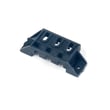
If the breaker is fine and the error keeps coming back, inspect the power connections at the dryer. A common fix is replacing a heat-damaged terminal block such as the dryer terminal block WP3397659.
What to look for
- Melted plastic, discoloration, or a burnt smell at the cord connection
- Loose mounting screws on the terminal block lugs
- Brittle or charred wire ends
| Symptom | What it points to | What to do next |
|---|---|---|
| Tumbles, no heat | Missing L2 to heater | Reset breaker; check terminal block |
| Intermittent heat | Loose connection | Tighten/repair wiring; replace terminal block if damaged |
| Burning smell at back | Overheated connection | Replace terminal block and damaged cord/wiring |
Why it matters
An L2 voltage problem prevents proper heater operation and can overheat electrical connections. Fixing the power supply issue restores normal drying and helps protect key heating components like the heater and thermal safety devices.
Last updated: February 2026
What's the life expectancy of a Maytag dryer?
A Maytag electric dryer like model MED6205RW0 typically lasts 14 to 16 years with normal household use. Consistent airflow maintenance (lint and venting) and replacing wear parts early are the biggest factors in reaching that lifespan.
Typical lifespan and what changes it
Most dryers fail early due to heat stress, restricted airflow, or drum-drive wear. For MED6205RW0, these factors matter most:
- Vent restriction (long dry times, overheating, blown thermal fuse)
- Worn drum support parts (thumping, squealing, drum drag)
- Heating system stress (no-heat or intermittent heat)
- Electrical connection issues (power cord/terminal block overheating)
- Overloading (extra strain on motor, belt, rollers, idler)
Parts that commonly extend dryer life
Replacing small wear parts on time often prevents bigger damage (like a damaged drum or motor). These are common “life-extender” parts for this model:
- Dryer drum support roller WPW10314173
- Dryer idler pulley W10837240
- Dryer blower wheel WP697772
- Thermal fuse W10909685
- Dryer terminal block WP3397659
Quick symptom-to-cause guide
| Symptom | Most common cause | What to check first |
|---|---|---|
| Takes too long to dry | Airflow restriction | Lint screen, vent duct, outside hood |
| Runs but no heat | Heating circuit fault | Breaker, heater, thermal fuse |
| Squealing or thumping | Roller/idler wear | Rollers, idler pulley, blower wheel |
| Stops mid-cycle | Overheating | Venting, high-limit thermostat, lint buildup |
Why it matters
A dryer can be “old” but still reliable if it runs at the right temperature and moves air freely. Good airflow reduces overheating, which protects key safety and heating components and helps your Maytag dryer reach the full 14 to 16 year service life.
Last updated: February 2026
How to clear Maytag dryer error code?
To clear an error code on your Maytag MED6205RW0 electric dryer, we reset power to the control by unplugging the dryer (or switching the breaker off) for 1 to 5 minutes, then restoring power and starting a cycle. If the code returns, troubleshoot the cause.
Quick reset steps (safe first try)
- Turn the dryer off.
- Unplug the power cord; if you cannot access the plug, switch the dryer breaker OFF.
- Wait 1 to 5 minutes.
- Plug back in (or switch breaker ON).
- Start a timed dry cycle and watch for the code to reappear.
If the code comes back: what to check next
Many Maytag dryer codes return because the underlying problem is still present. Start with the most common causes:
- Airflow restriction: clean the lint screen and check the vent path.
- Overheating protection tripped: a blown thermal fuse or thermal cut-off often points to poor venting.
- Heating problem: an open heater can trigger heat-related faults.
- Drum not turning smoothly: worn rollers or an idler pulley can cause abnormal operation.
- Loose power connection: inspect the cord connection area for heat damage.
Common parts that relate to recurring error codes
| Symptom you notice | Common related part | Example part for MED6205RW0 |
|---|---|---|
| No heat or weak heat | Heating element | Element, heater 5400w WP3387747 |
| Dryer stops, won’t run, or overheats | Thermal fuse | Thermal fuse W10909685 |
| Overheats, then shuts down | Thermal cut-off kit | Whirlpool dryer thermal cut-off fuse kit (352-degree f) 280148 |
| Squealing, thumping, drum drag | Drum support roller | Dryer drum support roller WPW10314173 |
| Rumbling or poor airflow noise | Blower wheel | Dryer blower wheel WP697772 |
Why it matters
Clearing the code without fixing the cause can lead to repeat shutdowns, long dry times, or overheating. Restoring proper airflow and replacing failed safety or drive components keeps drying performance consistent and helps prevent repeat faults.
Related troubleshooting help
Use our error-code references to match the code to a specific failure pattern: Maytag bravos dryer error codes.
Last updated: February 2026
Are most dryers 30 amp or 50 amp?
Most electric dryers, including the Maytag MED6205RW0, are typically on a 30-amp circuit; 50-amp circuits are not common for standard residential dryers. The exact requirement depends on the dryer’s nameplate rating and the home’s wiring setup.
What’s typical for electric dryers
In most U.S. homes, an electric dryer is designed around a 240-volt, 30-amp branch circuit.
- 30 amp: most common for standard electric dryers
- 40 amp: sometimes used for higher-wattage or specific installations
- 50 amp: uncommon for typical clothes dryers; more often seen with ranges or other large loads
How to confirm the right breaker size (safe checks)
We recommend verifying the circuit based on the dryer’s electrical rating and the receptacle type.
- Check the dryer’s rating label/nameplate (usually inside the door opening or on the cabinet)
- Confirm the receptacle type (3-prong vs 4-prong) matches the dryer cord
- Verify the breaker size in your electrical panel (commonly 30A for dryers)
- Make sure the power cord and terminal block connections are tight and not heat-damaged
- If you see discoloration or melting at the cord connection, stop using the dryer until repaired
Why the amperage matters
Using the correct circuit size helps prevent nuisance trips, overheating at connections, and damage to wiring or components like the heater.
| Circuit size | Typical use case | What you might notice if mismatched |
|---|---|---|
| 30 amp | Standard electric dryer | Works normally when wiring is correct |
| 40 amp | Higher-demand setups | May indicate non-standard install requirements |
| 50 amp | Rare for dryers | Increased risk if wiring/cord are not correctly matched |
Parts that can be affected by power or heat issues
If you’re troubleshooting heat or power symptoms on MED6205RW0, these parts are commonly involved:
- Dryer terminal block WP3397659 (cord connection point)
- Element, heater 5400w WP3387747 (heating circuit)
- Thermal fuse W10909685 (opens if overheating occurs)
- Whirlpool dryer thermal cut-off fuse kit (352-degree f) 280148 (overheat protection)
For additional dryer troubleshooting and maintenance tips, see how to keep a dryer clean and economical.
Last updated: February 2026
How to tell if a dryer thermal fuse is blown?
On a Maytag MED6205RW0 electric dryer, a blown thermal fuse usually shows up as a dryer that will not start or runs but will not heat. The sure test is a continuity check with a multimeter; a blown fuse reads open (no continuity).
Quick symptoms to look for
- Dryer will not start (some models route power through the thermal fuse)
- Drum tumbles but there is no heat
- Cycle ends with clothes still wet and cool
- You recently had poor airflow (long dry times, very hot cabinet, weak exhaust outside)
- The problem appeared suddenly after normal operation
How we test the thermal fuse (basic continuity check)
- Unplug the dryer (or switch off the breaker) before opening any panels.
- Access the fuse location (commonly on the blower housing or exhaust duct area).
- Pull the wires off the fuse terminals (note their positions).
- Set a multimeter to continuity or the lowest ohms setting.
- Touch probes to the fuse terminals.
What the meter reading means
| Meter result | What it means | What to do next |
|---|---|---|
| Beep or near 0 ohms | Fuse is good | Keep troubleshooting airflow, heat circuit, or controls |
| No beep, OL, or very high ohms | Fuse is blown | Replace the fuse and correct the overheating cause |
Parts that commonly relate to a blown fuse (MED6205RW0)
A thermal fuse often blows because the dryer overheats from restricted airflow. These parts are commonly involved:
- Thermal fuse W10909685 (the safety fuse itself)
- Dryer high-limit thermostat WP8557403 (can contribute to overheating symptoms)
- Whirlpool dryer thermal cut-off fuse kit (352-degree f) 280148 (used on some heat housings)
- Dryer blower wheel WP697772 (a damaged wheel reduces airflow)
- Screen W10120998 and dryer lint screen housing W11129408 (lint buildup or poor sealing can restrict flow)
Why it matters
The thermal fuse is a one-time safety device; if it is blown, the dryer is protecting itself from overheating. Replacing the fuse without fixing the airflow restriction often leads to another blown fuse and longer dry times.
Last updated: February 2026