 Installation guide
 Owner’s manual
 Error Codes







What is the average life expectancy of a GE dishwasher?
Most GE dishwashers typically last about 12 years (with a common range of 10 to 15 years) when they are installed correctly, used normally, and kept clean. For your GE GDF640HMM2ES, consistent maintenance and quick fixes for small problems help you reach the high end of that range.
Typical lifespan and what changes it
A dishwasher’s life is mainly driven by how often it runs, water quality, and whether wash and drain systems stay clear.
- Light use (a few loads per week): often closer to 12 to 15 years
- Heavy use (daily or multiple loads/day): often closer to 8 to 12 years
- Hard water and heavy soil loads: can shorten life if buildup is not managed
- Good cleaning habits: can extend life by reducing strain on the pump, heater, and spray arms
- Correct installation: prevents issues that lead to early failures (leaks, drain problems, vibration)
Maintenance that most improves longevity
These steps reduce wear on high-cost components like the circulation pump, heating element, and control.
- Clean the filter and sump area regularly (remove debris before it reaches the pump)
- Keep spray arm holes clear; replace a cracked or warped arm if wash pressure drops
- Use the right detergent amount for your water hardness (too much can cause etching and residue)
- Run a cleaning cycle periodically to reduce film and mineral buildup
- Address draining or filling problems early (standing water and slow fills stress the motor and heater)
Parts that commonly affect “end of life” symptoms
When performance drops, these are frequent culprits on many dishwashers, including the GDF640HMM2ES.
| Symptom | Common cause | Example part on this model |
|---|---|---|
| Not cleaning well | Poor spray, low circulation | Dishwasher spray arm, lower WD22X33499 |
| Not drying | Heater issue, airflow/heat problem | Dishwasher heating element WD05X35098 |
| Won’t start or stops mid-cycle | Door not latching | GE dishwasher door latch lock WD21X10490 |
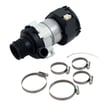
| Not draining | Drain restriction or weak pump | Drain pump asm WD19X24829 |
Why it matters
Knowing the typical 10 to 15 year lifespan helps you decide whether to repair or replace. If your dishwasher is near the 12-year mark and needs multiple major parts, planning ahead can prevent unexpected downtime.
For model-specific care and cleaning routines, follow the owner's manual.
Last updated: February 2026
Can a clogged drain cause an FTD error?
Yes. On the GE GDF640HMM2ES dishwasher, an FTD (fail to drain) error commonly happens when the drain path is restricted, so the drain pump cannot push water out. Clearing the filter, air gap, disposer connection, and drain hose usually restores normal draining (see the owner's manual).
What to check first (fast, no parts)
- Turn off power at the breaker before reaching into the sump area.
- Remove the bottom rack and clean the ultra-fine filter assembly; rinse with warm soapy water.
- If your setup has an air gap, lift the cover and clean the cap and passage with a toothpick.
- If the dishwasher drains into a garbage disposer, run the disposer and confirm the sink drains normally.
- Inspect the drain hose for kinks, pinches, or a clog; make sure the routing matches the drain-loop guidance in the installation guide.
When a clog points to a part problem
If the drain path is clear but the unit still will not drain, the issue is often in the drain pump or the hose.
| Symptom | Most likely area | What we do next |
|---|---|---|
| Water standing in the tub after a cycle | Air gap, disposer, filter | Clean and retest a drain cycle |
| Hums but drains slowly or not at all | Drain pump or blockage at pump inlet | Check for debris; consider replacing the pump |
| Drains sometimes, then shows FTD again | Partial clog in hose or air gap | Clear hose and air gap; verify drain routing |
Model-matched parts that commonly relate to FTD symptoms include the drain pump asm WD19X24829 and the dishwasher drain hose WD24X10062.
Why it matters
A restricted drain can leave dirty water in the tub, cause odors, and interrupt cycles. Fixing the clog quickly also helps prevent strain on the drain pump and improves overall wash performance.
For code-specific troubleshooting steps, we also use the GE electronic dishwasher error codes guide.
Last updated: February 2026
What is the most common problem with a GE dishwasher?
The most common GE dishwasher problems are not draining and not starting. On the GE GDF640HMM2ES, these usually trace back to a clogged drain path (filter, hose, disposer connection), a door that is not fully latched, or a control setting that prevents a cycle from beginning (see the owner's manual).
Most common symptoms and what they usually mean
- Standing water in the bottom: drain restriction or a weak/failed drain pump.
- Won’t start or stops immediately: door not fully latched, latch switch issue, or control problem.
- Poor cleaning: spray arm ports clogged, low water fill, or loading blocking spray.
- Detergent left in the cup: dishes blocking the dispenser (the manual notes not to block the dispenser with large/tall items).
- Suds/overflow: wrong detergent type (hand dish soap causes sudsing and poor wash performance).
Quick checks we recommend first (fast, no parts)
- Confirm the door closes firmly and the latch engages.
- Cancel/drain the cycle (per the control instructions in your owner's manual) and see if water evacuates.
- Check the drain hose routing for kinks and make sure the high loop/air gap setup is correct (see the installation guide).
- Use only automatic dishwasher detergent; avoid hand dish soap to prevent suds.
- Reload to avoid blocking the detergent dispenser and spray paths.
Common parts involved (when checks don’t fix it)
| Problem | Common suspect part | What it affects |
|---|---|---|
| Won’t start | GE dishwasher door latch lock WD21X10490 | Confirms the door is closed so the control will run |
| Not draining | Drain pump asm WD19X24829 or dishwasher drain hose WD24X10062 | Pushes water out; hose carries water to the sink/disposer |
| Not cleaning | Dishwasher spray arm, lower WD22X33499 | Water spray coverage and pressure |
Why it matters
Drain and start issues are the most common because they are tied to everyday conditions: food debris in the drain path, installation factors (hose routing), and the safety interlock that prevents operation when the door is not securely latched.
Helpful troubleshooting resources
- GE electronic dishwasher error codes (useful when the control displays a code or beeps)
Last updated: February 2026
How do I get my GE dishwasher out of delay mode?
To take your GE GDF640HMM2ES dishwasher out of Delay Hours (delay mode), press Delay Hours until the delay is cleared, then press Start and close the door to begin the cycle. If you want to stop the cycle and delay completely, press and hold Start for 3 seconds to cancel.
Clear Delay Hours (most common)
Use this when the dishwasher is counting down and you want it to start now.
- Press Delay Hours to cycle the delay setting down.
- Keep pressing until the delay indicator is off (0 hours).
- Press Start.
- Close the door within 10 seconds to start the wash.
- If the door is open and the panel goes to sleep, press any pad or close and open the door to wake it.
Cancel the cycle (also cancels a delayed start)
Use this when you want to fully stop what is set and start over.
- Press and hold Start for 3 seconds.
- Close the door.
- The dishwasher will drain, beep, and the cycle light will turn off.
If it still will not start
Delay mode is sometimes confused with control lock or a door not fully latched.
- Check whether Control Lock is on; unlock by holding the correct key combination for 3 seconds (varies by control panel).
- Make sure the door is fully closed and latched.
- If the dishwasher beeps every minute, it is paused because the door is open; press Start and close the door within 4 seconds.
Quick comparison
| What you want to do | What to press | What happens |
|---|---|---|
| Start now (remove delay) | Delay Hours until off, then Start | Cycle starts after door closes |
| Stop everything and reset | Hold Start 3 seconds, close door | Drains and cancels |
| Resume after opening door | Start, close door within 4 seconds | Cycle continues |
Why it matters
Delay Hours is designed to start a wash later (up to 8 to 12 hours depending on model). Clearing it correctly prevents “won’t start” confusion and avoids accidentally canceling a cycle when you only meant to remove the delay. See the GDF640HMM2ES owner's manual for the exact button names and indicator lights on your control panel.
Last updated: February 2026





