 Owner’s manual
 Error Codes
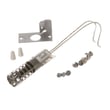



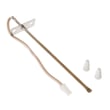


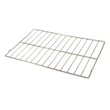
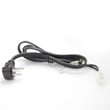

How to change Kenmore spark electrode igniter?
On Kenmore gas range model 36275575690, changing a surface-burner spark electrode (igniter) means shutting off power, removing the grate and burner pieces, swapping the electrode and wire connection, then reassembling so the burner head sits correctly over the electrode for reliable sparking. See the 36275575690 owner's manual for burner-part removal and safety notes.
Safety first (do this every time)
- Turn all burner knobs to OFF.
- Disconnect electrical power to the range before servicing or cleaning.
- Let grates and burner parts cool completely.
- Do not disassemble or clean around one burner while another burner is on (all burners can spark when one is set to LITE).
- If you smell gas at any point, stop and ventilate the area.
Steps to replace a surface spark electrode
- Remove the burner parts: Lift off the grate, then lift off the burner cap and burner head (and drip pan if your range is equipped).
- Access the electrode: The electrode sits next to the burner head and is exposed when the burner head is removed.
- Disconnect the wire: Carefully pull the igniter wire connector off the old electrode.
- Remove the electrode: Take out the mounting screw and lift the electrode out of its holder.
- Install the new electrode: Set it into the holder and secure it with the screw.
- Reconnect the wire: Push the connector firmly onto the new electrode terminal.
- Reassemble and test: Reinstall burner head and cap, then restore power and test ignition.
Reassembly checklist (common “no spark” causes)
- Burner head is seated flat and aligned.
- The small hole/area that fits over the electrode is clear (a sewing needle or wire twist tie can help unclog).
- Burner cap is centered.
- Grate is stable and not rocking.
| Symptom | Most likely cause | What to check |
|---|---|---|
| Clicking but no flame | Clogged burner ports or misaligned head | Clean and reseat burner head/cap |
| No clicking at that burner | Loose wire or bad electrode | Reseat connector; inspect electrode |
| All burners click when one is on LITE | Normal operation | Use the correct burner knob |
Why it matters
A properly mounted electrode and correctly seated burner head help the burner light quickly and reduce delayed ignition, uneven flames, and repeated clicking.
Last updated: January 2026
What is the code F1 on a Kenmore gas range?
On the Kenmore gas range model 36275575690, an F1 (or F10) error code typically points to a problem in the electronic oven control (clock/control board); it can also be triggered by a faulty oven temperature sensor or damaged wiring between the sensor and control.
What to check first (safe, quick steps)
- Cancel the alarm: press Clear/Off (or the equivalent key) and see if the code returns.
- Power reset: turn the range off at the breaker for 1 minute, then restore power.
- Look for heat-related symptoms: oven not heating, overheating, or temperature swings.
- Inspect visible wiring (with power off): look for burned, loose, or pinched wires at the back panel and near the oven sensor harness.
- Check for moisture or spills around the control panel area that could affect the keypad.
Likely causes and what they mean
| Likely cause | What you may notice | Typical fix |
|---|---|---|
| Electronic oven control failure | F1 returns randomly, beeping, oven may not run | Replace control (model-specific part) |
| Oven temperature sensor issue | Oven overheats or won’t regulate temperature | Test sensor resistance; replace sensor if out of range |
| Wiring/connectors problem | Code appears after moving range or during preheat | Repair/secure harness, replace damaged connector |
| Stuck/shorted keypad (if separate) | Beeping, keys act “pressed” | Replace keypad/control panel assembly |
How we recommend confirming the problem
- Unplug the range or shut off the breaker.
- Access the rear panel and check harness connections to the control and sensor.
- If you have a meter, use guidance from how to use a multimeter to test electrical parts video to test the oven sensor circuit.
- Use the wiring diagram and troubleshooting section in the 36275575690 owner's manual to match the error behavior to the correct component.
Why it matters
An F1/F10 code often means the oven control is detecting an unsafe or invalid temperature signal. Addressing it quickly helps prevent unreliable baking, overheating, and repeated shutdowns.
Last updated: January 2026
What are the parts of a gas oven?
A Kenmore gas range like model 36275575690 is built around a gas burner system (bake and broil), an ignition system, airflow and venting, and the oven door sealing system. These parts work together to ignite gas safely, control temperature, and vent heat properly (see the 36275575690 owner's manual).
Main parts you will find in most gas ovens
- Oven (bake) burner: provides heat for baking; it cycles on and off to maintain the set temperature.
- Broil burner: provides high, direct heat from the top for broiling.
- Ignition system (glow bar igniter): heats up so gas can flow and ignite; the oven typically lights within about 30 to 90 seconds.
- Oven gas valve and shut-off lever: controls gas flow to the oven burner; the shut-off lever location varies by burner style.
- Air adjustment shutters: tune the air-to-gas mix for proper flame shape (blue cones, steady flame).
- Oven vent/duct openings: vents hot air through openings at the rear of the cooktop; these must stay unblocked.
- Oven door and door gasket: the gasket creates the seal needed for efficient heating and good baking results.
- Oven light system: bulb, socket, and lens/retainer so you can see inside the cavity.
Model 36275575690 parts you may replace
These are common service parts for lighting and visibility issues:
- Oven ignition: WB2X9154 WB2X9154 (oven burner igniter)
- Oven light bulb: 40a15bulb 40A15 (40-watt appliance bulb)
- Light socket: pushin receptacle WB08T10026 (range light socket)
Quick “what it does” reference
| Part/system | What it does | Common symptom when it fails |
|---|---|---|
| Glow bar igniter | Enables gas flow and ignition | No bake/broil ignition, long preheat |
| Oven venting | Moves hot air out, brings fresh air in | Overheating surfaces, poor baking |
| Door gasket | Seals heat in the cavity | Uneven baking, heat leaking at door |
| Air shutters | Sets correct flame characteristics | Yellow, lifting, or noisy flames |
Why it matters
Knowing the major gas oven parts helps you troubleshoot safely. For example, this model uses electric ignition, so the oven and broiler cannot be lit during a power outage, and vent openings must stay clear to keep airflow to the burners uninterrupted.
Last updated: January 2026
How do I reset my Kenmore oven control board?
For Kenmore gas range model 36275575690, the most reliable “reset” is a full power reset: turn the oven controls to OFF, shut off power at the breaker (or unplug the range) for about 5 minutes, then restore power and reset the clock using the steps in the 36275575690 owner's manual.
Step-by-step reset (power cycle)
- Turn the OVEN SET knob to OFF.
- Turn off the range’s circuit breaker (or unplug the power cord).
- Wait 5 minutes to let the control fully clear.
- Restore power.
- Press the CLOCK pad and use HOUR and MIN pads to set the time.
- Test Bake and Broil to confirm normal operation.
If the reset is related to a power outage
After a power outage, this model’s display can flash the time of day until a pad is pressed or a knob is turned. If the oven was running when power went out, the OVEN SET knob must be turned back to OFF, then set again to the desired function and temperature.
Quick reference
| Situation | What to do | What you should see |
|---|---|---|
| Control acting “glitchy” | 5-minute power reset | Normal display returns |
| Display flashing time | Set clock | Correct time stays steady |
| Oven was on during outage | Turn OVEN SET to OFF, then re-set | Oven responds normally |
When a reset will not fix the problem
A reset clears temporary control issues, but it will not correct a failed ignition or gas heating problem. If the oven will not heat and you do not hear ignition, a common repair is replacing the oven igniter, such as WB2X9154 WB2X9154.
Why it matters
Resetting the control correctly restores normal timing functions (clock, timer, timed baking) and helps you separate a simple control glitch from a real heating or ignition failure.
Last updated: January 2026




