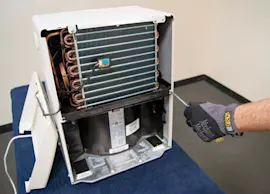
Owner’s manual
 Error Codes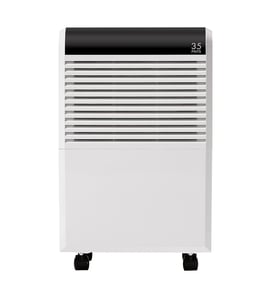





How many hours a day should you run a dehumidifier?
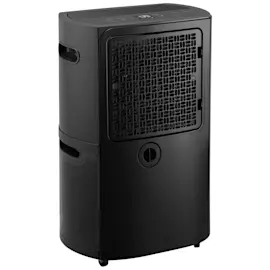
For a Frigidaire FAD704DWDE1 dehumidifier, we typically run it as long as needed to reach and hold the target humidity; in many homes that works out to about 8 to 12 hours per day, but it can run longer in very damp conditions. For fastest dry-out, the manual recommends using CONTINUOUS for the first 3 to 4 days. See the owner's manual for the exact operating modes and settings.
Best practice: control humidity, not hours
Instead of picking a fixed number of hours, we recommend setting a humidity goal and letting the unit cycle.
- Start around 45% to 50% RH for general comfort and moisture control
- Use CONTINUOUS temporarily for musty odors, sweating, or initial dry-out
- Keep doors and windows closed in the space you are drying
- Make sure air can circulate; a basement unit will not dry a closed closet without airflow
- Avoid cold spaces; performance drops below 41°F (5°C)
What changes the daily runtime
Runtime depends on how quickly new moisture enters the room and how hard the unit has to work.
| Situation | Typical runtime pattern | What to do |
|---|---|---|
| First few days after dampness | Long runs, fewer shutoffs | Use CONTINUOUS for 3 to 4 days |
| Normal living space | Cycles on and off | Set a mid-range humidity target |
| Very damp basement | May run most of the day | Improve airflow, close openings |
| Cool room (near 41°F) | Weak moisture removal | Warm the space if possible |
Why it matters
Running only on a timer can leave humidity too high (moldy smells, condensation) or run longer than needed (extra noise and energy use). Using the humidistat or CONTINUOUS strategically keeps the space dry with less guesswork.
Quick checks if it seems to run “too much” or not enough
- Confirm the bucket is seated correctly; the unit may not run if the float switch is tripped
- Clear the front grill and airflow path; blocked airflow reduces drying
- Give it time after restart; high humidity takes longer to pull down
- Verify the room is within the 41°F to 96°F operating range
For deeper troubleshooting by symptom, use our dehumidifier doesn't remove moisture guide.
Last updated: February 2026
Why do most dehumidifiers stop working?
Most dehumidifiers (including Frigidaire model FAD704DWDE1) stop working because a safety or control condition shuts them down: the bucket is full or mis-seated, airflow is blocked by a dirty grille or filter, the humidity setting is satisfied, or the room is too cold for normal operation. See the owner's manual for model-specific operating limits and checks.
Most common causes (and what to check first)
- Bucket full or not installed correctly: the unit turns off when the bucket reaches the preset level; reseat the bucket until it sits flush.
- Humidity setting reached: the dehumidifier shuts off when the selected dryness level is met; use CONTINUOUS if you need more moisture removal.
- Power issue: confirm the plug is fully seated; check the home fuse or circuit breaker.
- Blocked airflow: keep the intake and discharge areas clear; clean the front grille and operate with the air filter in place.
- Room temperature too low: performance drops and operation can stop if the room is below 41°F (5°C).
- Frost on the coil: after startup, frost can appear briefly and usually clears within about an hour; persistent frost often points to low room temperature or airflow problems.
Quick troubleshooting table
| Symptom | What it usually means | What we do |
|---|---|---|
| Won’t turn on | No power, bucket switch open, or controls off | Reseat bucket, verify outlet power, reset breaker |
| Runs but room stays damp | Setting too high, poor airflow, cold room | Lower humidity setting or use CONTINUOUS; clean airflow path; warm the space |
| Shuts off quickly | Bucket full, bucket misaligned, or dryness level reached | Empty and reinstall bucket; adjust humidity setting |
| Frost on coil | Normal after start or room too cold | Wait up to 60 minutes; raise room temp above 41°F |
Why it matters
Dehumidifiers rely on steady airflow across the coil and correct humidity sensing. When airflow is restricted or the room is too cold, the unit protects itself by cycling off, and moisture removal drops sharply.
When a repair is more likely
If power, bucket seating, airflow cleaning, and temperature are all correct and the unit still will not run or remove moisture, a failed sensor or control component becomes more likely. Our step-by-step DIY guidance in dehumidifier repair guide landing page helps you narrow the failure by symptom.
Last updated: February 2026
Are Frigidaire dehumidifiers any good?
Frigidaire dehumidifiers, including the Frigidaire FAD704DWDE1, are a solid choice for everyday humidity control when they’re sized correctly for the space and set up for good airflow. In normal use, you should expect steady moisture removal, straightforward controls, and typical fan and compressor sounds.
What “good” looks like in real use
A dehumidifier is doing its job when it pulls damp air across cold coils, sends drier, warmer air back into the room, and collects water in the front bucket. That’s the basic operating design described in the owner's manual.
Common signs it’s performing well:
- The bucket fills regularly (or the drain runs steadily if you use a hose)
- Room humidity drops over several hours, not minutes
- Air coming out feels slightly warmer and drier
- The fan runs smoothly with a consistent sound
- The unit cycles normally (it may pause briefly due to built-in compressor protection)
Setup factors that make any dehumidifier seem “better”
Even a good unit will disappoint if the room setup fights it. For best results:
- Run it in an enclosed area; keep doors and windows closed
- Keep the intake and discharge areas unblocked for proper clearance
- Make sure the bucket is seated correctly (many units will not run if it isn’t)
- Use a lower humidity setting or “continuous” when you need maximum drying
- Avoid cold spaces; performance drops when room temperature is below about 41°F
For deeper troubleshooting by symptom, we use the dehumidifier doesn't remove moisture guide.
Quick expectations table
| What you notice | Usually normal | Usually needs attention |
|---|---|---|
| Fan noise | Steady airflow sound | Rattling, grinding, or loud vibration |
| Frost on coil | Can clear within about 60 minutes after startup | Persistent frost in a room above 41°F |
| Room not drying fast | Takes time in very damp spaces | Airflow blocked, setting too high, space too large |
Why it matters
A “good” dehumidifier is mostly about matching capacity to the space and maintaining airflow. When the coils can’t exchange air properly or the room keeps pulling in outdoor humidity, moisture removal drops and run time increases.
Last updated: February 2026