 Owner’s manual




What is the capacity of the wm3570hwa?
The LG WM3570HWA is an ultra large-capacity front-load washer with a 4.3 cu. ft. stainless steel drum, so you can wash more items per load and reduce the number of loads you run. For full specs and features, use the WM3570HWA owner's manual.
How to confirm you have the right model
We recommend matching the model on the rating label to ensure you are looking at the correct specifications.
- Check the model number on the washer’s rating label (should read WM3570HWA).
- Match the series shown in documentation (the manual covers WM3570H*A models).
- If your model has a suffix like “/01,” use the same manual family for specs and operation.
- Keep the manual handy for cycle options, detergent drawer use, and maintenance.
Capacity vs. what fits in a load (practical guidance)
Capacity is measured in cubic feet, but what you can wash depends on fabric type and how freely items can tumble.
| Load type | What to expect in a 4.3 cu. ft. front-load washer | Tip |
|---|---|---|
| Everyday mixed load | Larger basket volume than standard units | Avoid packing items tightly |
| Bulky items | Better drum space for comforters and towels | Use a cycle designed for bulky bedding |
| Heavy absorbent loads | Can become very heavy when wet | Keep loads balanced for smooth spinning |
Why it matters
Using the correct capacity helps prevent overloading, which can increase vibration, extend cycle time, and reduce cleaning performance. A properly loaded drum also helps the washer reach full spin speed efficiently.
Last updated: February 2026
Is a DE1 error expensive to repair?
On the LG WM3570HWA washer, a dE1 (door error) is usually not expensive to fix because it often comes from a door that is not fully closing, a misaligned strike, or a simple obstruction. If a part is needed, the most common repairs are the door lock or strike.
What to check first (no-cost fixes)
- Power the washer off, then firmly close the door; listen for a solid latch click.
- Check for laundry caught between the door glass and the door boot (gasket).
- Wipe the door glass and the door boot sealing surface; detergent residue can prevent a full seal.
- Inspect the door hinge area for looseness or sagging.
- Unplug the washer for 2 minutes, then restore power and retry a cycle (resets the control).
Parts that commonly solve dE1 on WM3570HWA
If the door is closing correctly but the error returns, these parts are the typical next step:
| Symptom | Most likely cause | Common part to replace |
|---|---|---|
| Door won’t “click” shut or feels loose | Strike not lining up | LG washer door lock strike MFG63099101 |
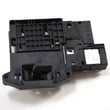
| Door clicks but won’t lock, or locks intermittently | Door lock switch/assembly failing | LG washer door lock EBF61315802 |
Why repair cost varies
Labor is what changes the total cost. A door strike replacement is usually quick; a door lock replacement takes longer because it involves accessing the lock wiring and mounting points. If the door boot is torn or deformed, that can also increase labor.
Use the model’s manual for the exact checks
We recommend following the door and error-code troubleshooting steps in the WM3570HWA owner’s manual so you confirm alignment, cleaning, and reset steps before replacing parts.
Last updated: February 2026
How do I tell what model LG washer I have?
Your LG washer’s model number is printed on the appliance rating label; on the LG WM3570HWA it’s most often found around the door opening (door jamb/inner rim) or on the back panel. Match that exact model number to the one shown in the WM3570HWA owner's manual.
Where to look for the model number label
Check these common spots on LG front-load washers:
- Inside the door opening on the cabinet frame (door jamb/inner rim)
- Along the edge of the door opening behind the door seal area
- On the back of the washer cabinet
- On a side panel near the rear edge
- Near the detergent dispenser area (look for a rating plate/label)
What the model number looks like (and what to write down)
Record the full model number exactly as shown on the label.
| What to capture | Example | Why it matters |
|---|---|---|
| Model number | WM3570HWA | Ensures correct parts and procedures |
| Suffix/version (if shown) | /01 | Helps match the exact variation |
| Serial number | (varies) | Useful for service history and support |
If your washer has LG “Tag On” (NFC)
Some WM3570HWA units support LG Tag On features for Smart Diagnosis, cycle download, and laundry stats. If your control panel has a Tag On logo, you can use an NFC-equipped smartphone with the LG Smart Laundry app features described in the WM3570HWA owner's manual.
Why it matters
LG washers can have multiple versions that look similar. Using the exact model number (and any suffix like “/01”) helps us match the right LG parts, such as a door lock, water inlet valve, or drain pump motor, and prevents ordering the wrong replacement.
Last updated: February 2026
What is the average lifespan of an LG washer?
Most LG washers, including the LG WM3570HWA, typically last 10 to 15 years with normal household use. You can push lifespan toward the high end by keeping the tub clean, using the right water supply setup, and replacing wear items (like hoses) on schedule; see the WM3570HWA owner's manual.
What affects washer lifespan the most
- Maintenance frequency: the manual notes the tub-clean alert commonly appears every 1 to 2 months; running Tub Clean helps prevent buildup.
- Water quality: hard water mineral scale can shorten life; periodic descaling and (when needed) a water softener helps.
- Hose condition and leaks: LG recommends new inlet hoses at installation and replacing hoses every 5 years.
- Water pressure and temperature: correct supply pressure and reasonable hot-water temperature reduce stress on valves and seals.
- Load habits: avoiding chronic overloading reduces strain on the motor, shocks, and bearings.
Maintenance schedule we recommend (simple and effective)
| Task | Typical timing | Why it matters |
|---|---|---|
| Run Tub Clean | Every 1 to 2 months | Reduces odor, residue, and mineral buildup |
| Inspect inlet hoses for cracks/leaks | Monthly | Prevents water damage and valve wear |
| Replace inlet hoses | Every 5 years | Old hoses are a common failure point |
| Wipe door boot and leave door ajar after use | After wash day | Helps prevent mold and seal deterioration |
Quick tips that prevent early failures
- Do not overtighten fill hoses; overtightening can damage the valves and cause leaks.
- Use the correct detergent amount (especially HE detergent) to reduce oversudsing and residue.
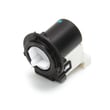
- If you see slow draining, check the drain path and consider the drain pump system; a failing pump motor can shorten cycle life (example replacement: drain pump motor (4681EA2001T) - washer part by LG electronics 4681EA2001T).
Why it matters
A washer that is kept clean and leak-free runs cooler, drains faster, and puts less stress on key components like the inlet valve, drain pump, and door boot. That is what most often separates a 10-year washer from a 15-year washer.
Last updated: February 2026
What are the common errors on an LG washing machine?
Common LG washer errors typically point to a few systems: draining, load balance, door lock, and water fill. On the LG WM3570HWA, many “error” situations are corrected by checking the door, leveling and redistributing the load, and inspecting the drain hose and pump filter (see the WM3570HWA owner's manual).
Most common LG washer error types (and what they usually mean)
- Drain problems (often shown as OE): washer drains slowly or not at all; check drain hose height, kinks, clogs, and the pump filter.
- Unbalanced load (often shown as UE): load is out of balance; stop and redistribute items.
- Door/lock problems (often shown as dE, dL): door not fully closed or lock not engaging; clear clothing from the door area.
- Water fill/supply problems (often shown as IE, FE): water not entering correctly; check that supply hoses are connected properly and not twisted or pinched.
- Control or sensor-related errors: may require power reset and, if repeated, service.
Quick checks we recommend first (WM3570HWA)
- Power reset: turn the washer off, then back on; if needed, unplug for a short reset.
- Door check: confirm the door is fully closed and nothing is caught in the gasket area.
- Drain hose setup: keep the drain hose from being pinched; avoid excessive standpipe height (the manual notes issues when the hose is installed too high).
- Clean the drain pump filter: open the pump plug cap and remove debris.
- Load balance: pause and redistribute bulky items; avoid overloading.
What’s normal vs. what signals a real problem
| Symptom | Often normal | Often a problem |
|---|---|---|
| Buzzing/gushing during drain | Drain pump running | Loud grinding, won’t drain |
| Thumping during spin | Load shifting briefly | Repeated UE, heavy vibration |
| Water spraying sound | Water circulating | Leaks at hoses/valves |
Parts that commonly relate to these errors
If troubleshooting points to a failed component, these model-matched parts are common suspects:
- Drain pump motor (4681EA2001T) - washer part by LG electronics 4681EA2001T (drain/OE symptoms)
- LG washer door lock EBF61315802 (door/lock errors)
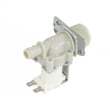
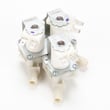
- LG washer water inlet valve 5220FR2075L (fill/IE symptoms)
Why it matters
Addressing the right “system” (drain, fill, door lock, balance) prevents repeat shutdowns, reduces vibration and noise, and helps protect the control board and motor from stress.
Last updated: February 2026
How to fix dE1 LG washing machine?
On an LG WM3570HWA washer, the dE1 code points to a door not locking or being detected as locked. We fix it by resetting power, checking the door latch area for obstructions, and then testing the door lock and strike if the code returns. See the WM3570HWA user manual for model-specific checks and Smart Diagnosis steps.
Quick reset and door checks
- Press POWER to turn the washer off.
- Unplug the washer (or switch the breaker off), wait 10 seconds, then restore power.
- Open and firmly close the door; do not slam it.
- Check for items caught between the door and gasket (socks, lint, detergent residue).
- Wipe the door glass and gasket sealing surface dry.
Parts that commonly cause dE1
If the reset and basic checks do not stop dE1, the most common causes are the door lock system parts.
- Door lock not engaging or internal switch failing: LG washer door lock EBF61315802
- Door not aligning with the lock: LG washer door lock strike MFG63099101
- Door sagging or hinge misalignment (inspect for looseness or play)
What to test (safe, practical checks)
- Listen for the lock click after pressing Start; no click often points to the lock/strike.
- Check alignment: the strike should enter the lock opening cleanly.
- Power cycle again after reseating the door; intermittent dE1 can be a marginal lock.
Symptom-to-likely-cause guide
| What you notice | Most likely issue | What we do next |
|---|---|---|
| Door never “clicks” locked | Door lock assembly | Inspect wiring and replace lock if needed |
| Door closes but feels loose/misaligned | Strike or hinge alignment | Replace strike; tighten hinge screws |
| Code appears mid-cycle | Lock overheating or failing intermittently | Replace door lock assembly |
Why it matters
The washer will not run (or may stop) until it confirms the door is locked. Fixing dE1 protects you from leaks and prevents the drum from spinning with an unlatched door.
Last updated: February 2026
What is the most common problem with LG washers?
The most common issues we see with LG washers like model WM3570HWA are drainage problems (slow or no drain from a clogged filter, kinked hose, or failing pump), followed by unbalanced loads and door/lock-related interruptions. Many of these are preventable with routine cleaning and correct loading; see the WM3570HWA owner's manual.
Most common problems (and what they look like)
- Drains slowly or not at all: standing water, long drain time, cycle stops mid-cycle
- Unbalanced load vibration: banging, walking, repeated rebalancing during spin
- Door won’t lock or unlock: cycle won’t start, stops with door/lock symptoms
- Water fill issues: slow fill, no fill, or overfilling behavior tied to inlet/valve problems
- Odor or mildew (front-loaders): musty smell around the door boot area
Quick checks we recommend first (WM3570HWA)
- Check the drain hose routing: keep it from being pinched or kinked; the manual notes drain issues when the hose is installed too high or restricted.
- Clean the drain pump filter/area: remove debris that can block draining.
- Confirm the door closes cleanly: clear clothing from the door area so it can fully lock.
- Verify water hoses are installed correctly: do not overtighten; check for leaks at the faucets.
Parts that commonly solve the “won’t drain” complaint
If the hose and filter are clear but draining is still weak, these are frequent repair paths:
| Symptom | Most likely area | Example part for WM3570HWA |
|---|---|---|
| Hums but won’t drain | Drain pump motor | Drain pump motor (4681EA2001T) - washer part by LG electronics 4681EA2001T |
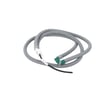
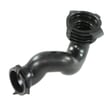
| Slow drain, intermittent drain | Pump/hose restriction | Washer tub-to-pump hose 4738ER1002A |
| Leaks at fill, odd fill behavior | Water inlet valve | LG washer water inlet valve 5220FR2075L |
Why it matters
Drain and balance problems are the top causes of incomplete cycles, wet loads, and extra wear on the tub, suspension, and door lock system. Catching a clog early often prevents a pump failure and reduces leaks.
Related help
- For spin and balance symptoms, use our LG front load washer ue error code guide.
- For motor-related stopping or “won’t tumble/spin” symptoms, use our LG front load washer le error code guide.
Last updated: February 2026


