 Installation guide
 Owner’s manual
 Error Codes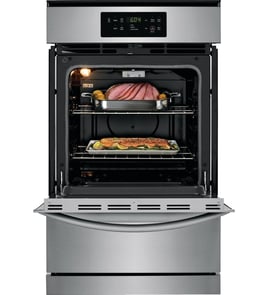



Where is the model number on a Jenn Air wall oven?
On the Jenn-Air gas wall oven model JGW8130DDB, the model number is printed on the data plate located on the oven front frame, on the bottom side of the trim. You typically see it when you open the oven door and look along the lower front frame area.
How to find it quickly
- Turn the oven off and let it cool completely.
- Open the oven door fully.
- Look along the front frame of the oven opening (not the door itself).
- Check the lower area of the frame, near the bottom trim.
- Write down both the model and serial numbers for parts lookup and service.
What the data plate information is used for
The data plate usually includes:
- Model number (for example, JGW8130DDB)
- Serial number
- Sometimes gas and electrical rating information
Common “look-alike” label locations (comparison)
If you do not spot it immediately, these are the most common places customers check on wall ovens.
| Location | What you will see | How common |
|---|---|---|
| Oven front frame, bottom side of trim | Data plate with model and serial | Most common for JGW8130DDB |
| Side frame near the hinge area | Sticker or plate | Sometimes |
| Storage/warming drawer area (if equipped) | Sticker on frame | Less common |
Why it matters
Using the exact model number helps us match the correct Jenn-Air wall oven parts (like an oven sensor, door gasket, or igniter) and prevents ordering a similar-looking part that will not fit.
For the official location and a diagram-style description, use the JGW8130DDB owner's manual.
Last updated: January 2026
How to hard reset jenn air oven?
To hard reset your Jenn-Air gas wall oven model JGW8130DDB, turn the oven off, then disconnect power for a few minutes and restore power. This clears many control glitches and is also the recommended first step if a fault code keeps beeping.
Hard reset steps (power cycle)
- Press Stop/Clear to end any active cooking cycle.
- Turn the oven off.
- Switch the oven circuit breaker OFF (or remove power at the disconnect, if equipped).
- Wait 3 to 5 minutes.
- Switch the breaker ON.
- Set the clock if needed, then test Bake.
If the display shows a fault code and beeps
The JGW8130DDB user guide advises a reset sequence for repeating fault codes:
- Press Stop/Clear.
- If the code and beeps continue, disconnect power for a few minutes.
- Restore power and recheck operation.
- If the code returns, disconnect power and schedule service.
What a hard reset fixes (and what it does not)
| Symptom | Hard reset helps? | Common next step |
|---|---|---|
| Control panel frozen or unresponsive | Yes | Retry after power cycle |
| Random beeping with no cooking | Often | Check for stuck keypad, then reset |
| Oven will not heat during a power outage | No | Wait for power to return (pilotless ignition) |
| Repeated fault code after reset | No | Service diagnosis |
Why it matters
A hard reset safely clears the electronic control state after a glitch, power interruption, or error beeping. It also helps you confirm whether the issue is a temporary control problem or a condition that needs repair.
For control features and lockout details, follow the steps in the JGW8130DDB owner's manual.
Last updated: January 2026
What does F9 mean on a Jenn air oven?
On the Jenn-Air JGW8130DDB gas wall oven, the F9 error points to a door latch problem (the latch is not locking or unlocking as expected). This is most common during or after a self-clean cycle and is often caused by a stuck latch, a failed latch switch, or a wiring issue.
What to check first (safe, quick steps)
- Press Stop/Clear to cancel the cycle and clear the display.
- Let the oven cool completely if the error appeared during Clean.
- Make sure the door is fully closed and not binding on the trim.
- Turn off power to the oven at the breaker for 1 minute, then restore power.
- If the door is locked, wait for the lock to release after cooling; do not force the door.
Likely causes of an F9 door latch error
- Door latch mechanism is stuck from heat or residue after self-clean
- Door latch switch is not changing state (open/closed) when the latch moves
- Loose, damaged, or overheated wiring at the latch or control
- Control not sensing the latch position correctly
Parts that are commonly involved
If the latch system is not being detected correctly, the door switch circuit is a common place to start.
| Symptom | What it often points to | What to do next |
|---|---|---|
| F9 appears and door will not unlock | Latch stuck or latch switch not resetting | Cool fully, power reset, then inspect latch area |
| F9 appears but door is not locked | Switch/wiring signal issue | Check door switch and harness connections |
| F9 returns after reset | Failed switch, latch motor/mechanism, or control issue | Follow diagnostic steps in the manual |
Helpful reference part: oven door switch WP74008263
Why it matters
The oven uses the door latch system as a safety interlock, especially for self-clean. If the control cannot confirm the latch position, it will stop the cycle and display F9 to prevent unsafe operation.
Where to find the model-specific guidance
We recommend using the troubleshooting and “Before You Call for Service” section in the JGW8130DDB owner's manual for the exact reset steps and checks for your control style.
Last updated: January 2026
How long do Jenn Air wall ovens last?
Most Jenn-Air wall ovens last about 15 years with normal household use and basic maintenance. For the JGW8130DDB gas wall oven, keeping the oven clean, using proper rack positions, and addressing minor issues early helps you reach (and often exceed) that typical lifespan.
Typical lifespan and what affects it
A wall oven’s life depends more on heat exposure, cleaning habits, and component wear than on the cabinet it’s installed in.
- Usage frequency: daily baking and broiling shortens life compared to occasional use
- Heat management: repeated high-heat cycles accelerate wear on wiring, controls, and door seals
- Cleaning and soil buildup: heavy soils can cause smoke, odors, and extra stress during cleaning cycles
- Power quality: outages and surges can stress electronic controls
- Service history: replacing wear parts early prevents secondary damage
What “wear parts” usually fail first
These parts commonly affect performance long before the oven itself is “worn out”:
- Ignition components (no-heat or delayed ignition symptoms)
- Temperature sensing components (inaccurate baking temperatures)
- Door sealing components (heat loss, longer cook times)
- Light bulbs and door switches (convenience and safety interlocks)
| Symptom | Common area to check | Example part for this model |
|---|---|---|
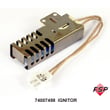
| Oven will not heat | Ignition system | Range oven burner igniter 74007498 |
| Oven temperature seems off | Temperature sensing | Oven sensor 12001655 |
| Heat leaking around door | Door seal | Door gasket WPW10162384 |
Maintenance habits that extend life
We recommend these practical habits for the JGW8130DDB:
- Keep spills from baking onto the oven bottom; clean before soils become heavy
- Avoid covering an entire rack with foil or placing foil on the oven bottom
- Let the oven fully preheat (many ovens take roughly 7 to 14 minutes)
- Use the Stop/Clear function to shut the oven off promptly after cooking
- If a fault code appears, follow the reset steps in the JGW8130DDB owner's manual
Why it matters
A wall oven is designed for long service, but small issues (like a weak igniter or a leaking door gasket) can increase heat stress and cooking time. Fixing those early helps protect the control area and keeps baking results consistent.
Last updated: January 2026





