 Error Codes



How do I tell what model Kenmore stove I have?
Your Kenmore stove’s model number is printed on the appliance ID label; for the range shown on this page, the model is 9119108710. On most Kenmore electric ranges, you can find that label around the oven door frame, behind the storage drawer, or on the back panel.
Where to look on a Kenmore electric range
Check these common spots in this order:
- Oven door frame: open the oven door and look along the frame edge
- Storage drawer opening: pull the bottom drawer out and look on the frame behind it
- Back of the range: on the rear panel near the power cord entry
- Under the cooktop (some models): lift-up cooktop or near surface element area
- Side panel (less common): near the lower side trim
What the label looks like and what to write down
The ID label usually includes several fields. Record these exactly (take a clear photo if possible):
| Label item | Why we need it |
|---|---|
| Model number | Matches the correct parts list and diagrams |
| Serial number | Helps confirm production series and compatible revisions |
| Electrical rating (volts/amps) | Helps when diagnosing power and heating issues |
How to confirm you have the right model
Use these quick checks to avoid ordering the wrong part:
- The model number should match character-for-character (example: 9119108710)
- Ignore marketing names like “Elite” or “Classic”; they are not the model number
- If the label is worn, compare the control panel layout and burner configuration to the parts list
- If you are replacing a heating part, match the part by function and location (bake vs surface)
Why it matters
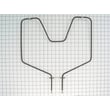
Kenmore ranges often have multiple versions that look similar, but use different bake elements, surface elements, or switches. Using the exact model number helps us match the correct parts, such as the bake element WB44K5012 or a surface element like the 6 in tp unit WB30X254.
Last updated: February 2026
Why is my Kenmore electric oven not getting hot?
If your Kenmore electric range model 9119108710 oven is not getting hot, the most common causes are a failed bake heating element, a bad temperature sensor/thermostat circuit, or a power supply issue (one leg of 240V missing). Start by checking the bake element for damage, then verify power and controls.
Quick checks (fastest wins first)
- Confirm the range is getting 240V at the outlet; a tripped double breaker can leave you with 120V and weak or no heat.
- Set Bake and listen for a relay click; no click can point to a control or wiring issue.
- Inspect the bake element WB44K5012 for blisters, cracks, or a burned spot.
- If the oven heats but never reaches temp, suspect a sensor/thermostat problem or poor connections.
- Check for a loose or overheated power connection at the terminal block 330031 (signs include melting, discoloration, or a burning smell).
What to test with a multimeter
Before testing, shut off power at the breaker.
| What you test | What it tells you | Typical next step |
|---|---|---|
| Bake element continuity | Whether the element is electrically intact | Replace the element if open |
| Voltage to bake element during Bake | Whether the control is sending power | Trace wiring, control, or safety devices |
| Terminal block and cord connections | Whether power is being delivered reliably | Repair/replace damaged connections |
Why it matters
An electric oven needs full 240V and a working heating circuit to reach temperature. A broken element or a failing terminal connection can stop heating completely, and a partial power loss can make the oven heat very slowly.
Related DIY help
If your range is displaying a fault code or acting erratically, use our Kenmore 2014-model self-cleaning electric range error codes guide to narrow down control and sensor-related problems.
Last updated: February 2026
What is the average lifespan of 9119108710?
A Kenmore electric range like model 9119108710 typically lasts 13 to 15 years with normal household use. Lifespan depends most on heating-element wear, door seal condition, and electrical connection health; replacing common wear parts can keep the range cooking safely and evenly.
Typical lifespan and what affects it
- Cooking frequency and heat levels: frequent high-heat baking and broiling shortens element life.
- Power quality and wiring: loose or overheated connections can damage components.
- Cleaning habits: spills left to bake on can stress elements and insulation.
- Door alignment and closure: heat loss makes the oven work harder.
- Timely part replacement: swapping a failed element or switch prevents secondary damage.
Parts that most often determine “end of life”
If the range is otherwise in good shape, these repairs commonly extend service life:
- Oven not heating evenly: replace the bake element WB44K5012
- Surface burner won’t regulate heat: replace the infinite switch WB21X36771
- Power cord connection overheating or arcing: replace the terminal block 330031
- Oven door not closing smoothly: inspect hinges such as door hinge WB14X104
Quick decision guide: repair or replace
| Situation | What it usually means | Best next step |
|---|---|---|
| One function fails (bake or one burner) | Single part failure | Repair with the matching part |
| Multiple heating issues at once | Wiring, switches, or power connection problem | Inspect terminal block and wiring |
| Repeated overheating at power connection | High-resistance connection | Replace terminal block and damaged wires |
| Cabinet is solid, oven cavity is clean | Good candidate for repair | Replace wear parts as needed |
Why it matters
A range near the end of its lifespan often shows slow preheat, uneven baking, or burners that cycle incorrectly. Addressing those symptoms early helps maintain cooking performance and reduces the chance of heat damage to wiring and connectors.
Last updated: March 2026




