 Owner’s manual

Which Hoover has the best suction power?
Suction strength varies by Hoover model and by what you measure (sealed suction, airflow, or cleaning pickup). For your Hoover UH72450 upright vacuum, the best real-world “suction power” comes from keeping the airflow path clear and the filters and brushroll clean, as outlined in the UH72450 owner's manual.
How to compare “best suction” across Hoover vacuums
Different tests emphasize different strengths, so we recommend comparing models using the same metric and test method.
- Sealed suction (water lift): best for deep clogs and strong pull at the hose
- Airflow (CFM): best for moving debris through the system
- Agitation (brushroll performance): best for carpet pickup
- Filtration and bin design: affects how long suction stays strong as the cup fills
- Floorhead design: affects pickup more than raw suction numbers
| What you want | Metric that matters most | Typical “best” Hoover style |
|---|---|---|
| Strong hose suction for tools | Sealed suction (water lift) | Upright with strong suction motor and tight seals |
| Best carpet pickup | Brushroll + airflow | Upright with a well-maintained brushroll and belt |
| Consistent suction over time | Filtration + airflow path | Models with easy-to-clean filters and low clogging |
Get the strongest suction from your UH72450 (most common fixes)
If your UH72450 feels weak, we treat it as an airflow restriction or a maintenance issue first.
- Empty and reinstall the dirt cup correctly
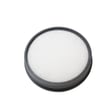
- Clean the rinsable filter and the filter made with HEPA media (a dirty filter reduces airflow fast)
- Clear debris from the brushroll
- Check the hose for clogs
- Set the air valve to the correct mode for floor cleaning vs hose use
For step-by-step locations and cleaning intervals, follow the maintenance and troubleshooting sections in the UH72450 owner's manual.
Why it matters
Two vacuums can have similar “suction” on paper but clean very differently. On an upright like the Hoover UH72450, airflow plus brushroll agitation usually determines carpet pickup, while sealed suction is more noticeable at the hose.
Last updated: January 2026
What are common Hoover vacuum problems?
Common problems on the Hoover UH72450 upright vacuum are low suction, the vacuum not running, the brushroll not turning, dust leaking, and overheating shutoffs. Most are caused by a dirty filter, a full or misinstalled dirt cup, or a clog in the hose or brushroll area; the troubleshooting steps in the UH72450 owner's manual cover these fixes.
Most common symptoms and what usually causes them
- Low suction or not picking up: dirty rinsable filter or HEPA media filter, clogged hose, clogged brushroll area, wrong valve mode selection
- Vacuum will not turn on: no power at the outlet, thermal protector tripped from overheating
- Brushroll not spinning: debris or hair wrapped on the brushroll, obstruction triggering the automatic brushroll shutoff (red light)
- Dust escaping: dirt cup not installed correctly, filter not seated completely
- Shuts off during use: overheating from restricted airflow (clog or dirty filter)
Quick checks we recommend (in order)
- Unplug the vacuum before any cleaning or inspection.
- Empty and reinstall the dirt cup; make sure it seats fully and latches.
- Clean the filter assembly: open the dirt cup, remove the filter assembly, and clean debris off (a dusting tool works well).
- Check for clogs: inspect the hose path and the brushroll area for blockages.
- Clean the brushroll: turn the vacuum over and remove hair and debris.
- If it overheated: unplug and let it cool 30 minutes to reset the thermal protector.
Brushroll red light and reset basics
The UH72450 uses an automatic brushroll shutoff. If the brushroll stops and the red light is on, clear the obstruction in the brushroll area, then toggle the brushroll ON/OFF switch OFF and wait for the red light to go out; then turn it back on.
| Symptom | Most likely cause | Best first fix |
|---|---|---|
| Low suction | Dirty filter or clog | Clean filter, check hose |
| Brushroll not turning | Jammed brushroll | Remove debris, reset brushroll |
| Won’t run | Thermal protector tripped | Cool down 30 minutes |
Why it matters
A clogged filter or brushroll restriction reduces airflow, which hurts cleaning performance and can trigger overheating shutoffs. Regular dirt cup and brushroll cleaning keeps suction strong and protects the motor.
For step-by-step DIY help beyond the manual, use our vacuum repair-guides landing page.
Last updated: January 2026
What's the best upright Hoover to buy?
If you want the best Hoover upright for your home, start by matching features to your floors and cleaning needs (pets, allergies, carpet vs. hard floors). If you already own the Hoover UH72450, keeping it maintained (filters, brushroll, clogs) often delivers “best” performance without replacing the vacuum; see the UH72450 owner's manual.
How we recommend choosing the best Hoover upright
- Homes with pets: prioritize strong agitation (brushroll) and easy hair removal.
- Allergies: prioritize sealed airflow and HEPA media filtration.
- Mostly carpet: prioritize brushroll performance and height adjustment (if equipped).
- Mostly hard floors: prioritize a brushroll shutoff or hard-floor mode (if equipped).
- Stairs and above-floor cleaning: prioritize hose reach and onboard tools.
Quick comparison: what “best” means for most shoppers
| Your priority | What to look for in a Hoover upright | Why it helps |
|---|---|---|
| Pet hair pickup | Anti-tangle style brushroll, easy access to brushroll | Reduces hair wrap and keeps pickup strong |
| Low dust exposure | HEPA media filter, good seals, easy filter maintenance | Helps trap fine dust and allergens |
| Fewer clogs | Wide air path, easy-to-clear hose and inlet | Maintains suction and prevents overheating |
| Long-term value | Available replacement belts, filters, brushroll parts | Keeps the vacuum running like new |
If you already have the Hoover UH72450: get “best performance” first
The UH72450 manual highlights common performance killers: a clogged brushroll or hose, a dirty rinsable filter or HEPA media filter, the dirt cup not installed correctly, or the valve in the wrong mode.
- Empty and reinstall the dirt cup carefully
- Rinse and fully dry the rinsable filter (if equipped)
- Check and clean the HEPA media filter (if equipped)
- Clear debris from the brushroll and check the hose for clogs
- Confirm the selector valve is set to the correct mode
For step-by-step DIY help, use vacuum repair-guides landing page.
Why it matters
Most “bad vacuum” complaints come from airflow restrictions (filters, clogs) or brushroll drive issues (belt, brushroll). Fixing those restores suction and carpet agitation, which is what people usually mean by “best.”
Last updated: January 2026
What is the highest rated upright vacuum cleaner?
The “highest rated” upright vacuum depends on what you clean most, but the top performers are consistently strong on carpet deep-cleaning, pet hair pickup, and sealed filtration. If you already own a Hoover UH72450, keeping the brushroll, filters, and dirt cup maintained often delivers performance comparable to many top-rated uprights.
What “highest rated” usually means (and what to match it to)
Most review rankings weigh a mix of suction, agitation (brushroll), filtration, and ease of use. Use these priorities to choose the right upright vacuum cleaner:
- Carpet-heavy homes: prioritize brushroll performance and airflow
- Pet hair: prioritize tangle resistance, strong agitation, and easy bin emptying
- Allergies: prioritize sealed airflow path and HEPA media filtration
- Hard floors: prioritize brushroll shutoff or gentle brushroll control
- Stairs and upholstery: prioritize hose reach and tool usability
How the Hoover UH72450 compares to “top-rated” features
Your Hoover UH72450 includes features that align with what people like in highly rated uprights, including brushroll control and HEPA media filtration (filter media type). For model-specific operation and care details, follow the UH72450 owner's manual.
| Feature shoppers rate highly | Why it matters | What to check on UH72450 |
|---|---|---|
| Strong carpet cleaning | Lifts embedded grit and pet hair | Brushroll on, nozzle clear, belt/brush not slipping |
| Easy maintenance | Keeps suction consistent | Empty dirt cup before it reaches the max line |
| Filtration | Helps reduce dust blow-by | Filters seated correctly and cleaned on schedule |
| Tool performance | Better stairs, edges, upholstery | Hose seated, attachments fully pushed on |
Quick ways to get “top-rated” performance from your UH72450
These steps fix the most common reasons an upright vacuum feels weak or “not like it used to.”
- Empty the dirt cup before it reaches the max fill line
- Confirm the vacuum is in the correct handle position for floor cleaning
- Turn the vacuum on, then turn the brushroll on when cleaning carpet
- Check for clogs at the hose connection points and nozzle inlet
- Make sure filters and the dirt cup are installed correctly before use
For symptom-based troubleshooting, use vacuum not suctioning well or vacuum brush roll on spinning.
Why it matters
“Highest rated” uprights stay highly rated because they maintain airflow and agitation over time. On the Hoover UH72450, routine dirt cup emptying, correct brushroll use, and keeping the air path clear are the biggest drivers of real-world cleaning results.
Last updated: January 2026


