 Owner’s manual
 Error Codes


How do I clear the error code on my Samsung oven?
On the Samsung NE597R0ABSR electric freestanding range, most error or information codes clear by canceling the current function and then resetting power. Press Clear/Off (or Cancel) for 3 to 5 seconds; if the code returns, turn the range off at the breaker for 1 to 2 minutes, then restore power and recheck.
Quick reset steps (safe first)
- Press Clear/Off and hold for 3 to 5 seconds.
- Wait 30 seconds to see if the display returns to normal.
- If the code stays on, switch the range OFF at the circuit breaker.
- Leave power off for 1 to 2 minutes, then turn the breaker back on.
- Set the clock, then try Bake at 350°F to confirm normal operation.
- If the code appears only when you touch certain keys, wipe the control panel dry and try again.
If the display shows demo or test mode (common “won’t heat” situation)
Some Samsung ranges can be put into a demo or test mode that looks like an error and prevents heating. Use the exact key sequence shown for your model in the NE597R0ABSR owner's manual.
Typical signs:
- Oven will not heat even though the display responds
- A short code or “test” style message appears after power is restored
When the code points to a heating problem
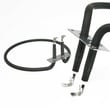
If the oven is not heating and you suspect a failed bake circuit, the bake element is a common cause. For this model, the correct replacement is the range bake element DG47-00038B.
| Symptom | Most likely area to check | What to do next |
|---|---|---|
| Oven won’t heat, broil may still work | Bake element | Inspect for blisters or breaks; replace if damaged |
| Code returns right after reset | Wiring or control sensing | Check connections (power off); look for loose or burned terminals |
| Code appears when pressing certain keys | Stuck or wet keypad | Clean and dry the panel; retry after reset |
Why it matters
Clearing the code correctly helps you confirm whether it was a one-time control glitch, a mode setting (demo/test), or a real failure such as a heating component or wiring issue.
For replacement parts for your range, use the parts list for this model or search by model number on Sears PartsDirect.
Last updated: February 2026
How to hard reset a Samsung oven?
For a hard reset on your Samsung NE597R0ABSR electric freestanding range, turn the range power OFF at the circuit breaker for 5 to 10 minutes, then turn it back ON. This fully power-cycles the control board and clears many lockups and minor software glitches.
Hard reset steps (breaker reset)
- Set the oven to OFF and make sure no cooking cycle is running.
- Switch the range circuit breaker OFF (or remove the fuse if applicable).
- Wait 5 to 10 minutes.
- Turn the breaker ON.
- Set the clock, then test Bake and Broil.
Soft reset (when the controls still respond)
If the display and keys still work, a soft reset can clear minor issues without cutting power.
- Press OFF/CLEAR to stop a cycle.
- If the panel is acting odd, press and hold OFF/CLEAR for about 3 seconds.
- Re-try the cooking mode and temperature.
If the oven still will not heat after a reset
A reset fixes control glitches, but it will not fix a failed heating circuit. Check these common causes:
- House power issue: the range may have lights but be missing one leg of 240V.
- Bake element problem: visible blistering, cracks, or no heat in Bake.
- Wiring connection issue: loose or overheated connections at the terminal block.
- Door switch or latch issue: some modes will not run if the door sensing circuit is wrong.
Quick symptom guide
| Symptom after reset | Most likely direction | What to check next |
|---|---|---|
| Display works, no Bake heat | Heating circuit | Range bake element DG47-00038B and wiring |
| Range seems dead | Power supply | Breaker, cord, and range terminal block DG96-00173A |
| Oven acts like door is open | Door sensing | Range oven door switch DG34-00006A |
Why it matters
Power-cycling clears a “stuck” electronic control state. If the problem returns quickly, the reset helped confirm the issue is likely in a heat component (element) or a power connection, not just the settings.
For control panel features and model-specific key sequences, follow the owner's manual. If you need to order parts beyond what is listed for NE597R0ABSR, search by model number on Sears PartsDirect.
Last updated: February 2026
Why is my Samsung convection fan not spinning?
If the convection fan on your Samsung NE597R0ABSR electric freestanding range is not spinning, the most common causes are a failed convection fan motor, a loose or damaged wire connection, or a control issue that is not sending power to the motor. Use the wiring diagram and test steps in the owner's manual to pinpoint the failure safely.
Quick checks we recommend first
- Turn off power at the breaker before removing panels or touching wiring.
- Make sure convection mode is actually selected (not bake) and the oven is started.
- Listen for a brief “attempt to start” sound; a hum with no spin often points to a stalled motor or obstruction.
- Check for anything rubbing the fan blade (foil, warped liner, heavy grease buildup).
- If the fan spins by hand with power off but will not run, move to electrical tests.
Electrical causes (most likely)
A convection fan needs a complete circuit: control output, wiring, and a good motor.
| What to check | What it looks like | What it usually means |
|---|---|---|
| Convection fan motor | No continuity or seized shaft | Motor failure (replace motor) |
| Wire harness and connectors | Burn marks, loose pins, broken wires | Intermittent or no power to motor |
| Control sending voltage | No voltage to motor during convection | Control or sensor/door logic issue |
| Terminal block and power supply | Heat damage, melted plastic, arcing | Range may not be delivering stable power |
For wiring and power troubleshooting, we use a multimeter and follow safe test practices like those shown in how to use a multimeter to test electrical parts video.
Parts that commonly relate to this symptom
These parts are on the NE597R0ABSR parts list and are often involved when a fan will not run:
- Range oven convection fan motor DG96-00110A (drives the fan)
- Range wire harness DG96-00273A (power and signal path to components)
- Range terminal block DG96-00173A (incoming power connection point)
Why it matters
A non-spinning convection fan causes uneven baking, longer cook times, and overheating around the oven cavity. Fixing the root cause protects the control wiring and helps the oven maintain stable temperatures.
If you need to order parts, use the parts list for model NE597R0ABSR on this page, or search by model number on Sears PartsDirect.
Last updated: February 2026





