Owner’s manual
 Error Codes



What is the downside of a dehumidifier?
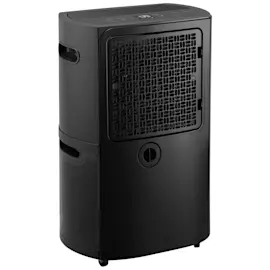
A dehumidifier like the GE ADEL70LWQ1 can raise energy use, add fan and compressor noise, and require routine upkeep (filter cleaning and bucket emptying). It can also warm the room slightly and, if used in cold spaces, may frost the coils and reduce moisture removal.
Common downsides (and what to do about them)
- Higher electricity use: Run it only when humidity is high; use a target setting instead of nonstop when possible.
- Noise: Fan and compressor sound is normal; place it on a smooth, level floor to reduce vibration.
- Maintenance: A dirty filter restricts airflow and hurts performance; clean or replace the dehumidifier air filter WK85X21721.
- Bucket handling: The unit shuts off when the bucket is removed or full; keep the bucket seated correctly.
- Limited reach: In a basement, it may not dry an adjacent closet unless air can circulate in and out.
- Cold-temperature performance: If the area drops below about 41°F, frost can form on the coil; the unit may go into automatic defrost and dehumidify less during that time.
Quick operating tips for better results
Use these setup basics to reduce the “downsides” and get steadier humidity control:
- Keep doors and windows closed in the room you are drying.
- Allow at least 12 to 18 inches of clearance on all sides for airflow.
- Avoid blocking the front or back with curtains or furniture.
- When first starting in a damp space, run continuously for 24 hours to pull down moisture.
- Choose one water-removal method: bucket or hose (do not use both at the same time).
Bucket vs hose: what changes
| Water removal method | What you may notice | Best for |
|---|---|---|
| Bucket | Needs emptying; unit stops when bucket is removed/full | Occasional use, smaller moisture loads |
| Hose to drain | Less hands-on; must be routed correctly to prevent leaks | Continuous operation, high humidity areas |
Why it matters
Over-drying, restricted airflow, or cold-room operation can make a dehumidifier seem “ineffective” while still using power. Following the placement, temperature, and cleaning guidance in the ADEL70LWQ1 owner’s manual helps you control humidity efficiently and avoid nuisance issues like frosting or water handling problems.
Last updated: January 2026
How many hours a day should you run a dehumidifier?
For the GE ADEL70LWQ1 dehumidifier, we run it as long as needed to reach and hold the humidity setting; in many homes that means several hours per day, and it may cycle on and off automatically. When first using it in a damp space, operate it continuously for 24 hours (then adjust based on results). See the ADEL70LWQ1 owner's manual.
Recommended run-time by situation
- First-time drying or after a water event: run continuously for 24 hours, then reassess.
- Everyday humidity control: run until you maintain about 30% to 50% RH (typical comfort range).
- Basements and very damp rooms: expect longer run times; the unit may run most of the day.
- Cool rooms: moisture removal drops when the room is below 41°F; longer run time is normal.
- If the bucket fills often: empty and reseat the bucket so the unit can keep running.
What makes your dehumidifier run longer (or shorter)
| Factor | What you’ll notice | What to do |
|---|---|---|
| Humidity setting is high | Unit shuts off sooner | Lower the setpoint for drier air |
| Doors/windows open | Unit runs “too much” | Close openings to outside air |
| Restricted airflow | Weak performance, longer run time | Keep clear space around the unit and clean the filter |
| Dirty filter | Reduced airflow and moisture removal | Replace the dehumidifier air filter WK85X21721 |
Quick checks if it seems to run all day
- Confirm the humidity setpoint is not set too low for the space.
- Make sure curtains, furniture, or walls are not blocking airflow.
- Clean or replace the air filter.
- Verify the bucket is seated correctly; the unit shuts off if the bucket is out of position.
- If you are using the bucket, do not leave a drain hose attached (water can end up on the floor).
Why it matters
Run time is normal when the dehumidifier is actively pulling moisture from the air. Correct airflow, a clean filter, and a realistic humidity setting help the ADEL70LWQ1 reach the target faster, reduce unnecessary compressor run time, and prevent nuisance shutoffs from a full or mis-seated bucket.
Last updated: January 2026
How many square feet will a 70 pint dehumidifier take care of?
A 70-pint dehumidifier like the GE ADEL70LWQ1 is typically used for large spaces; in very damp conditions it often handles about 1,000 sq. ft., and in moderately damp areas it can cover 2,000 sq. ft. or more. Actual coverage depends most on humidity load, air circulation, and temperature.
Typical coverage ranges (what to expect)
Coverage is driven by how wet the space is and how much outside air leaks in.
- Very damp or wet basement (standing moisture, musty odor): about 1,000 to 1,500 sq. ft.
- Moderately damp (seasonal humidity, occasional condensation): about 1,500 to 2,500 sq. ft.
- Loosely sealed areas (frequent door opening, leaky windows): expect the lower end of the range
- Cool rooms (near or below 41°F): moisture removal drops and frost/defrost cycles can increase
For best results, follow the spacing and location guidance in the ADEL70LWQ1 owner's manual.
Quick sizing guide
| Space condition | Common symptoms | 70-pint unit fit |
|---|---|---|
| Very damp | musty smell, damp walls, visible moisture | Good for large rooms; may need longer run time |
| Moderately damp | clammy air, occasional window sweat | Strong match for large areas |
| Multiple rooms | closed doors, poor airflow between rooms | Works best per-room unless airflow is improved |
What changes the square-foot number the most
- Air circulation: closed doors and tight corners reduce performance
- Temperature: dehumidifiers work best above 41°F
- Humidity setting: a lower setpoint increases run time and water removal
- Airflow restrictions: dirty filter or blocked grilles reduce capacity
- Moisture sources: laundry drying indoors, seepage, or open windows add load
Why it matters
If the space is larger than the dehumidifier can realistically handle, the unit can run “too much” and still feel damp. Matching capacity to the room’s moisture load helps you reach the target humidity faster and reduces unnecessary compressor run time.
Last updated: January 2026