
How do I change my shop vac from dry to wet?
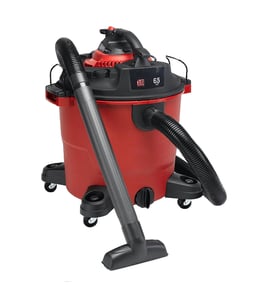
To switch your Shop-Vac QPS30 from dry pickup to wet pickup, we remove the dry filter setup, confirm the tank is empty and clean, then install the correct wet-pickup protection (foam sleeve or float cage, depending on what your unit uses) before vacuuming liquids.
Dry vs. wet setup: what changes
Most wet/dry shop vacuums use the same motor head and tank for both modes; the change is mainly the filter and float protection.
- Dry pickup: uses a dry filter (cartridge or bag) to capture dust
- Wet pickup: uses a washable foam sleeve or no dry cartridge filter (varies by design)
- Float shutoff: a float rises with liquid level and helps stop airflow when the tank is full
Steps to change from dry to wet (QPS30)
- Unplug the vacuum.
- Remove the power head (motor top) and set it aside.
- Empty the tank and wipe out heavy dust so it does not turn into sludge.
- Remove the dry filter or dust bag (if installed).
- Install the wet-pickup filter/protector your QPS30 uses (commonly a foam sleeve over the filter cage).
- Reinstall the power head and latch it.
- Test briefly; if suction suddenly drops during wet pickup, the float may be closing because the tank is full.
Quick checks before vacuuming liquids
- Use a GFCI-protected outlet.
- Keep the hose and nozzle clear so the float system can work correctly.
- Stop and empty the tank when you hear a pitch change or suction drops.
| Task | Dry pickup | Wet pickup |
|---|---|---|
| Filter installed | Cartridge/bag | Foam sleeve or wet setup |
| Main risk | Clogged filter | Float shutoff, overflow |
| Cleanup after use | Tap/brush filter | Empty tank, rinse, dry |
Why it matters
Using a dry filter for liquid pickup can clog the filter fast and can cause messy blow-by. Setting the QPS30 up for wet pickup helps protect airflow, improves suction, and makes cleanup easier.
For parts and accessories that fit your Shop-Vac QPS30, we recommend searching by model on Sears PartsDirect.
Last updated: February 2026
What should you not vacuum with a wet dry vac?
For a Shop-Vac QPS30 wet/dry vacuum, do not pick up anything hot, burning, explosive, or ultra-fine; those materials can damage the motor, clog the filter, or create a fire hazard. For safe operation and the right replacement items, start with the model parts list, or search by model on Sears PartsDirect.
Materials you should not vacuum
- Hot ash, embers, or coals (including fireplace ash that is not fully cold)
- Burning cigarettes or anything smoldering
- Flammable liquids (gasoline, solvents, paint thinner) or fuel-soaked debris
- Explosive or reactive dust (some metal dusts, grain dust in quantity)
- Very fine powders (drywall dust, cement, flour) unless your setup is specifically designed for fine dust control
- Large sharp debris (big glass shards, sharp metal) that can puncture hoses or the tank
If you must clean up “messy” stuff, use the right setup
Wet/dry vacuums can handle many wet and dry messes, but performance depends on using the correct filter and keeping airflow open.
- For wet pickup, remove any dry paper-style filter and use the correct wet pickup configuration (float/cage as equipped).
- For fine dust, use a fine-dust filter and consider a collection bag or pre-separator to reduce clogging.
- For sharp debris, sweep up the biggest pieces first, then vacuum the remainder carefully.
Quick decision guide
| Material | Use the QPS30? | Better approach |
|---|---|---|
| Cold water, spills | Yes (wet setup) | Empty tank promptly; dry the unit after |
| Sawdust, dirt | Yes (dry setup) | Clean/replace filter when suction drops |
| Drywall dust, flour | Avoid unless fine-dust setup | Use fine-dust filtration; short runs |
| Hot ash, embers | No | Let it cool completely; use ash-rated equipment |
| Gasoline/solvents | No | Use proper spill control methods |
Why it matters
Hot debris and flammables can ignite inside the tank; fine powders can pass through or clog filtration, overheat the motor, and permanently reduce suction. Using the correct filter and pickup mode protects the vacuum and improves cleaning results.
Last updated: February 2026
Why is my wet dry vac not working?
If your Shop-Vac QPS30 wet/dry vacuum is not working, the most common causes are a power problem (outlet, cord, switch), a clogged airflow path (hose, filter, tank inlet), or a float shutoff triggered by liquid pickup. We start with quick checks, then move to electrical testing.
Quick checks (fastest fixes first)
- Confirm the outlet has power by plugging in a lamp or another tool.
- Reset any tripped breaker or GFCI outlet.
- Reseat the hose and check both ends for a blockage.
- Remove the filter and clear heavy dust buildup (or replace if torn).
- Empty the tank; a full tank or wet pickup can trigger the float shutoff.
- Inspect the nozzle, wand, and tank inlet for packed debris.
No power: what to test safely
Unplug the vacuum before inspecting anything internal.
- Power cord: look for cuts, crushed spots, or a loose connection at the plug.
- On/off switch: if it feels loose, sticks, or only works intermittently, it is a prime suspect.
- Motor thermal overload: if it stopped after heavy use, let it cool 30 to 60 minutes, then try again.
If you have a meter, use our guide to check continuity on the cord and switch: how to use a multimeter to test electrical parts video.
Runs but has little or no suction
Suction loss is almost always airflow restriction or an air leak.
- Clean or replace the filter; a clogged filter is the top cause.
- Check the hose for a hidden clog (coins, drywall dust, damp debris).
- Verify the lid is seated evenly and the gasket area is clean.
- Make sure the float is not stuck in the “up” position after wet pickup.
Symptom-to-cause guide
| What you notice | Most likely cause | What we do first |
|---|---|---|
| Completely dead | No power, bad cord, bad switch | Test outlet, inspect cord, test switch |
| Runs, no suction | Clogged filter or hose | Remove filter, clear hose |
| Stops mid-use | Thermal overload or blocked airflow | Cool down, clear restrictions |
| Works after emptying | Float shutoff triggered | Empty tank, free float |
Why it matters
Running a wet/dry vac with restricted airflow can overheat the motor and shorten its life. Clearing clogs and keeping the filter in good shape restores suction and helps prevent repeat shutdowns.
For model-specific replacement parts and diagrams for your QPS30, use the parts list for this model, or search by model number on Sears PartsDirect.
Last updated: February 2026


