Installation guide
 Owner’s manual
 Error Codes












How do I reset my 79096629700 electric oven?
To reset the control settings on your Kenmore Elite 79096629700 electric range, use the control-panel “clear stored recipes” procedure; it restores multiple preferences back to factory defaults. After any reset or power interruption, set the clock and reselect your cooking function.
Factory-default style reset (clears stored recipes)
This model’s control has a reset that’s tied to clearing stored recipes; it also resets several user adjustments.
- Press and hold the recipe/recipe recall keypad until the first single beep sounds (about 6 seconds)
- Press START once to complete the reset
- Re-enter the clock and any preferred settings afterward
Keypad names can vary by control panel; use the exact button labels shown in the owner's manual.
What this reset changes
Clearing stored recipes also resets common control preferences back to factory settings.
- 12 or 24 hour time-of-day display
- Continuous bake or 12 hour energy savings mode
- Silent control operation
- Fahrenheit or Celsius temperature display
- Oven temperature adjustment (calibration/offset)
Quick reference
| Reset type | What it does | When to use it |
|---|---|---|
| Clear stored recipes reset | Restores multiple control preferences to factory defaults | Odd settings, calibration changes, display mode changes |
| Power interruption reset | Requires resetting clock and reselecting oven function | After a power outage or breaker trip |
If you meant “reset” after an error or beeping
Use the basic stop/clear action first, then retry your setting.
- Press STOP to clear the display and stop beeping
- Reprogram the oven function (Bake, Broil, Convection)
- If the same fault returns, troubleshoot the heating and sensing circuits
Why it matters
Resetting eliminates control-setting issues (display mode, silent mode, calibration, energy-saver mode) so you can focus troubleshooting on real heating problems like a failed sensor, element, or wiring.
Last updated: February 2026
How many watts does a Kenmore oven use?
A Kenmore oven’s wattage depends on the model and which heating elements are running. For Kenmore Elite range model 79096629700, the exact oven wattage is listed on the appliance serial plate as a kilowatt (kW) rating; you can also confirm electrical requirements in the installation guide.
Typical wattage you can expect
Most 30-inch electric ranges like the Kenmore Elite 79096629700 fall into these common ranges (actual values vary by element and mode):
- Bake element: often about 2,000 to 3,500 watts
- Broil element: often about 3,000 to 4,500 watts
- Convection element (if equipped): often about 2,000 to 3,500 watts
- Whole range connected load: commonly 8,000 to 16,500 watts (8.0 to 16.5 kW)
How to find the exact wattage for model 79096629700
Use these quick checks to get the model-specific number:
- Look for the serial plate on the range (commonly on the oven frame behind the door, storage or warming drawer area, or rear panel).
- Find the kW rating listed for 120/240V and sometimes 120/208V.
- Convert kW to watts: kW × 1,000 = watts.
- Match your home supply (most homes are 240V; some apartments use 208V).
kW to watts conversion table
| Rating on serial plate | Equivalent watts |
|---|---|
| 8.8 kW | 8,800 W |
| 12.0 kW | 12,000 W |
| 16.5 kW | 16,500 W |
Why it matters
Wattage affects breaker size, power cord and terminal block connections, and how much power the oven draws when bake, broil, or convection heat is on. Using the correct electrical setup helps prevent overheating at the terminal block and reduces nuisance breaker trips.
Related parts that can affect heating performance
If the oven is not heating correctly (which can look like a “wattage” problem), these model-compatible parts are common suspects:
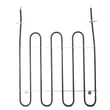
- Frigidaire range bake element 316413800
- Frigidaire range broil element 316203301
- Frigidaire range oven temperature sensor 316490000
Last updated: February 2026
Where can I find my 79096629700 oven model number?
You can find the model number for your Kenmore Elite range on the appliance identification label, typically on the oven frame behind the door (door jamb area) or on the frame behind the lower storage or warming drawer. Your Use and Care Guide also lists the model series as 790.9662*. See the owner's manual for model identification details.
Common places to check on model 79096629700
- Open the oven door and look along the front frame (left or right side) for a rating label
- Pull out the lower drawer (storage or Warm & Ready drawer) and check the frame behind it
- Check the back panel area near the venting path (if accessible)
- Look for a label with both the model number and serial number
- Write the number exactly as shown (all digits), then use it to match parts
What the label usually looks like
Most Kenmore ranges use a paper or foil rating label that includes:
- Model number (for example, 79096629700)
- Serial number
- Electrical rating information
| What you see | What it means | Why it helps |
|---|---|---|
| Model number | Identifies the exact design | Ensures the right parts fit |
| Serial number | Production identifier | Helps match revisions when needed |
| Electrical ratings | Voltage and amperage info | Useful for safe electrical service |
Why it matters
Kenmore model numbers can look similar across different ranges. Using the exact 79096629700 model number helps us match the correct parts list for items like a bake element, broil element, or oven temperature sensor.
Last updated: February 2026
Why is my 79096629700 stove not working?
If your Kenmore Elite 79096629700 electric range is not working, the most common causes are a power supply problem (tripped breaker, loose cord connection), a control lockout condition, or an oven control fault code (an “F” code). Start with the quick checks in the owner's manual.
Quick checks (most common fixes)
- Confirm the range is plugged in fully and the outlet is working.
- Reset the double circuit breaker for the range (turn OFF, then ON).
- Check for a power outage by verifying other lights/outlets in the home.
- If the cooktop display shows "--", unlock the cooktop (lockout condition).
- If the control is beeping and shows an F code, press STOP to clear it and see if it returns.
- Make sure you are using the correct knob/control for the surface element you want.
What the display is telling you
| What you see | What it usually means | What to do next |
|---|---|---|
| No lights, no display | No power to the range | Reset breaker; check cord/outlet |
| "--" on ESEC display | Cooktop lockout or self-clean lockout | Wait for self-clean to finish or unlock cooktop |
| Beeping with an “F” code | Control detected a fault | Press STOP; if it returns, troubleshoot the circuit/part |
If the oven heats wrong or not at all
If the oven runs but temperatures are off, a failed sensor is a common cause. For this model, the oven temperature sensor is a frequent diagnostic step because it tells the control board what temperature the oven is actually at.
- If baking is inconsistent, confirm you preheat fully and use the recommended rack position.
- If the oven seems too hot or too cool, follow the temperature adjustment guidance in the manual.
- If you suspect a sensor issue, check the wiring connections and consider replacing the frigidaire range oven temperature sensor 316490000.
Why it matters
Electrical ranges depend on stable 240V power and accurate feedback from components like the oven sensor and control system. A simple lockout, breaker trip, or recurring fault code can stop heating even when the range looks “fine” from the outside.
Last updated: February 2026