 Owner’s manual



How do I know which vacuum bag to buy?
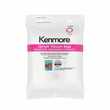
For Kenmore model 11631150313, the correct replacement dust bag is Style O (Sears part 20-53293 for a 2-pack or 20-53294 for a 6-pack). Using the right bag style helps maintain airflow, keeps the CHECK BAG indicator accurate, and protects the motor and filters; see the 11631150313 owner's manual.
What to match when buying bags
- Model number: Use 11631150313 to avoid lookalike Kenmore bag styles.
- Bag style: This vacuum uses Style O bags.
- Filtration needs: If you want to maintain asthma and allergy performance, use AAFA-approved replacement bags and exhaust filters.
- Usage type: Change bags more often if you vacuum fine powders (carpet freshener, face powder, soot, plaster dust) because they can clog the bag early.
- Do not reuse bags: Reusing can cause bursting and reduced suction.
Quick reference (what to buy)
| What you’re replacing | Correct spec for 11631150313 | Notes |
|---|---|---|
| Dust bag | Style O | Replace when full or when airflow drops |
| Dust bag (2-pack) | 20-53293 | Common “starter” quantity |
| Dust bag (6-pack) | 20-53294 | Better for frequent vacuuming |
How to confirm you need a new bag
The vacuum’s CHECK BAG indicator can turn on when airflow is restricted. Replace the bag first, then check for clogs if the light stays on.
- Light comes on with normal floor cleaning: bag is full or airflow is blocked
- Light comes on with tools/attachments: often normal due to reduced airflow
- Suction drops or dust smell increases: bag is likely loaded
Why it matters
Using the correct Style O bag and replacing it on time keeps suction strong, helps prevent filter clogging, and reduces the risk of vacuum damage from restricted airflow.
Last updated: February 2026
What is the average weight of an upright vacuum?
Most full-size corded upright vacuums average about 13 to 17 lb (around 15 lb is typical). For the Kenmore Elite 11631150313, the exact weight is listed in the specifications section of the 11631150313 owner's manual.
Typical upright vacuum weight ranges
Upright vacuum weight varies mainly by motor size, brushroll design, and whether the unit is bagged.
- Compact uprights: about 10 to 13 lb
- Full-size corded uprights: about 13 to 17 lb
- Heavier “power” uprights: about 17 to 20+ lb
- Bagged models often feel heavier when the bag is full
Why weight matters for cleaning and handling
A heavier upright usually delivers strong carpet agitation and suction, but it can be harder to carry upstairs and steer around furniture. If your vacuum feels unusually heavy to push, airflow restrictions can also increase drag at the nozzle.
Quick checks if your upright feels hard to push
These steps help restore normal airflow and brush performance on the Kenmore Elite 11631150313.
- Make sure you are using the correct floor setting (FLOOR vs CARPET)
- Check the bag status; a full bag can reduce airflow and performance
- Inspect the hose path for clogs; the manual notes the CHECK BAG light can come on with blocked airflow
- Clean debris from the clean-out port area if your model has one
- If you suspect a hose restriction, inspect or replace the vacuum hose KC84PDWFZV07
Weight at a glance (typical)
| Upright type | Typical weight | Best for |
|---|---|---|
| Compact upright | 10 to 13 lb | Small spaces, quick pickups |
| Full-size corded upright | 13 to 17 lb | Whole-home cleaning |
| Heavy-duty upright | 17 to 20+ lb | Deep carpet cleaning |
Why it matters
Choosing the right weight helps balance cleaning power with comfort. If you regularly clean stairs or have limited lifting strength, staying closer to the 13 to 15 lb range usually improves day-to-day usability.
Last updated: February 2026
What is the suction power of the Kenmore Elite vacuum?
Kenmore Elite model 11631150313 does not list a kPa or CFM suction-power rating in the product documentation; instead, suction performance is managed through airflow, attachments, and built-in motor protection. For best real-world suction, keep the airflow path sealed and clear, and use the correct tool for the surface (details in the 11631150313 use and care guide).
What we recommend for maximum suction
- Empty the bag or dust area before it gets packed full.
- Check the hose and wand for clogs; even a partial blockage drops suction fast.
- Inspect the hose for cracks or loose connections; replace if it will not seal.
- Use the combination brush without the brush for higher suction on cushions and stairs.
- If the vacuum shuts off, let it cool and reset the thermal protector (unplug first).
Quick suction troubleshooting checklist
| Symptom | Most common cause | What to do first |
|---|---|---|
| Weak pickup on carpet | Clog or air leak | Check hose, wand, and connections |
| Works on floor, weak on tools | Hose leak or blockage | Inspect/clear hose; confirm tight fit |
| Vacuum stops while running | Thermal protector tripped | Unplug, cool down, then restart |
| Dust escaping | Poor seal at bag area | Reseat bag/support and check for gaps |
Parts that commonly affect suction on this model
If you find an air leak or damaged connection, these model-matched parts are common fixes:
- Vacuum hose KC84PDWFZV07 (cracks, splits, loose cuffs)
- Bag support KC10KDWFZV07 (bag seating and sealing issues)
- Dust compartment KC66KDWFZ000 (damage that prevents proper sealing)
Why it matters
Suction “power” is only part of cleaning performance; airflow and a sealed system matter just as much. A small clog or leak can make a strong motor feel weak, and it can also trigger the thermal protector that shuts the motor off to prevent damage.
Last updated: February 2026
Why don't vacuum cleaners have bags anymore?
Many vacuum cleaners moved to bagless designs because they are cheaper to operate day to day and easier for many people to empty, but bagged uprights like the Kenmore 11631150313 are still common because they help contain fine dust and keep airflow more consistent when maintained per the 11631150313 owner's manual.
Bagless vs. bagged: what changed
Bagless vacuums became popular mainly for convenience and marketing, not because bags stopped working.
- No ongoing bag purchases; you empty a bin instead
- Clear bins make it easy to see when it is full
- Some designs keep suction steady until the bin and filters load up
- More frequent filter cleaning is usually required
- Emptying can release a dust cloud if done indoors
Why bagged vacuums are still a smart choice
Your Kenmore Elite upright is designed to run with a dust bag and filters installed; that setup helps protect the motor and manage fine dust.
- Better containment for allergens and fine debris (less mess when disposing)
- Helps prevent dirt from coating internal air paths
- Often reduces odor compared to a dirty dust cup
- Less hands-on contact with debris
Maintenance that matters most on model 11631150313
The manual guidance is clear: keep the bag and filters in place, replace the bag when full, and clear airflow restrictions when suction drops.
| Symptom | Most common cause | What to do first |
|---|---|---|
| Check bag light on | Full bag or airflow restriction | Replace bag; check for clogs |
| Poor pickup | Clogged hose/nozzle or dirty filters | Remove clogs; clean/replace filters |
| Sound changes with tools | Reduced airflow through attachment | Check for blockage; this can be normal |
If you suspect a blockage in the wand or hose path, inspecting and replacing the vacuum hose KC84PDWFZV07 is a practical next step.
Why it matters
Airflow is everything in a vacuum. A full bag, dirty filter, or clogged hose reduces suction and can trigger indicators, overheating protection, or poor cleaning performance.
Last updated: February 2026
Why is my Kenmore vacuum not suctioning?
Loss of suction on a Kenmore Elite vacuum cleaner model 11631150313 is almost always caused by restricted airflow: a full dust bag, clogged filter, or a blockage in the hose or clean-out path. Restoring airflow (bag, filters, and clogs) brings suction back.
Quick checks that fix most “no suction” problems
- Replace the dust bag if it is full or packed with fine dust.
- Check the hose and wand for a clog; remove the hose handle and inspect the full length.
- Inspect the clean-out port and any visible air passages for debris.
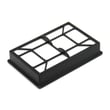
- Replace clogged filters, including the HEPA media exhaust filter cartridge.
- If suction changes and you hear rushing air, the by-pass valve may be open due to restricted airflow.
Step-by-step: clear clogs and restore airflow
- Unplug the vacuum.
- Check the dust bag first; a full bag is the most common airflow restriction.
- Follow the clog-removal steps in the 11631150313 owner’s manual (see the “Removing clogs” section).
- Inspect the extension hose and remove any blockage.
- Replace the exhaust filter cartridge if it is dirty or plugged.
If the vacuum overheated
This model uses thermal protection. After you remove clogs and correct airflow restrictions, wait about 50 minutes before restarting.
Common causes and what you’ll notice
| Cause | What you’ll notice | What to do |
|---|---|---|
| Full dust bag | Weak pickup, higher pitch motor sound | Replace bag |
| Clogged HEPA exhaust filter | Reduced airflow, warmer exhaust | Replace filter cartridge |
| Hose or clean-out blockage | Suction at base changes, tools don’t pull | Clear clog |
| By-pass valve open | Loud rushing air sound | Restore airflow, adjust suction control when using tools |
Parts that are often involved
If you find damage or an air leak while checking for clogs, these model-matched parts are common fixes:
- Vacuum hose KC84PDWFZV07 (cracks, splits, loose connections)
- Dust compartment KC66KDWFZ000 (poor sealing or damage around the bag area)
Why it matters
Suction loss is an airflow problem. When airflow drops, the vacuum can open the by-pass valve for cooling and may overheat, which reduces cleaning performance and can trip thermal protection.
Last updated: February 2026


