Installation guide
 Owner’s manual
 Error Codes


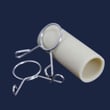

How do I get my Fisher and Paykel DishDrawer to drain?
To get your Fisher & Paykel DD24DCTX6-88511A DishDrawer to drain, we start by checking the drain hose for kinks or a blockage, then clean the drain filter and filter plate. The manual also notes the DishDrawer must be used with the drain filter, filter plate, and spray arm correctly in place for proper draining.
Quick steps to restore draining
- Cancel the cycle and let the unit go to drain (if your control panel supports cancel/drain).
- Check the sink drain or garbage disposer for a clog (a backed-up sink drain can stop dishwasher draining).
- Inspect the drain hose routing for kinks, crushing, or a low spot that traps water.
- Remove and rinse the drain filter and confirm it sits flush with the filter plate.
- Verify the spray arm and filter plate are seated correctly after cleaning.
- Run a short rinse cycle to confirm the drawer drains fully.
Clean the drain filter and filter plate (most common fix)
The DD24DCTX6-88511A manual recommends cleaning the drain filter whenever you see food particles, and cleaning the spray arm and filter plate about once a month in normal use. Use the cleaning steps in the DD24DCTX6-88511A owner's manual.
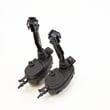
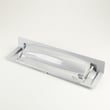
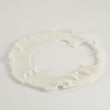
If you need replacement parts because the filter is cracked, warped, or will not seat correctly, match the part to your model:
- Drain filter 524828 (part number 529824)
- Filter plate 524888 (part number 529822P)
Drain hose checks (kinks, clogs, and connections)
A drain problem is often a hose issue. Use this checklist:
| What we check | What “good” looks like | What to do if it’s not good |
|---|---|---|
| Hose routing | Smooth curve, not pinched behind cabinet | Re-route to remove pinch points |
| High loop/air gap setup | Routed per install instructions | Correct routing per DD24DCTX6-88511A installation guide |
| Connection at waste pipe/disposer | Secure, no leaks | Re-seat clamp and clear blockage |
Why it matters
When the drain filter or filter plate is dirty or not seated, food debris can restrict flow and the pump can struggle to move water out. A kinked drain hose can trap water and cause repeated “not draining” symptoms even after cleaning.
Last updated: February 2026
How do you reset the flood switch on a Fisher Paykel dishwasher?
On the Fisher & Paykel DD24DCTX6-88511A DishDrawer, a flood switch (flood fault) is cleared by turning the dishwasher’s power off, waiting briefly, then restoring power; if the switch re-trips, you must remove the water that triggered the flood protection before it will stay reset. See the DD24DCTX6-88511A owner's manual for the flood fault guidance.
What to do (safe reset steps)
- Press Power to stop the cycle and turn the drawer off.
- Turn power supply off to the DishDrawer (unplug or switch off the breaker).
- Wait 2 to 5 minutes.
- Restore power and press Power to turn the unit back on.
- If the flood fault returns, do not keep resetting; remove the water and correct the cause.
If the flood fault comes back: remove the water and check common causes
Flood protection usually trips because water is where it should not be (leak, overflow, or drainage issue). After shutting power off:
- Pull the drawer open and remove standing water with towels or a wet/dry vacuum.
- Confirm nothing is blocking the spray arm and that the filter area is seated correctly.
- Clean and reseat the filter components; a clogged filter can contribute to poor draining.
- Inspect the drain path for kinks or restrictions.
- If you suspect a drain valve issue, inspect the dishwasher drain valve and o-ring 522150 for debris or damage.
Quick symptom-to-check table
| What you notice | Most likely area to check | What to do first |
|---|---|---|
| Water left in the bottom after a cycle | Drain restriction or filter issue | Clean filter area; check drain hose routing |
| Beeping and fault returns right after restart | Active leak or water in base | Dry out water; look for drips under/around drawer |
| Poor wash plus water sloshing | Spray arm obstruction or filter not seated | Clear obstruction; reseat filter components |
Why it matters
The flood switch is a safety device that helps prevent water damage. Resetting power can clear the fault once, but the dishwasher will keep protecting itself until the leak, overflow, or drainage problem is fixed.
Last updated: February 2026
What does A6 mean on Fisher and Paykel dishwasher?
On the Fisher & Paykel DD24DCTX6-88511A DishDrawer dishwasher, an A6 code means there’s a spray arm fault. Open the drawer, make sure the spray arm is properly seated on its mount, and confirm it spins freely without hitting dishes; see the DD24DCTX6-88511A owner's manual.
What to check right away
- Pause the cycle and open the drawer.
- Remove any tall items (cutting boards, utensils, pan handles) that can block rotation.
- Lift and re-seat the spray arm so it sits firmly on the hub.
- Spin the spray arm by hand; it should rotate smoothly.
- Check the spray arm holes for debris; rinse and clear any blocked jets.
- Reinstall the racks correctly and restart the cycle.
Parts that are commonly involved
If the spray arm is damaged, warped, or won’t stay seated, replacement is often the fastest fix.
| Symptom | Most likely cause | What to do |
|---|---|---|
| Spray arm won’t spin | Dishes blocking rotation | Reload to create clearance |
| Poor cleaning plus A6 | Spray arm holes blocked | Clean spray arm jets |
| Spray arm loose or off | Worn or damaged spray arm | Replace the dishwasher spray arm 527475 |
Why it matters
A spray arm that cannot rotate prevents proper water coverage, which leads to unclean dishes and can cause the dishwasher to stop the cycle with a fault. Keeping the spray arm seated and unobstructed restores normal wash performance.
If A6 keeps coming back
- Run a quick rinse cycle with the drawer empty to confirm free rotation under water pressure.
- Clean the filter area so wash water can circulate properly (food debris can contribute to wash issues).
- If the spray arm is confirmed good and unobstructed, the issue can be related to wash circulation components; at that point, service is the next step.
Last updated: February 2026