



How to test a moisture sensor on a Maytag dryer?
On a Maytag MDE7758AYW dryer, we test the moisture sensor by checking continuity/resistance across the two sensor bars. With the bars dry, the meter typically shows open or very high resistance; bridging both bars with a wet cloth should change the reading, confirming the sensor circuit responds.
- Digital multimeter (ohms/continuity setting)
- Wet cloth or paper towel
- Screwdriver (to access the sensor area if needed)
- Flashlight
- Unplug the dryer (or switch off the breaker).
- Locate the sensor bars inside the drum, usually near the lint screen housing.
- Set your multimeter to ohms (Ω) or continuity.
- Touch one meter lead to each sensor bar.
- Dry bars: note the reading (often OL/open or very high resistance).
- Wet test: press a wet cloth across both bars at the same time.
- Watch for a clear change in the meter reading (resistance drops or continuity changes).
| Meter result | What it usually means | What to do next |
|---|---|---|
| Reading changes when wet | Sensor circuit is responding | Clean bars; then check wiring if drying still acts up |
| No change wet vs. dry | Sensor circuit not responding | Inspect wiring/connector; test harness back to control |
| Always shows very low ohms (short) | Sensor or wiring shorted | Inspect for pinched wire; repair or replace damaged parts |
- Clean the sensor bars with rubbing alcohol; dryer sheet residue insulates them.
- Clean the lint screen and housing; restricted airflow can mimic “sensor” problems.
- Confirm the load is not overdried by using the correct cycle and dryness level.
The moisture sensor helps the dryer stop at the right time. If it cannot “see” moisture, the MDE7758AYW can shut off too soon or run too long, wasting energy and stressing parts like the belt, tumble WP33002535.
Last updated: February 2026
What's the life expectancy of a Maytag dryer?
A Maytag dryer like model MDE7758AYW typically lasts 12 to 15 years with normal household use and basic upkeep. Many units reach the higher end of that range when airflow is kept strong and wear parts are replaced before they cause bigger damage.
Dryer life is mostly driven by heat stress, airflow restriction, and drum support wear.
- 12 to 15 years: common for a well-maintained Maytag dryer
- 8 to 12 years: heavy use, poor venting, frequent overheating
- 15+ years: light to moderate use, clean venting, timely part replacement
These steps reduce overheating and strain on the motor, belt, and drum rollers.
- Clean the lint screen every load; replace a torn or warped screen such as the dryer lint filter WP33001808
- Clean the vent duct and outside hood regularly (short, straight vent runs dry faster)
- Do not overload; overloading stretches the belt and stresses drum supports
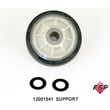
- Stop using the dryer if you hear squealing or thumping; inspect drum support parts like the roller w/bea 12001541
- If the dryer shuts off and will not restart, test safety fuses before repeated resets; a common item is the dryer thermal fuse, 243-degree f WP307473
| Symptom | Most common cause | What we usually check first |
|---|---|---|
| Clothes take too long to dry | Restricted airflow | Venting, lint filter, blower path |
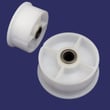
| Squealing, rumbling, thumping | Worn drum support | Rollers, bearing kit, idler pulley |
| Runs but no heat | Heating circuit issue | Thermal fuse, thermostat, heating element |
| Stops mid-cycle | Overheating or motor issue | Airflow, motor, fuses |
A dryer that is overheating or running with worn drum supports can damage the drum, motor, and belt. Fixing airflow and replacing common wear parts early often costs less than waiting for a major breakdown.
Last updated: February 2026
Where to find part number on Maytag dryer?
On a Maytag dryer like model MDE7758AYW, the part number is printed on the part itself (not on the model/serial tag). We typically find it stamped, printed, or on a small sticker on the component after you open the cabinet or remove the part.
- Check the model/serial tag area (door opening, door frame, or inside the front panel) to confirm you have MDE7758AYW before ordering parts.
- Look directly on the part for a stamped number (metal parts like a heater housing or bracket).
- Look for a white barcode sticker (common on plastic parts like a blower wheel or lint duct pieces).
- Check the back side of knobs, baffles, and trim pieces after removal.
- For electrical parts, check the side of the component body (motor, thermostat, thermal fuse).
| Part type | Where the part number is usually found | What it may look like |
|---|---|---|
| Belt and drum support parts | Printed on belt; stamped on roller bracket | Inked text or molded ID |
| Heating and safety parts | On the heater can, thermostat body, or fuse label | Sticker with digits/letters |
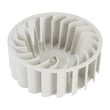
| Airflow parts | On blower wheel hub or housing sticker | Molded number or barcode |
| Door parts | On hinge/strike area or backside | Stamped or sticker |
- Take a clear photo and zoom in; try different angles and lighting.
- Wipe lint and residue off the label area (dry cloth first).
- Search by model number MDE7758AYW and match by part name and diagram location.
- If you are replacing a common wear item, match it to a known listing such as the belt, tumble WP33002535 or dryer thermal fuse, 243-degree f WP307473.
Maytag dryers often use multiple similar-looking versions of belts, thermal fuses, and blower wheels; matching the exact part number (or matching by model MDE7758AYW) prevents fit and heating or airflow issues after installation.
Last updated: February 2026





