Owner’s manual












How to find part number on Whirlpool dryer?
On your Whirlpool WED8300SB1 dryer, the model and serial tag is typically located in the door opening area (often on the upper-right side near the door switch). Use the model number and serial number from that tag to look up the correct replacement part number for your exact dryer.
Where to look on the dryer
Check these common tag locations first:
- Inside the dryer door opening on the cabinet frame
- Upper-right area of the door opening near the door switch
- Along the front panel just inside the door
- On the rear panel (less common)
For diagrams and model identification details, use the WED8300SB1 owner’s manual.
What numbers you need (and why)
The tag usually includes several identifiers. Here is what each one is used for:
| What you see on the tag | What it’s used for | Example format |
|---|---|---|
| Model number | Matches parts to your exact design | WED8300SB1 |
| Serial number | Confirms production series and revisions | Letters and numbers |
| Type/Code (if shown) | Helps narrow variations on some Whirlpool builds | Varies |
Why it matters
Whirlpool can change components during a production run. Using the exact model number (WED8300SB1) and the serial number helps ensure the part you order fits and works correctly the first time.
Tips for ordering the right part
Before you search for a part number, we recommend:
- Write the model and serial number exactly as shown (including all letters)
- Take a clear photo of the tag for reference
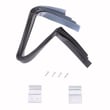
- Match the part by name and ID when possible (for example, a wear item like the dryer repair kit 4392067)
- If you are troubleshooting a heat problem, confirm the symptom first; many “no heat” issues trace to airflow or a failed heater circuit
Last updated: February 2026
What are common dryer part failures?
On the Whirlpool WED8300SB1 dryer, the most common part failures show up as no heat, long dry times, won’t start, or unusual noises. We focus first on airflow and safety devices (lint screen, venting, thermal cut-off) because restrictions can overheat the dryer and damage heating and drive components; see the WED8300SB1 owner's manual.
Most common failures and what you’ll notice
- No heat or weak heat: failed heating circuit parts such as a thermal cut-off or heating element
- Long dry times or clothes too hot: clogged lint screen or restricted exhaust venting (often the root cause)
- Won’t start or stops mid-cycle: house breaker/fuse issue, door latch problem, or a blown safety fuse
- Squealing, thumping, or rumbling: worn drum support rollers or idler pulley
- Poor airflow/noisy airflow: damaged blower wheel
Parts that commonly fix these symptoms (WED8300SB1)
If your symptoms match, these model-compatible parts are frequent solutions:
- Dryer thermal cut-off fuse kit 279973 (no heat, won’t run after overheating)
- Dryer heating element WP8544771 (electric heat failure)
- Dryer thermistor WP8577274 (temperature sensing issues, overheating or poor drying)
- Support WPW10314173 and dryer idler pulley 279640 (squeal/rumble, drum not turning smoothly)
- Dryer blower wheel WP697772 (weak airflow, loud fan noise)
Quick checks we recommend before replacing parts
- Clean the lint screen every load; a blocked screen increases drying time.
- Check the exhaust venting for lint buildup, crushed duct, or too many turns; long vent runs increase dry time.
- Use the right vent material; heavy metal venting is recommended (avoid plastic or foil-style vent).
- Confirm the room temperature is above 45°F (7°C) for normal cycle performance.
- If you see “PF” (power failure), press and hold START to restart.
Symptom-to-part guide
| Symptom | Most likely area | Common parts to check |
|---|---|---|
| No heat | Heating circuit/safety | Thermal cut-off, heating element, thermistor |
| Long dry times | Airflow/venting | Lint screen, vent ducting, blower wheel |
| Squealing/rumbling | Drum support/drive | Support roller, idler pulley |
| Won’t start | Power/door/safety | Breaker/fuse, door latch, thermal cut-off |
Why it matters
Airflow problems (lint screen and vent restrictions) are the most common trigger for overheating, shutdowns, and repeat part failures. Fixing airflow first helps the WED8300SB1 dry faster and protects the heating element, fuses, and motor.
Last updated: February 2026
What are the common problems with Whirlpool dryers?
Common problems on a Whirlpool dryer like model WED8300SB1 include a dryer that will not run, no heat even though the drum turns, unusual noises, and long dry times; many of these trace back to power supply issues, airflow restrictions, or normal wear parts in the drum and drive system. For model-specific checks and safety steps, use the WED8300SB1 owner's manual.
Most common symptoms and what they usually mean
- Dryer will not run: door not fully closed, Start not held long enough, or a tripped breaker (many electric dryers use 2 breakers).
- No heat (but tumbles): one breaker tripped, restricted venting, or a failed heating circuit component.
- Not spinning or squealing/grinding: worn rollers, idler pulley, or belt related wear.
- Thumping at startup: common after a period of non-use; it often fades after a few minutes.
- Rattling: small items (coin, button, paper clip) caught between the drum and front or rear.
- Vibration/walking: dryer not level or leveling legs not secure.
Quick checks we recommend first (fast, no parts)
- Confirm power: reset both dryer breakers (or check both fuses) and verify a 240-volt supply for electric drying.
- Start correctly: press and hold Start for 1 second; make sure the door is firmly closed.
- Check airflow: clean the lint screen and make sure the vent path is not crushed or clogged.
- Listen and inspect: check drum edges for small objects; remove anything you find.
Parts that commonly fix noise or no-heat complaints
| Symptom | Common wear area | Example part for WED8300SB1 |
|---|---|---|
| Squealing, rumbling, poor tumbling | Drum support and belt drive | Support WPW10314173 or dryer idler pulley 279640 |
| No heat | Heating circuit | Dryer heating element WP8544771 |
| Overheating, shuts off, no heat | Safety cut-off components | Dryer thermal cut-off fuse kit 279973 |
Why it matters
Catching airflow and power issues early helps prevent repeat no-heat failures and reduces strain on the heating element, motor, and drum support system.
Last updated: February 2026
What does F1 mean on a whirlpool dryer?
On the Whirlpool WED8300SB1 dryer, an F1-style message falls under the display’s “F-” variable service codes (examples include F-01). In the troubleshooting guidance, these “F-” codes are treated as service conditions; after a basic reset, the next step is service.
What the code is telling you
The WED8300SB1 uses code messages to flag operating problems. In the troubleshooting section, “F-” variable codes (such as F-01, F-22, F-23, F-26) are listed as service codes.
- If you see PF, that indicates a power failure interruption.
- If you see an F- code (including an F1-type display), the dryer is reporting a service code.
- Repeated F-code messages after a reset point to an issue that needs diagnosis and repair.
For the exact wording and the code-message section, use the WED8300SB1 owner’s manual.
What to do first (safe, quick checks)
- Press Cancel/Stop to clear the display.
- Unplug the dryer or switch off the breaker for 1 minute.
- Restore power.
- Press and hold Start to restart the cycle (this is also the recommended action after a PF message).
- Check that the plug is fully seated.
- Confirm the breaker is not tripped.
- If the code returns immediately, stop the cycle and plan for service.
Code message quick guide
| Display message | What it indicates | What we recommend |
|---|---|---|
| PF | Power interruption during the cycle | Restore power; press and hold Start |
| F- (including F-01) | Service code condition | Reset once; if it returns, schedule service |
Why it matters
An F-code is the dryer’s way of preventing unreliable operation. Addressing power issues first and then moving to service for recurring F-codes helps protect the electronic control and prevents repeated shutdowns.
Last updated: February 2026
What's the life expectancy of a Whirlpool Duet dryer?
A Whirlpool Duet dryer like model WED8300SB1 typically lasts about 10 years with normal household use. With consistent vent cleaning, correct loading, and prompt repair of wear parts (belt, rollers, idler), many Duet dryers reach 12 to 15 years.
What affects dryer lifespan the most
- Vent restriction (overheating stresses the heater, motor, and thermal fuses)
- Heavy usage (large households, daily loads, bulky items)
- Worn drum support parts (rollers and idler pulley noise, drag, belt wear)
- Heat control issues (cycling problems can overheat components)
- Moisture sensor and lint screen condition (can cause long dry times and extra run time)
Typical lifespan ranges (what we see most often)
| Usage pattern | Typical life | What usually fails first |
|---|---|---|
| Light (few loads/week) | 12 to 15 years | Rollers, belt, idler pulley |
| Average (4 to 7 loads/week) | ~10 years | Heating system parts, rollers |
| Heavy (daily loads) | 7 to 10 years | Motor, heater, thermal cut-off |
Maintenance that adds years (and prevents repeat failures)
- Clean the lint screen every load; replace a damaged screen such as screen W10120998.
- Keep the exhaust vent short and clear; remove lint buildup behind the dryer.
- Avoid overloading; heavy loads strain the drive motor and drum supports.
- If you hear squealing or thumping, service the drum support system early; a kit like dryer repair kit 4392067 often addresses common wear items together.
- Follow the spacing and installation guidance in the WED8300SB1 owner's manual, especially if installed in a garage (clearance and placement help prevent heat and airflow problems).
Why it matters
Dryer life is mostly determined by heat and airflow. When airflow is restricted, the dryer runs hotter and longer, which shortens the life of the heating element, thermal cut-off, and drive components.
Last updated: February 2026