Owner’s manual
 Error Codes


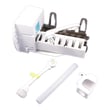
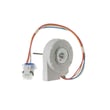
How to reset GE side by side refrigerator not cooling?
If your GE GSE22ESHCSS side-by-side refrigerator is not cooling, the most effective reset is a power reset: unplug it (or switch the breaker off) for 1 full minute, then restore power. After power is restored, allow up to 24 hours for temperatures to fully stabilize.
Reset steps (safe and effective)
- Make sure the temperature controls are not set to 0 (off).
- Unplug the refrigerator for 60 seconds (or turn the circuit breaker off).
- Restore power and confirm interior lights and display come back on.
- Keep doors closed as much as possible for the next several hours.
- Wait 24 hours for the refrigerator to completely cool down after a reset or first power-up.
Quick checks if it still is not cooling
These items cause most “not cooling” complaints on GE side-by-side models:
- Defrost cycle: the refrigerator may be in defrost; wait about 30 minutes.
- Door left open: check for packages holding the door open.
- Warm room or frequent openings: set the control one step colder.
- Airflow issue: blocked vents or heavy frost can reduce cooling.
- Fan problem: if you do not hear the evaporator fan running, inspect the fan area and wiring.
What to do next (symptom-based)
| Symptom | Most likely direction | Common parts to check |
|---|---|---|
| Freezer cold, fresh food warm | Air not moving to refrigerator side | Refrigerator air damper assembly WR13X10988, temperature sensor |
| Both sections warm, compressor runs | Poor heat removal or airflow | condenser fan, condenser coil |
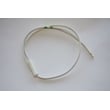
| No fan noise, temps rising | Evaporator fan not running | Rca refrigerator evaporator fan motor WR60X10185 |
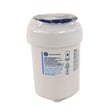
| Water dispenser slow too | Water supply restriction | GE refrigerator water filter MWFP, water valve |
Why it matters
A reset clears control glitches and restarts normal cycling, but cooling still depends on airflow (fans and damper), proper control settings, and keeping doors sealed and closed long enough to pull temperatures down.
For control locations, temperature setting guidance, and troubleshooting tables specific to GSE22 models, use the GSE22ESHCSS owner’s manual.
Last updated: January 2026
What is the most common problem with GE refrigerators ice maker?
On the GE GSE22ESHCSS side-by-side refrigerator, the most common ice maker problem is a water supply issue, especially restricted water flow from a clogged water filter or a shut-off/blocked water line. These problems typically show up as small or hollow cubes, slow ice production, or no ice.
Quick checks we recommend first
- Make sure the ice maker power switch is set to ON.
- Confirm the household water supply valve is fully open and the water line is not kinked.
- Replace the water filter if cubes are small/hollow or ice production is slow; a clogged filter is a top cause.
- If cubes are stuck in the ice maker, turn the ice maker off, remove the cubes, then turn it back on.
- If the freezer is warm, wait 24 hours after temperature changes for full cooling.
What symptoms usually mean (common causes)
| Symptom | Most likely cause | What to do |
|---|---|---|
| No ice at all | Ice maker switched off, water supply off | Turn switch on; open water supply |
| Small or hollow cubes | Clogged water filter | Replace GE refrigerator water filter MWFP |
| Ice maker stops intermittently | Cubes piled up in bin | Level cubes by hand |
| Cubes stuck in mold | Jam in ice maker | Power off ice maker; clear cubes; power on |
Why it matters
Ice makers depend on steady water flow and a cold freezer. When flow is restricted (often by the filter) or the freezer is too warm, the ice maker cannot fill and freeze correctly, which leads to slow production, hollow cubes, or shutdowns.
Helpful model-specific references
- Use the GSE22ESHCSS owner's manual for the ice maker switch location, water line guidance, and troubleshooting steps.
- For prevention tips that reduce repeat clogs and dispenser issues, follow how to prevent water dispenser and ice maker problems.
Last updated: January 2026
How do I find the model number on my GSE22ESHCSS?
For your GE GSE22ESHCSS side-by-side refrigerator, the model number is printed on the rating label inside the fresh food (refrigerator) compartment; it’s located at the top right side behind the controls. You can confirm the exact label location in the owner's manual.
Where to look (exact spot)
Open the refrigerator door (not the freezer door) and check:
- Inside the refrigerator compartment
- At the top, on the right side
- Behind the temperature controls (look for a sticker or plate)
- The label typically lists both Model and Serial numbers
What the label looks like and what to write down
The label includes two key identifiers; record both for parts and service.
| What you need | How it’s shown | Why you need it |
|---|---|---|
| Model number | “Model #” followed by letters and numbers | Ensures diagrams and parts match your exact build |
| Serial number | “Serial #” followed by letters and numbers | Helps identify production date and version changes |
Tips if you don’t see it right away
If the label is hard to spot, these steps usually help:
- Turn on the interior light and use a flashlight
- Look just behind or above the control housing on the right
- Wipe dust or condensation off the surface so the print is readable
- Copy the model number exactly (including any dashes or suffix letters)
Why it matters
GE often uses similar-looking model families (like GSE22 and GSE25), but parts such as a water filter, temperature sensor, or control board can vary by the full model number. Using the exact model number prevents ordering the wrong part.
Last updated: March 2026