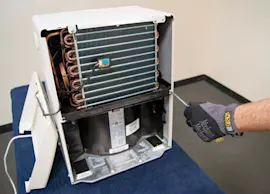
Owner’s manual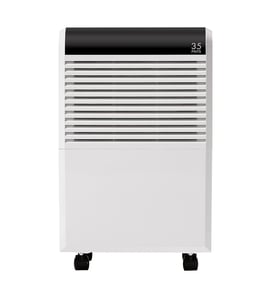

How many square feet will a 50 pint dehumidifier do?
A 50-pint dehumidifier typically covers about 1,500 to 4,500 square feet, depending on how damp the space is, ceiling height, temperature, and airflow. For your Kenmore 25155570510 dehumidifier, use the capacity and coverage guidance in the owner's manual to match your room conditions.
Typical coverage by humidity level
Coverage claims vary because “50 pints” is a moisture-removal rate, not a room-size rating. Use these common planning ranges:
- Light dampness (occasional musty smell): ~3,000 to 4,500 sq. ft.
- Moderate dampness (regular damp feel): ~2,000 to 3,000 sq. ft.
- Very damp or wet areas (basement seepage, standing moisture): ~1,500 to 2,500 sq. ft.
- Warmer rooms remove more moisture than colder rooms (cold basements often need more capacity)
Quick sizing checklist (what to consider)
- Basement vs. living space: basements usually need more capacity per square foot
- Ceiling height: higher ceilings increase the air volume to dry
- Air leaks: open stairwells, leaky windows, and crawlspaces increase load
- Drain setup: continuous drain or pump helps maintain performance without frequent bucket emptying
- Filter and coil cleanliness: a dirty filter or frosted coil reduces moisture removal
Coverage planning table
| Space condition | What you’ll notice | Practical coverage target for 50 pints |
|---|---|---|
| Light damp | mild musty odor | 3,000 to 4,500 sq. ft. |
| Moderate damp | damp air most days | 2,000 to 3,000 sq. ft. |
| Very damp | wet walls/floors at times | 1,500 to 2,500 sq. ft. |
Why it matters
If the dehumidifier is undersized, it can run constantly, struggle to reach the humidity setpoint, and collect less water than expected. If it is oversized, it may short-cycle and control humidity less evenly.
For more sizing guidance, we recommend our article what size dehumidifier do i need.
Last updated: February 2026
How to clean the filter on a Kenmore dehumidifier?
To clean the filter on your Kenmore dehumidifier model 25155570510, remove the air filter, clean it with a vacuum or warm water, let it dry completely, then reinstall it so airflow is not restricted. For model-specific access details, use the owner's manual.
Quick steps (safe, routine maintenance)
- Turn the dehumidifier OFF and unplug it.
- Remove the air filter from the intake grille (location varies by model).
- Dry clean: vacuum both sides to remove lint and dust.
- Wet clean (if needed): rinse with warm water; do not use harsh cleaners.
- Air dry fully before reinstalling (a damp filter can cause odors and poor performance).
- Reinstall the filter securely; make sure it sits flat and does not bow.
How often to clean the filter
Most dehumidifiers perform best when the filter is cleaned on a regular schedule:
| Usage conditions | Recommended cleaning frequency |
|---|---|
| Daily use, dusty area, pets | Every 1 to 2 weeks |
| Typical basement use | Every 2 to 4 weeks |
| Light/seasonal use | Monthly and before storage |
Why it matters
A clogged filter reduces airflow across the evaporator coil, which can lead to weak moisture removal, longer run times, icing on the coil, and extra strain on the fan motor and compressor.
If it still does not remove moisture after cleaning
- Confirm the humidity setting is below the room humidity.
- Make sure doors and windows are closed; reduce outside air infiltration.
- Check that the unit has proper clearance around the air intake and exhaust.
- If you see frost on the coil, let the unit run in a warmer space and recheck airflow.
For deeper troubleshooting and maintenance tips, see how to clean a dehumidifier and dehumidifier doesn't remove moisture.
Last updated: February 2026
How fast will a 50 pint dehumidifier fill up?
A “50-pint” Kenmore dehumidifier like model 25155570510 is rated to remove up to 50 pints of water in 24 hours under standard test conditions, so the bucket can fill anywhere from a few hours to more than a day depending on humidity, temperature, airflow, and whether you use a drain hose. For model-specific bucket capacity and drain setup, check the 25155570510 owner's manual.
What “50 pints” really means
The 50-pint number is a per-day moisture removal rating, not the size of the water bucket.
Typical real-world fill times for a 50-pint unit:
- Very damp basement (high humidity): bucket may fill in 4 to 10 hours
- Moderately humid space: bucket may fill in 8 to 18 hours
- Mild humidity or cool room: bucket may take 18 to 36+ hours to fill
Quick way to estimate your bucket fill time
Use this simple approach:
- Start with 50 pints/day as the upper limit
- Assume 25 to 40 pints/day in many normal homes
- Divide your bucket capacity (pints) by your estimated pints per hour
Example estimate table
| Estimated removal rate | Pints per hour | If bucket is 12 pints, fills in | If bucket is 16 pints, fills in |
|---|---|---|---|
| 50 pints/day (max rating) | 2.1 | ~6 hours | ~8 hours |
| 35 pints/day (typical) | 1.5 | ~8 hours | ~11 hours |
| 20 pints/day (light load) | 0.8 | ~14 hours | ~19 hours |
Why your dehumidifier may fill faster or slower
These factors change how quickly water collects:
- Room humidity level (higher RH fills faster)
- Room temperature (cooler air reduces moisture removal)
- Airflow (dirty filter or blocked grille slows collection)
- Fan speed and setpoint (lower RH target runs longer)
- Door/window leaks (outside air adds moisture)
- Drain setup (continuous drain prevents bucket fill)
Why it matters
Knowing expected fill time helps you decide whether to empty the bucket more often, switch to continuous drain, or troubleshoot if the unit doesn’t collect water. If collection seems unusually low for your conditions, our dehumidifier doesn't remove moisture guide walks through the most common causes.
Last updated: February 2026
Why is my Kenmore dehumidifier not working?
If your Kenmore dehumidifier model 25155570510 runs but is not removing moisture (or will not run at all), the most common causes are airflow problems, a full or mis-seated bucket, a drain issue, or coil icing from low temperature or restricted airflow. Use the checks below, then confirm model-specific indicators in the owner's manual.
Quick checks that fix most “not working” complaints
- Make sure the bucket is fully seated; the bucket switch must close or the unit will stop.
- Empty the bucket and clean any slime or debris that can block the outlet.
- Clean the air filter and confirm the intake and exhaust are not blocked by curtains or furniture.
- Set humidity at least 10% lower than the room’s current humidity so the compressor is commanded on.
- If the room is cool (often below the mid-60s F), expect reduced water collection and possible frost.
- If using a hose, confirm continuous drain is sloped downward with no kinks.
What to check based on the symptom
| What you see | Most likely cause | What to do next |
|---|---|---|
| Fan runs, little or no water collected | Dirty filter, blocked airflow, low room humidity | Clean filter, improve airflow, lower setpoint |
| Frost/ice on coil | Low temperature, dirty filter, weak airflow | Let it defrost, clean filter, run in warmer area |
| Unit stops quickly, “full” behavior | Bucket not seated, float stuck, bucket switch issue | Reseat bucket, clean float area |
| Water on floor | Drain hose issue, bucket crack, unit not level | Re-route hose, check bucket, level the unit |
Why it matters
A dehumidifier removes moisture by moving warm, humid air across a cold evaporator coil. When airflow is restricted or the coil gets too cold and frosts, moisture removal drops sharply and the unit can appear “not working.”
When a repair is more likely
If airflow is good and the bucket and drain are correct, but the unit still does not dehumidify, focus on controls and sensing. Our DIY guide dehumidifier doesn't remove moisture walks through deeper checks (sensor, fan, control, and sealed-system symptoms) in a practical order.
Last updated: February 2026
Is it worth repairing a dehumidifier?
For the Kenmore 25155570510 dehumidifier, repair is worth it when the problem is a simple, low-cost issue (bucket switch, drain blockage, dirty filter, loose wiring). It’s usually not worth repairing when the sealed refrigeration system or compressor is failing because labor and parts typically exceed replacement value.
Quick way to decide (cost vs. benefit)
Use this checklist before you spend money on parts or service:
- If it runs but doesn’t collect water, start with cleaning and airflow checks.
- If it won’t power on, rule out outlet, cord, and control issues first.
- If it leaks, check bucket seating, drain hose routing, and clogs.
- If it ices up, check airflow and room temperature.
- If it hums, clicks, or trips a breaker, suspect compressor/start components or electrical faults.
For model-specific operating and maintenance steps, use the owner's manual.
What’s usually worth repairing vs. not
| Symptom | Common cause | Usually worth repairing? |
|---|---|---|
| Fan runs, little or no water collected | Dirty filter, blocked coil, low airflow, sensor issue | Yes |
| Water on floor | Bucket not seated, cracked bucket, drain hose issue, clog | Yes |
| Unit won’t run at all | Float switch, control board, wiring, safety switch | Often |
| Loud rattling or vibration | Loose fan blade, worn fan motor mounts | Often |
| Runs constantly but humidity stays high | Low refrigerant, weak compressor, sealed system leak | Usually no |
Steps to try before deciding
These steps often restore performance and cost nothing:
- Clean the air filter and intake grille; confirm strong airflow.
- Wash dust off the coil (unplug first); let it dry fully before restarting.
- Verify the room is warm enough; many units struggle below about 65°F.
- Confirm the bucket is fully seated and the float moves freely.
- If using a hose, make sure it slopes downward with no kinks.
A deeper troubleshooting path for poor moisture removal is in dehumidifier doesn't remove moisture.
Why it matters
A dehumidifier is basically a small refrigeration system. When the issue is maintenance, drainage, or a sensor/control problem, repairs are practical. When the sealed system is failing, the repair cost typically approaches the price of a new unit.
Last updated: February 2026