 Error Codes





Does a Kenmore 79099503993 have a reset button?
No. The Kenmore Elite electric range model 79099503993 does not use a single dedicated reset button; the practical “reset” is a power reset at the breaker, and some issues clear only after you correct the underlying heating, sensor, or control problem.
How to reset (power reset) safely
- Turn OFF the range circuit breaker (240V) for 3 to 5 minutes.
- Turn the breaker back ON.
- Set the clock if it flashes or shows a power interruption.
- Test a basic function (for example, Bake 350°F) to confirm the control responds.
- If the display is dead after reset, stop and check the power supply and wiring before running the oven.
When a “reset” will not fix it
A power reset only reboots the control. If a part is failing, the problem returns quickly.
Common causes on electric ranges like this one:
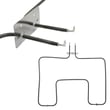
- Oven not heating evenly or not heating: failed bake or broil element
- Temperature swings or error symptoms: failing oven temperature sensor
- No interior light: bad bulb or light socket
- Intermittent power, burning smell at cord area, or dead unit: damaged terminal connections
Parts that commonly solve the underlying issue
| Symptom | Part to check first | Example part on this model page |
|---|---|---|
| No bake heat | Bake element | Bake element 318255201 |
| No broil heat | Oven broiler element | Oven broiler element 318255605 |
| Oven temp inaccurate | Temperature sensor probe | Probe 316217002 |
| Oven light out | Bulb or socket | Range oven light bulb 316538904 / receptacle 316116400 |
| Power issues at cord | Terminal connections | Terminal block 5304409888 |
Why it matters
Repeatedly “resetting” a range that has a heating or power-connection problem can lead to inconsistent cooking results and can worsen electrical connection damage. Fixing the root cause restores safe, reliable baking and broiling.
Last updated: February 2026
How to unlock oven door on Kenmore 79099503993 gas range?
On the Kenmore Elite 79099503993 electric range, the oven door unlocks automatically after Self Clean ends and the oven cools. Wait for the lock indicator to turn off and listen for the latch click; then open the door normally.
Quick unlock steps (most common)
- Press Cancel/Off to end any active cycle.
- If Self Clean was used, wait for the oven to cool; the latch stays engaged until the temperature drops.
- Watch for LOCKED or the lock icon to turn off.
- When you hear the latch click, gently pull the door open.
- If the control is not responding, do a power reset (next section).
Reset power to clear a stuck lock
- Turn the range Off.
- Switch the range breaker Off for 2 to 5 minutes.
- Turn the breaker On and wait 30 to 60 seconds for the control to reboot.
- Check the lock indicator and try the door again.
If it still will not unlock
A door that stays locked after cooling and a reset usually points to a latch/control sensing problem or an overheat condition.
- Let the oven cool longer if it was recently hot.
- If baking temperatures seem inaccurate, check the oven temperature sensor; a failed sensor can keep the control reading “too hot.” Consider the probe 316217002.
- If you are already troubleshooting electrical issues on the range, use safe testing practices; our how to use a multimeter to test electrical parts video helps with basic checks.
Fast triage
| What you see | Most likely cause | What to do |
|---|---|---|
| Lock icon on right after Self Clean | Normal cool-down lock | Wait 30 to 90 minutes |
| Lock icon stays on long after cool | Stuck latch or control issue | Power reset at breaker |
| Oven seems to overheat | Sensor reading wrong | Test/replace sensor |
Why it matters
Forcing a locked oven door can bend the latch mechanism or damage the door glass. Waiting for cool-down and using a breaker reset protects the latch, wiring, and control.
Last updated: February 2026
Where is the model number on the Kenmore 79099503993 stove?
On the Kenmore Elite 79099503993 electric range, the model number is typically on a rating label around the oven opening or storage drawer area. Check the door frame (door jamb) first; if you do not see it there, check behind the bottom drawer or on the back of the range.
Most common places to check
Look for a paper or metal rating label in these spots:
- Along the oven door frame when you open the oven door (left or right side)
- On the front frame behind the storage drawer or warming drawer (remove the drawer to view)
- On the back panel of the range near the power cord entry area
- On a side panel edge near the lower front (less common)
Quick steps to find it fast
- Open the oven door and scan the frame around the opening.
- Pull the bottom drawer out fully; many drawers lift slightly and then pull out to remove.
- If needed, use a flashlight and look at the rear panel.
What the label looks like (and what to write down)
The label usually includes the model number and often a serial number.
| Label item | Why it matters | Example format |
|---|---|---|
| Model number | Ensures parts fit your exact range | 79099503993 |
| Serial number | Helps match production run details | Letters and numbers |
Why it matters
Kenmore ranges can look similar across multiple model series; using the exact model number helps us match the correct bake element, oven temperature sensor, control parts, and drawer hardware for your specific unit.
If you are confirming the model number so you can order parts, you can start with common items like the range oven light bulb 316538904 and match from there.
Last updated: February 2026
Why is my Kenmore 79099503993 stove not working?
If your Kenmore Elite 79099503993 electric range is not working at all, the most common causes are a power supply problem (tripped breaker, loose cord connection), a burned terminal connection, or a failed control. Start by confirming the range is getting the correct 240V power, then inspect the main power connections.
Quick checks first (no disassembly)
- Make sure the range is fully plugged in and the cord is not damaged.
- Reset the breaker: most electric ranges use a double-pole 240V breaker; cycle it fully OFF then ON.
- If the display is blank but the outlet is live, unplug the range for 2 minutes, then plug back in.
- If only the oven or only the cooktop is dead, note which functions fail; that helps narrow the circuit.
What to inspect if the range is completely dead
Turn off power at the breaker before removing any panels.
- Check for burn marks or melted wiring where the cord connects.
- Tighten loose lugs and replace any heat-damaged connectors.
- Inspect the terminal block 5304409888; a burned terminal block is a common reason a range loses power.
Why the terminal block matters
The terminal block is the main junction where the house power cord connects to the range wiring. If it overheats (often from a loose connection), the range can lose one leg of power or go completely dead.
If the range has power but the oven will not heat
These failures usually point to a heating or sensing issue:
- Failed bake element 318255201 (no bake heat)
- Failed oven broiler element 318255605 (no broil heat)
- Faulty probe 316217002 (temperature sensor causing incorrect heating or shutdown)
- Control or relay issue (especially if elements test good)
Basic symptom-to-likely-cause guide
| Symptom | Most likely cause | What to check next |
|---|---|---|
| Completely dead (no display, no heat) | Power supply, cord connection, terminal block | Breaker, outlet, terminal block 5304409888 |
| Cooktop works, oven does not | Bake/broil circuit problem | Bake element 318255201, oven broiler element 318255605 |
| Oven heats poorly or shuts off | Temperature sensing/control issue | Probe 316217002, wiring connections |
Why it matters
An electric range can appear “not working” from a simple power loss on one leg of the 240V supply, or from a failed heating component. Checking power and the terminal block first prevents unnecessary part replacement.
Last updated: February 2026





